

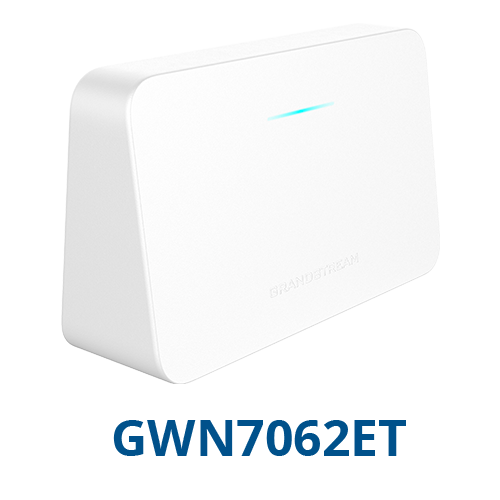
Quick Product Information
Grandstream Networks
GWN7062ET
Dual-band AX3000 Wi-Fi 6 router
SMBs, branch offices, retail, hospitality and home offices
Wi-Fi 6 networking with two integrated FXS ports
Up to 3 Gbps and up to 128 clients
Local UI, GDMS, GWN Manager and mobile apps
Supplier and quantity dependent; request current guidance
Product Overview
The Grandstream GWN7062ET is designed for organisations that have outgrown basic consumer routing but do not need a large rack-mounted security platform for every location. It brings several useful functions into one compact device: an internet router, dual-band Wi-Fi 6 access, three flexible Gigabit Ethernet WAN/LAN interfaces, two analog telephone ports, VPN services, traffic controls, guest access and mesh capability. For a small office or branch, this consolidated design can simplify equipment planning, reduce the number of separate boxes on a desk or wall and give administrators a more coherent way to manage everyday connectivity.
Wireless performance is based on the IEEE 802.11ax standard, with 2.4 GHz 2×2:2 and 5 GHz 3×3:2 MU-MIMO operation. In practical business terms, the router can communicate more efficiently with several compatible devices than older wireless generations, especially when staff are using laptops, mobile phones, point-of-sale terminals, tablets, smart displays and collaboration tools at the same time. The published aggregate wireless rate reaches up to 3 Gbps, although real throughput always depends on client capability, distance, walls, interference, channel choice, internet bandwidth and network design.
The two FXS ports distinguish the ET version from a standard Wi-Fi router. They allow supported analog telephones or related analog endpoints to connect through the router’s telephony function. This can be valuable in a reception area, small clinic, shop, serviced apartment, guest property or remote office where existing handsets are still useful but the organisation is moving toward modern IP connectivity. Telephony deployment still requires correct service settings, account information and compatibility checks; the physical presence of FXS ports does not by itself create a telephone service.
Security and administration are also central to the design. The platform supports WPA3 options, separate host and guest networks, access permissions, blocklists, denial-of-service defence, URL and application filtering, traffic analysis, secure boot and device-specific credentials. Built-in VPN support can help remote workers or small branches reach approved corporate resources, while intelligent quality-of-service rules can prioritise important traffic such as voice, meetings or business applications. These tools are useful, but they must be configured according to the organisation’s policies and risk profile.
For Africa buyers, the strongest purchasing approach is to match the router to a real site plan rather than choosing only from headline speed. FourTeck can help review the internet connection, expected device count, floor layout, telephone requirement, cabling, power conditions, mesh expansion plan, management preference and delivery location. This helps procurement teams select a suitable model and prepare a quotation that includes the correct quantity, practical accessories and any deployment assistance required.
Key Business Benefits
◆ Modern Wireless Capacity
Wi-Fi 6, OFDMA and MU-MIMO help the router serve busy device environments more efficiently. This matters when a small site has many simultaneous phones, laptops, payment devices and smart equipment competing for airtime. The benefit is not merely a higher advertised speed; it is a better foundation for responsive daily work when the network is planned correctly.
◆ Voice and Data Consolidation
Two FXS ports allow a business to connect suitable analog handsets while using the same compact platform for internet routing and wireless access. This can reduce device clutter in smaller sites and offers a practical migration path where existing telephone equipment remains useful. Service credentials and telephony compatibility should be confirmed before purchase.
◆ Flexible Expansion
Mesh support with compatible Grandstream devices gives buyers a route to wider coverage without replacing the primary router immediately. A business can begin with one correctly placed unit and consider additional nodes where the site survey shows weak areas. Mesh is helpful, but wired backhaul may still be preferable for high-demand zones.
◆ Practical Security Controls
Guest networking, WPA3 modes, secure boot, access permissions, filtering, blocklists and firewall functions give administrators several ways to separate users and reduce unwanted access. These controls support a stronger small-site security posture when combined with good passwords, firmware maintenance, endpoint protection and a clearly defined network policy.
◆ Remote and Central Management
The router can be managed through its local interface and supported Grandstream management platforms. This gives an installer or IT team options for a single site, distributed branches or an on-premise management preference. Central visibility can reduce unnecessary travel and help standardise settings, although access permissions should be carefully controlled.
◆ Better Traffic Prioritisation
Application-aware statistics and quality-of-service queues can help a business protect voice, meeting and operational traffic from less important activity. This is valuable on internet links where capacity is limited or variable. The router cannot create bandwidth that the service provider does not deliver, but sensible prioritisation can improve how available capacity is shared.
Product Highlights for Business Buyers
AX3000 Dual-Band Wireless
The 5 GHz radio supports rates up to 2402 Mbps and the 2.4 GHz radio up to 573.5 Mbps under compatible conditions. The combination is intended to serve both performance-focused devices and equipment that benefits from broader 2.4 GHz reach.
Three Gigabit WAN/LAN Ports
Three auto-sensing Gigabit Ethernet interfaces provide flexible wired connectivity. The design supports dual-WAN policies, failover and load balancing, subject to correct configuration and service-provider arrangements. Buyers should confirm how many wired client ports remain after WAN connections are assigned.
Analog Phone Connectivity
Two RJ11 FXS interfaces support suitable analog telephones. The capability is especially helpful for small sites that want modern networking while retaining familiar handsets for reception, service counters or operational calling.
Up to 16 Mesh Nodes
Compatible mesh devices can extend coverage across larger or more difficult layouts. Actual node count, placement and performance should be planned around building materials, interference, traffic demand and the availability of Ethernet backhaul.
Multiple VPN Methods
Support includes IPSec, OpenVPN, WireGuard, L2TP and PPTP roles as defined by the device software. Organisations should choose secure, currently supported methods that match their central gateway and security policy.
Local, Cloud and Mobile Tools
Administrators can use the local web interface, GDMS Networking, GWN Manager, GWN app or Grandstream Home app according to deployment needs. This range supports both professionally managed office networks and simpler remote-office administration.
Technical Specifications
| Specification | GWN7062ET Details |
|---|---|
| Wireless Standard | IEEE 802.11 a/b/g/n/ac/ax; dual-band Wi-Fi 6 |
| Processor | 1.3 GHz dual-core processor |
| Wireless Architecture | 2.4 GHz 2×2:2 and 5 GHz 3×3:2 MU-MIMO with downlink/uplink OFDMA |
| Maximum Published Wi-Fi Rates | Up to 2402 Mbps on 5 GHz and up to 573.5 Mbps on 2.4 GHz; aggregate up to approximately 3 Gbps |
| Concurrent Wireless Clients | Up to 128 clients |
| SSIDs | 4 host SSIDs plus 1 guest SSID |
| Ethernet Ports | 3 x auto-sensing 10/100/1000 Mbps RJ45 WAN/LAN ports |
| Analog Telephone Ports | 2 x RJ11 FXS ports |
| Auxiliary Interfaces | 1 x USB 3.0, SYNC button, reset pinhole and power input |
| Security | WPA3-192, WPA3, WPA2/WPA3, WPA2 and WPA/WPA2 modes; secure boot, device certificate, random default password, permissions, guest network and filtering functions |
| Firewall and Traffic Control | DoS defence, blocklist, NAT, DDNS, port forwarding, DMZ, UPnP, URL and application filtering, DPI traffic statistics and QoS |
| VPN | L2TP client, PPTP client, IPSec site-to-site and client-to-site, OpenVPN server, and WireGuard site-to-site and client-to-site; one VPN tunnel total |
| Mesh | Up to 16 compatible nodes, including supported GWN router and access-point models |
| Working Modes | Router, wireless bridge and wireless relay modes |
| Management | Local web UI, GDMS Networking, GWN Manager, GWN app, Grandstream Home app and TR-069 |
| Power | Universal adapter; 100-240 V input, 12 V/1.5 A output, up to 18 W |
| Dimensions and Weight | 160 x 50 x 98 mm; approximately 238 g |
| Mounting and Environment | Desktop or indoor wall mounting; 0°C to 40°C operating range; 10% to 90% non-condensing humidity |
| Package Contents | Router, power adapter, Ethernet cable and quick installation guide |
How to Read These Specifications
Published wireless rates are theoretical link rates, not guaranteed internet speeds. Real results depend on the internet service, client radio capability, channel width, distance, walls, congestion, interference and network configuration. A user with an older Wi-Fi adapter may connect successfully but will not receive the same performance as a modern compatible Wi-Fi 6 client.
Buyers should also note the three-port design. When one or two Ethernet interfaces are assigned to WAN services, fewer ports remain for local wired devices. A separate Gigabit or PoE switch may therefore be required for computers, IP phones, access points, cameras or other Ethernet equipment. FourTeck can help review the full device count before the quotation is prepared.
Configuration and Buyer Guidance
A successful router purchase begins with the environment, not the model label. Start by counting the people and devices that will use the network during the busiest period. Include staff laptops, mobile phones, payment terminals, printers, smart displays, cameras, voice devices and guest users. The published 128-client capacity is a platform maximum; the experience of each user still depends on traffic demand, signal quality and available internet bandwidth.
1. Map the Site
Share the floor area, wall materials, number of rooms, floors and known weak zones. A single router may be suitable for a compact open office, while divided spaces can require additional nodes or wired access points.
2. Confirm Internet Services
Identify the service type, advertised speed, modem or fibre terminal, addressing method and whether a backup line is planned. Dual-WAN features are useful only when the physical connections and provider settings are available.
3. Review Telephony
Confirm the number of analog handsets, service-provider credentials, numbering, emergency-call requirements and whether the FXS interfaces are appropriate. Ask whether a dedicated IP PBX or ATA would be more suitable for larger voice deployments.
4. Plan Wired Devices
List every Ethernet endpoint and decide whether a separate switch is needed. Cameras, desk phones and access points may also require PoE, which the router’s Gigabit ports do not provide as a general power source.
5. Choose Management
Decide who will administer the device, whether remote cloud management is allowed and how credentials will be protected. Multi-site buyers should define naming, firmware, backup and access standards before rollout.
6. Protect Power
Assess mains stability and consider a suitable UPS or surge-protection plan for the router, modem, switch and voice equipment. A good network design can still fail when power continuity is ignored.
Ideal Business Use Cases
Small and Medium Offices
A compact office can use the router as its primary internet gateway, wireless access point and basic wired connection hub. Staff can separate business and guest access, prioritise meetings or voice traffic and manage the device locally or remotely. Larger teams should confirm whether a dedicated switch, additional access points or a stronger security appliance is needed.
Retail and Service Counters
Shops, salons, small restaurants and customer-service points may need Wi-Fi for staff devices, payment terminals, cloud applications and guest access while retaining an analog telephone at the counter. Network segmentation and payment-security requirements should be reviewed before deployment.
Remote and Home Offices
Professional home workers can benefit from Wi-Fi 6, VPN access, traffic prioritisation and the option to connect an analog phone. The router can help separate work, guest and household traffic, but business security should also include managed endpoints, strong authentication and safe remote-access practices.
Clinics and Small Practices
A small medical, dental or consulting practice may use the device for appointment systems, staff connectivity, reception calling and controlled guest access. Sensitive information requires careful policy design, endpoint protection and compliance review; the router should be part of a broader security plan rather than the only safeguard.
Hospitality and Serviced Spaces
Small guesthouses, serviced apartments and hospitality offices can use separate SSIDs, captive-portal options, usage controls and mesh expansion. Coverage should be designed around rooms, floors, reinforced walls and the expected number of guest devices. A professional site survey is recommended for larger properties.
Branch and Project Offices
Temporary or permanent branches can use the platform for secure internet, remote management and VPN connectivity to a main office. The compact form factor is convenient, while dual-WAN policy support can assist where two links are available. The central gateway must support compatible VPN settings and the branch workload should be properly sized.
Grandstream GWN7062ET Wi-Fi 6 Performance and Coverage
Wi-Fi 6 is especially valuable in environments where many devices are active at the same time. OFDMA allows the wireless system to handle channel resources more efficiently, while MU-MIMO helps serve multiple compatible clients. The 5 GHz radio provides the higher peak rate and is generally preferred for performance-focused devices close enough to maintain a strong signal. The 2.4 GHz band offers wider practical reach and better wall penetration in many buildings, although it is often more congested.
The router’s antenna arrangement and beamforming features are intended to improve signal quality and direct energy toward compatible clients. However, no indoor router can overcome every wall, metal surface, lift shaft, concrete column or source of radio noise. A central, elevated and open position usually performs better than a closed cabinet, floor corner or back room. Buyers should avoid placing the device beside microwave equipment, heavy electrical machinery or dense metal shelving where possible.
Mesh support gives growing sites a practical expansion option. Up to 16 compatible nodes are supported by the product platform, but a large node count does not automatically create a high-performance network. Each wireless hop can consume airtime, so busy zones may benefit from Ethernet backhaul or purpose-designed wired access points. FourTeck can help buyers decide whether a simple mesh, a wired access-point design or a mixed approach is more appropriate.
Coverage planning should therefore begin with users, applications and building layout. A small open office may need one well-positioned unit. A two-floor property, hotel corridor or clinic with many partitioned rooms may need several access points and a managed switch. The correct design protects user experience and prevents the common mistake of judging a router only by its maximum published speed.
Grandstream GWN7062ET Telephony Integration
The two FXS ports allow analog telephones to participate in a modern voice deployment without an external two-port adapter. This is useful when a small site already owns reliable handsets, needs a familiar reception phone or wants a simple telephone connection alongside business Wi-Fi. Each port uses an RJ11 connection and must be configured with suitable telephony service details.
Buyers should distinguish between an FXS port and a complete telephone service. The router provides the physical analog interface and software functions, but calls depend on compatible account credentials, network reachability and service-provider settings. Numbering, call routing, emergency calling, codec policy and regional requirements must be reviewed. Where a business needs many extensions, advanced call queues, recording, receptionist functions or detailed reporting, a dedicated IP PBX and purpose-built endpoints may be a better architecture.
The platform documentation also indicates broader analog telephone connection capability when compatible mesh networking is used. This can be attractive for distributed small spaces, but it should not be treated as a substitute for a properly designed voice system. Voice quality depends on internet stability, latency, jitter, packet loss, local congestion and correct QoS configuration. A backup power plan is also important because analog phones connected through network equipment will normally stop working when the router or internet service loses power.
FourTeck can help buyers clarify whether the integrated FXS ports meet the requirement or whether an ATA, IP phone, PBX or hosted voice service should be included in the project. Sharing the number of handsets, expected calls, service provider and required features before quotation helps avoid purchasing a router that is technically capable but incomplete for the intended communication workflow.
Grandstream GWN7062ET Security and Management
The router includes a useful set of protections for small-site networking. Wireless encryption options extend through WPA3-192 and mixed WPA2/WPA3 modes, while device-specific certificates, secure boot and randomly assigned default passwords help strengthen the platform from initial deployment. Administrators can create host and guest SSIDs, hide selected network names, define user permissions, manage blocklists and apply access controls.
Firewall and content-management functions include denial-of-service defence, NAT, port forwarding, DMZ, URL filtering, application filtering, safe-search controls and traffic statistics based on deep packet inspection. These capabilities help administrators understand network use and control obvious unwanted activity. They do not replace endpoint security, data backup, multi-factor authentication, security awareness, patch management or a dedicated next-generation firewall where advanced threat inspection and regulatory controls are required.
VPN support can connect a remote employee or branch to approved corporate resources. The platform lists IPSec, OpenVPN, WireGuard, L2TP and PPTP roles, with one VPN tunnel total. A business should choose a protocol that is supported by the central gateway and accepted by its security policy. Legacy options should not be selected merely because they are easy to configure. Key handling, access restrictions, logging and firmware maintenance are equally important.
Management flexibility is a major operational benefit. A single site can use the local web interface, while distributed teams may prefer GDMS Networking, GWN Manager or a supported app. Cloud access should be protected with strong credentials and limited administrator roles. Configuration backups, naming standards and a documented change process make future troubleshooting easier. FourTeck can help buyers plan a manageable rollout rather than treating every router as an isolated device.
What Buyers Should Check Before Purchase
Before requesting a quote, buyers should confirm the required network role, site layout, user count, telephone requirement, management method and delivery location. The same model can perform very differently in a compact open office and a multi-room building with concrete walls. A clear requirement also helps identify accessories and alternatives that may not appear in a basic product listing.
Correct Model Selection
Confirm that the ET variant is required. The integrated FXS ports are the main reason to choose it over models intended only for data connectivity. Buyers who do not need analog telephony may prefer another router, while sites needing more wired ports or advanced security may need a different platform.
Compatibility Check
Share the modem or fibre terminal, IP addressing method, central VPN gateway, analog handset type, voice provider and existing Grandstream devices. Mesh, VPN and telephony work best when every component and service is confirmed in advance.
Ports and Accessories
Three Gigabit interfaces can be restrictive when multiple WAN links and wired clients are planned. Check whether the project also needs a switch, PoE switch, longer patch cables, wall-mount hardware, UPS, surge protection or additional access points.
Coverage Expectations
Provide floor plans, room count and construction details. Do not assume one router will cover every building. FourTeck can help identify whether mesh nodes, wired access points or a site survey should be part of the requirement.
Warranty and Support
Ask about the applicable supply source, warranty terms, return conditions and support path for the quoted unit. Coverage may differ by supplier, country and sales channel, so written commercial terms should be reviewed before payment.
Long-Term Operating Cost
Consider internet service, backup connectivity, power protection, installation time, remote management, replacement units and future expansion. A low device cost does not help if coverage problems later require an unplanned redesign.
Bulk and Project Supply
For several branches, provide quantity, rollout schedule, destination countries, standard configuration and spare-unit policy. This allows the quote to reflect project logistics and helps keep each site consistent.
Quote Preparation
Share your organisation name, contact details, country, quantity, internet links, expected clients, floor area, FXS requirement, management preference, installation need and target delivery period. Clear information speeds up product matching and commercial review.
Africa Availability and Service Support
FourTeck supports product inquiries across Africa with assistance for model selection, requirement review, quotation, delivery coordination and warranty guidance. Availability can change according to supplier status, order quantity, country, power-adapter version, project timing and the selected commercial source. For that reason, buyers should request a current quotation instead of relying on an old online listing or an unverified stock statement.
The support process can include checking whether the GWN7062ET is the correct variant, identifying required switches or mesh devices, reviewing telephony and VPN compatibility, and clarifying whether installation or remote configuration assistance is needed. For multi-site projects, FourTeck can also help structure a consistent bill of materials and gather the information required for phased supply.
Warranty handling depends on the quoted supply channel and applicable terms. Buyers should ask for written information covering the product source, warranty period, return procedure and responsibilities for delivery damage or configuration services. This creates a clearer procurement record and helps technical and finance teams approve the purchase with fewer assumptions.
Africa Country and Regional Coverage
Businesses across Africa, including Kenya, Uganda, Nigeria, Ghana, Tanzania, Rwanda, Ethiopia, South Africa, Zambia, Botswana, Senegal and nearby regional markets can contact FourTeck for product availability, configuration guidance and quote assistance. The team can help buyers review suitable quantities, related networking options, deployment requirements and project supply needs based on the actual business environment.
Delivery routes, taxes, import conditions, adapter requirements and warranty arrangements can vary by destination. Buyers should provide the delivery country and city, required quantity, preferred timeline and whether the equipment is for a single office or a wider rollout. This information allows the commercial team to check the most practical supply path and explain any country-specific considerations before the order is confirmed.
GCC, Middle East and Africa Availability
FourTeck Africa can support product inquiries for businesses across Africa while also guiding regional technology requirements through selected FourTeck platforms for GCC and Middle East markets. Companies with offices in Africa and locations in the UAE, Saudi Arabia, Qatar, Oman or Bahrain may need aligned models, common configuration standards and coordinated procurement documentation.
Availability, delivery options, warranty handling and service scope may vary by country, supplier status, quantity and local technical requirements. Regional buyers should provide all destination locations at the beginning of the discussion so the team can identify whether a single supply route or separate country quotations are more suitable. Power accessories, wireless regulations, tax treatment and import arrangements should be confirmed for each market.
Useful regional starting points include FourTeck Africa, FourTeck Kenya, FourTeck Uganda and FourTeck UAE. The appropriate platform depends on the destination and commercial requirement.
Other Options Buyers May Consider
The right alternative depends on whether the priority is analog telephony, client scale, multi-gigabit uplinks, enterprise access-point coverage or advanced routing. The following Grandstream options can help buyers frame the discussion before requesting a quotation.
Grandstream GWN7062E
A closely related AX3000 Wi-Fi 6 router for buyers who need the wireless and routing platform without the ET model’s integrated FXS telephone ports.
Grandstream GWN7062M
A higher-capacity AX3000 router option with multi-gigabit interface flexibility, suitable when more connected clients and faster wired uplink planning are important.
Grandstream GWN7062
A previous GWN Wi-Fi 6 router choice that may suit different client-count and performance requirements. Compare generation, capacity, interfaces and project availability.
Grandstream GWN7660 Series
Indoor Wi-Fi 6 access points are suitable when the project already has a router or firewall and needs professionally distributed wireless coverage.
Grandstream GWN7002 Router
A wired router option for deployments that need multiple WAN/LAN interfaces and plan to use separate access points for wireless coverage.
Business Network Design Support
For larger sites, the right answer may be a router, managed switch, several access points, structured cabling and UPS protection rather than one all-in-one device.
Why Buyers Choose FourTeck
Technology procurement is easier when the supplier understands both the product and the business problem. FourTeck helps buyers move from a general request to a clearer bill of materials by discussing users, applications, site layout, connectivity, telephony, security, power and future expansion. This reduces the risk of ordering the correct model name with the wrong surrounding equipment.
Current commercial inquiries can be checked against supplier and quantity conditions rather than assumed from old listings.
Buyers can review internet links, device counts, wireless coverage, FXS needs, VPN and management choices before order confirmation.
Commercial information can be prepared around quantity, destination, accessories and requested service scope.
The team can review destination requirements and explain that delivery routes and timing depend on country and supplier conditions.
Applicable warranty and return terms can be clarified from the quoted supply source before purchase.
When another router, switch, access point, UPS or voice platform is a better fit, the requirement can be adjusted before money is committed.
This approach supports SMB buyers, resellers, system integrators, project teams and enterprise procurement departments. It also creates a clearer handover to the installer because the quotation reflects the intended deployment rather than only a product code.
Frequently Asked Questions
What is the Grandstream GWN7062ET used for?
It is used as a small-business or home-office internet router, dual-band Wi-Fi 6 access point and analog telephone gateway. It can support wired and wireless devices, guest networks, VPN connectivity, traffic controls and two analog handsets. The exact fit depends on the site size, internet bandwidth, user count and required security level.
How many wireless devices can it support?
The product specification lists support for up to 128 concurrent wireless clients. This is a platform maximum rather than a promise that 128 users can all run demanding applications at full speed. Real capacity depends on device mix, signal strength, airtime use, interference, internet service and network design.
What are the two FXS ports for?
The FXS ports provide RJ11 connections for compatible analog telephones. They allow a business to use traditional handsets with an appropriate voice service and configuration. The ports do not include a telephone subscription by themselves, so service-provider credentials, numbering, call routing and regional requirements must be confirmed.
Can the router create a mesh network?
Yes. It supports mesh networking with compatible Grandstream routers and access points, with the product platform listing up to 16 nodes. Coverage and performance depend on placement, interference, walls and backhaul design. Wired connections between nodes can be preferable in busy areas because repeated wireless hops consume available airtime.
Does it support VPN connections?
Yes. Supported roles include IPSec, OpenVPN, WireGuard, L2TP and PPTP, with one VPN tunnel total listed in the specification. The correct protocol depends on the central gateway and security policy. Buyers should confirm compatibility, authentication, addressing and route requirements before deployment.
Is it available for purchase in Africa?
FourTeck accepts Africa-focused inquiries for this model. Current availability depends on supplier status, quantity, destination, adapter version and project timing. Contact the sales team with your delivery country, required quantity and target date so the most practical quotation and supply route can be reviewed.
Can FourTeck help with configuration planning?
Yes. FourTeck can help review the intended user count, wireless layout, WAN links, wired devices, FXS telephony, VPN requirements, mesh expansion, management preference and power protection. The scope of hands-on installation or remote configuration should be agreed in the quotation because service availability can vary by location.
Do I need a separate network switch?
Possibly. The router has three Gigabit WAN/LAN ports, and one or more may be used for internet connections. If the office has several wired computers, phones, cameras or access points, a separate Gigabit switch may be required. PoE devices generally need an appropriate PoE switch or injector.
Can businesses request bulk or multi-branch supply?
Yes. Businesses, resellers and project teams can request quotations for multiple units or branch rollouts. Provide the total quantity, destination countries, rollout schedule, standard configuration, spare-unit requirement and service expectations. This helps FourTeck prepare a clearer commercial response and identify whether phased supply is appropriate.
Need Help Choosing the Right Router?
FourTeck can help review product availability, wireless coverage, FXS telephony, VPN compatibility, related switches or access points, warranty guidance and delivery requirements for your business location. Send the expected user count, site layout, internet service, quantity and destination to begin the quotation process.
Reviews
There are no reviews yet.