

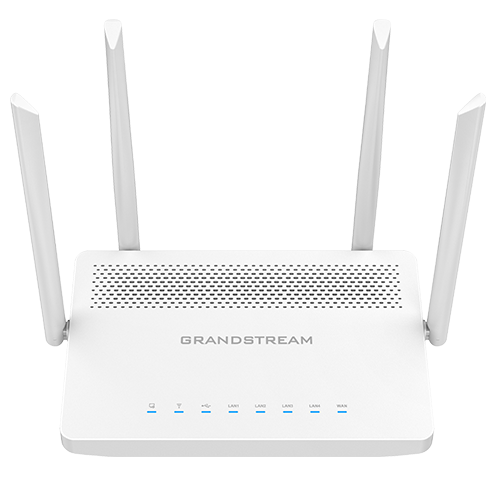
Quick Product Information
Grandstream
GWN7052F
Dual-band Wi-Fi 5 router
Small offices, remote teams and branches
Up to 100 concurrent clients
1 × Gigabit SFP WAN
Embedded controller and GDMS Networking
Contact Fourteck for current options
Product Overview
The GWN7052F is designed for organisations that have moved beyond the limitations of a basic home router but do not need a large enterprise gateway. It combines routing, dual-band wireless access, configurable Gigabit Ethernet, a fibre-ready SFP WAN interface, firewall functions, VPN services and controller-based management in a compact desktop or wall-mountable unit. This mix is valuable in a small office because one device can handle the core internet gateway role while also providing staff Wi-Fi, guest access, local wired connections and secure links to another office or remote service.
Wireless service uses the established IEEE 802.11ac standard, commonly known as Wi-Fi 5. The router provides a combined headline wireless rate of up to 1.266 Gbps across its 2.4 GHz and 5 GHz radios. The 2.4 GHz band can support longer reach and older devices, while the 5 GHz band is useful for faster client connections and less congested operation where local conditions permit. Dual-band 2×2 radio design and MU-MIMO on 5 GHz help the router serve several compatible devices more efficiently than a simple single-band gateway. Actual throughput always depends on walls, distance, interference, client capability, channel use and internet service speed.
The defining difference of the F model is its Gigabit SFP WAN port. This can suit locations where the service provider presents a compatible fibre or copper handoff through an SFP module, or where the network designer wants more flexibility than a fixed RJ45 WAN socket. Four additional Gigabit Ethernet ports can be configured for WAN or LAN duties according to the planned topology. That flexibility matters for offices using more than one internet link, a dedicated switch, an IP-PBX, a local server, a printer network or separated operational devices.
Security and remote connectivity are also central to the platform. The router supports WPA3 as well as earlier WPA and WPA2 modes, guest networking, network blocklists, anti-hacking secure boot, device-specific certificates and digitally signed protection for critical data and control functions. Its firewall toolkit includes Anti-DoS controls, traffic rules, NAT, ALG, port forwarding, DMZ and related gateway functions. VPN options include IPsec, OpenVPN, WireGuard, L2TP and PPTP modes, enabling several branch and remote-access designs when configured by a knowledgeable administrator.
For day-to-day administration, the embedded web controller can manage the router itself and up to 50 compatible Grandstream access points. GDMS Networking offers central cloud-based provisioning and monitoring, while SNMP, SSH and TR-069 support can help service providers and IT teams integrate the unit into wider management workflows. A business can therefore begin with the router alone and later add suitable GWN access points when coverage or capacity grows.
For Africa-based procurement teams, the practical question is not only whether the model has the right feature list. Buyers should also confirm the local ISP handoff, radio regulations, suitable SFP transceiver, power environment, mounting position, available cabling, expected device count and support plan. Fourteck can review these details, identify missing accessories and prepare a quotation that reflects the intended deployment rather than supplying a router without the surrounding items needed to make it useful.
Key Business Benefits
◆ Flexible Fibre Uplink
The Gigabit SFP WAN interface gives network planners a practical way to accept a compatible fibre-based service handoff or use a selected SFP module suited to the project. This can reduce unnecessary media-converter clutter and offers more deployment choice than a router limited to one fixed copper WAN connector. The module and fibre standard still need to match the service provider.
✓ One Platform for Wired and Wireless Access
Small offices can use the router for internet routing, local Ethernet connectivity and dual-band wireless service without introducing several separate appliances on day one. This simplifies the initial equipment list, conserves space and gives administrators a single starting point for policies, SSIDs, VLANs, traffic priorities and gateway settings.
⚙ Easier Growth with GWN Access Points
The embedded controller can manage up to 50 compatible GWN access points, allowing a business to expand beyond the router’s own radio coverage. Instead of replacing the gateway when a second floor, meeting area or warehouse zone needs service, the network can add carefully positioned access points and keep administration within the same ecosystem.
🔒 Secure Remote and Branch Connectivity
Multiple VPN technologies give IT teams options for connecting remote employees, linking two offices or supporting specific client requirements. Up to 50 concurrent VPN tunnels are supported on the F model. Correct design remains important because encryption type, authentication, routing, bandwidth and endpoint compatibility determine the actual user experience.
● Practical Traffic Separation
Support for VLANs, up to 16 SSIDs, guest networking and quality-of-service controls helps separate staff devices, visitors, voice traffic, smart equipment and other services. Clear segmentation can improve security, simplify troubleshooting and stop one group of users from consuming resources intended for business-critical communication.
↗ Central Visibility for Distributed Sites
GDMS Networking can help administrators provision and oversee supported Grandstream networking devices from a central cloud interface. This is useful for businesses with remote offices, managed-service environments or limited on-site technical staff because routine checks and configuration tasks can be coordinated without travelling to every location.
These benefits are strongest when the router is sized for the real environment. A quoted capacity of 100 clients does not mean every deployment should run 100 devices performing heavy traffic through one radio location. User behaviour, internet bandwidth, building materials, application mix and neighbouring wireless networks all affect service quality. Fourteck can help translate the published capacity into a practical access-point and cabling plan.
Product Highlights
This router is positioned around balanced small-business functionality rather than a single headline feature. Its dual-core 880 MHz processor, 256 MB memory and support for 60,000 NAT sessions provide the platform for Gigabit-class NAT routing, while the published IPsec VPN performance of up to 300 Mbps gives a useful reference for encrypted site links. These figures should be treated as laboratory performance indicators; actual results depend on packet size, rules, encryption settings, connected services and software version.
Up to 300 Mbps on 2.4 GHz and up to 867 Mbps on 5 GHz, with a combined stated rate of 1.266 Gbps.
Support for up to 100 concurrent wireless clients and 16 SSIDs, arranged as eight per radio.
One Gigabit SFP WAN port and four Gigabit Ethernet ports that can be assigned to WAN or LAN roles.
Embedded web controller, GDMS Networking, SSH, TR-069 and SNMP v1, v2c and v3 support different administration models.
WPA3, secure boot, unique certificates, random default passwords, guest access, network blocklists and firewall controls.
Desktop and wall-mount options, external antennas, universal power adapter and visible status indicators support compact office deployment.
A USB 2.0 port is also provided, and the unit supports IPv4, IPv6, 802.1Q, 802.1p, 802.1x and 802.11e/WMM. The platform includes common routing and gateway functions such as DDNS, port forwarding, DMZ and UPnP. Organisations should decide which features are appropriate for their security policy rather than enabling every available service by default.
Technical Specifications
Choosing the correct configuration begins with the WAN side. Ask the internet provider whether the circuit arrives as fibre, copper Ethernet or another managed handoff. Where fibre is used, obtain the required SFP standard and confirm whether the provider supplies the module. Next, map the four configurable Ethernet interfaces to actual duties such as primary WAN, backup WAN, LAN switch uplink, server connection or management segment. A small managed switch may still be needed when the office has several wired users, access points, IP phones, cameras or printers. Wireless planning should consider floor layout and interference rather than relying only on the maximum client count. For a large or divided site, use the router as the gateway and add properly placed GWN access points. Finally, define VPN requirements, VLANs, guest access and administrative ownership before deployment so the router is secure from the first day.
Configuration and Buyer Guidance
A router purchase affects every user and connected service in the office, so a model number alone is not enough to prepare the right order. Before requesting a quotation, document the current internet service, number of staff, expected growth, wired devices, wireless devices, coverage zones and applications that depend on the network. Include cloud accounting, video meetings, IP telephony, CCTV viewing, file transfer, point-of-sale systems and guest internet because each creates a different traffic pattern.
1. Define the WAN Handoff
Confirm circuit speed, fibre type, SFP requirement, public IP method, PPPoE or static addressing, and whether a backup internet link must be supported.
2. Count Real Devices
Include laptops, phones, tablets, printers, IP phones, cameras, smart displays and personal devices. Separate typical use from peak use.
3. Map Coverage
Identify concrete walls, multiple floors, outdoor zones, meeting rooms and interference. Extra access points may be more effective than increasing router transmit power.
4. Plan Segmentation
Decide whether staff, guests, voice, cameras and operational systems need different VLANs, SSIDs, traffic policies or access restrictions.
5. Confirm Remote Access
List branch-to-branch tunnels, mobile users, authentication methods, encryption requirements and the applications that remote users must reach.
6. Assign Administration
Choose who will maintain firmware, backups, passwords, alerts and policy changes, and whether cloud or local management is preferred.
Power quality and physical placement also matter. The router should be mounted in a ventilated, secure position with the antennas clear of metal obstructions and with controlled access to reset and network ports. Consider a small UPS where internet and voice services must continue during short power interruptions. Use suitable surge protection and avoid placing the device in a hot cabinet beyond its operating range. Fourteck can review the equipment list for the router, SFP, patch leads, switch, access points, rack accessories and power protection so the quotation covers the complete deployment rather than only the central unit.
Ideal Business Use Cases
The GWN7052F fits environments where a compact router must do more than share internet. It is not intended to replace a high-end security appliance for a large enterprise, but it can form a capable gateway for small and growing operations when the design matches its scale.
Small Professional Office
Connect staff laptops, mobile devices, printers, IP phones and meeting systems while maintaining separate guest access. VLAN and QoS controls can help keep voice and business applications organised, and Gigabit ports can feed a managed switch for additional desks.
Remote Worker or Executive Home Office
Use VPN services to access approved corporate resources, separate work devices from household or guest equipment, and prioritise video conferencing. Central management can help an IT team support the location when local technical assistance is limited.
Retail or Service Branch
Support point-of-sale terminals, office devices, cloud services, staff Wi-Fi and customer access with traffic separation. A site-to-site VPN can link the branch to headquarters, subject to bandwidth, policy and application requirements.
Clinic, School or Training Centre
Create distinct wireless networks for administration, staff, visitors and learning devices. Where the building is larger than one radio can serve, add compatible access points and manage them through the embedded controller.
Hospitality Back Office
Use the router for a small hotel’s office, reception or administrative network, with separate service groups for operations and guests. A full guest-property deployment may need more access points and specialised design, but the unit can serve as a manageable gateway.
Managed Multi-Site Deployment
Standardise a compact router across several low-density sites and use GDMS Networking for central provisioning and monitoring. This can reduce configuration inconsistency, provided each site’s internet handoff and local radio environment are assessed individually.
The router can also support smart-office and home-automation devices, but these should be placed on an appropriate isolated network rather than mixed freely with sensitive business systems. For warehouses, multi-floor buildings, crowded public venues or offices with heavy simultaneous video traffic, plan additional access points and possibly a higher-capacity router. Fourteck can help determine whether this model is sufficient or whether a Wi-Fi 6 alternative, dedicated firewall or multi-WAN gateway would provide better long-term value.
Grandstream GWN7052F SFP and Multi-WAN Flexibility
The SFP interface is the feature that most clearly distinguishes this model from the standard GWN7052. It gives the router a modular WAN connection, which can be useful when an internet service, building network or upstream switch presents fibre rather than a conventional copper Ethernet cable. A suitable transceiver can convert the router’s SFP cage into the optical or copper interface required by the design. This flexibility can create a cleaner installation and remove the need for a separate media converter in some projects.
SFP compatibility must be treated carefully. Buyers should confirm whether the link is single-mode or multi-mode, the required wavelength, link distance, connector type, speed, fibre pair arrangement and whether the service provider has a preferred module. Passive optical services such as GPON generally require provider-controlled termination and should not be assumed to work through an ordinary Ethernet SFP. The router’s cage is best viewed as a flexible Gigabit WAN interface, not a universal replacement for every fibre modem or optical network terminal.
The four configurable Gigabit Ethernet ports add another layer of design freedom. Depending on firmware and topology, they can support LAN or WAN roles, allowing the router to connect local switches, servers or a secondary internet service. A branch could use the SFP port for its primary circuit and an Ethernet port for a backup service, while the remaining ports serve local infrastructure. Policy, failover and address settings should be prepared and tested before the site depends on them.
For procurement, ask for the complete link description rather than simply requesting “one fibre router.” Fourteck can help turn the provider’s handoff details into a list covering the router, correct SFP, fibre patch lead, Ethernet patch cables, switch uplink and installation support. This avoids a common delay in which the router arrives but cannot connect because the transceiver, connector or provider termination was never confirmed.
Grandstream GWN7052F Wireless Capacity and Mesh Expansion
The router’s dual-band radios provide a practical foundation for compact office wireless service. Devices that need broad compatibility or are farther from the router may use 2.4 GHz, while compatible laptops, phones and tablets closer to the unit can benefit from the 5 GHz band’s higher data rate and wider channel options. The 5 GHz radio supports 2×2:2 MU-MIMO, allowing the access point to communicate more efficiently with multiple compatible clients. This does not remove the need for careful channel planning, but it improves the platform’s ability to serve mixed office traffic.
The published limit of up to 100 concurrent wireless clients is a capacity statement, not a guarantee that one router can deliver high throughput to 100 busy users at the same time. An office with many low-traffic sensors has a different load from one with dozens of video calls, cloud backups and large downloads. Client radio capability also matters: older devices may use slower standards, occupy airtime longer and reduce the experience for everyone sharing that channel.
Mesh support and wired access-point connections give the business a path to expand coverage. A mesh link can be convenient where running cable is difficult, but every wireless backhaul consumes airtime and is influenced by the same walls and interference as client traffic. Wired Ethernet backhaul is usually preferable for stable business performance where cabling can be installed. The embedded controller can manage up to 50 compatible GWN access points, making it possible to scale beyond a single-room or single-floor layout.
Before adding access points, complete a simple site survey. Mark work areas, walls, stairwells, meeting rooms, outdoor boundaries and places where users report weak service. Count the expected devices in each zone and note applications that need consistent latency. Fourteck can help decide whether one router is enough, whether an extra indoor access point is required, and whether a Wi-Fi 6 design would be more suitable for newer client fleets or higher-density environments.
Grandstream GWN7052F Security, VPN and Management
A business router must protect administrative access as carefully as it protects user traffic. The platform includes WPA3, device-specific security certificates, random default passwords, secure boot and digital-signature controls for critical data and functions. These features create a stronger baseline than equipment shipped with one predictable password across every unit. Administrators should still replace initial credentials, restrict management access, install stable firmware releases, disable unused services and keep configuration backups.
Firewall capabilities such as Anti-DoS, traffic rules, NAT, ALG, DMZ and port forwarding support ordinary gateway requirements. Their value depends on policy quality. Exposing an internal service through port forwarding or a DMZ can increase risk, and automatic protocols such as UPnP may not be appropriate on a managed business network. Use least-privilege rules, place public-facing services behind suitable protection and review logs when troubleshooting unusual traffic.
VPN support covers several common technologies, including IPsec, OpenVPN and WireGuard, with up to 50 concurrent tunnels on this model. This allows different designs for branch links, remote administrators or mobile users. The correct choice depends on endpoint support, encryption policy, authentication, routing and expected throughput. Legacy protocols may remain available for compatibility, but organisations should prefer modern secure methods where their systems allow.
Management can be local through the embedded interface or central through GDMS Networking. SNMP, SSH and TR-069 broaden integration options for IT departments and managed-service providers. Establish ownership before deployment: one named team should control credentials, firmware changes, VPN keys, alert handling and backup retention. Fourteck can assist with pre-sales planning and can help buyers identify when a more specialised firewall is necessary for advanced inspection, regulatory requirements, larger user populations or security subscriptions.
What Buyers Should Check Before Purchase
Before requesting a quote, buyers should confirm the complete operating requirement rather than choosing only by wireless speed or price. Start with the exact model: GWN7052F includes the SFP WAN interface, while similarly named versions may use a different port arrangement. Ask the supplier to state the manufacturer part number and package contents on the quotation. If fibre connectivity is the reason for selecting the F model, provide the ISP handoff document or transceiver specification so the SFP is not left to guesswork.
Configuration Fit
State internet speed, WAN type, number of wired ports, user count, SSID plan, VLAN requirement, VPN users and expected traffic. This determines whether the model has enough capacity.
Compatibility Check
Confirm SFP standard, fibre patch connector, existing switch VLAN support, access-point compatibility, ISP addressing, authentication and any monitoring platform that must receive device data.
Coverage and Placement
Share a floor plan or approximate dimensions, wall materials and user concentration. Decide whether the router radio can cover the site or whether wired GWN access points should be included.
Security Expectations
Define guest isolation, remote access, branch VPN, administrative roles, logging and firmware responsibility. A dedicated security appliance may be appropriate where deep inspection or subscription services are required.
Accessories and Power
Include the correct SFP, fibre and copper patch leads, wall-mount items, managed switch, access points, rack shelf if used, surge protection and UPS support where continuity matters.
Availability and Warranty
Ask for current lead time, product condition, regional warranty direction, return process and quotation validity. These details can vary with source, destination, quantity and project schedule.
Long-term operating cost should include more than the router. Consider installation labour, cabling, extra access points, remote support, replacement SFPs, backup power and staff time for administration. For a multi-branch project, standardisation can simplify support, but every branch still needs its local ISP and coverage checked. Ask whether firmware versions will be aligned and whether configuration templates, naming standards and backup files will be maintained centrally.
A useful quote request should contain the delivery country and city, quantity, required date, ISP speed and handoff, approximate floor area, number of wired and wireless devices, VPN requirement, existing switch and access-point models, and whether installation or configuration is needed. Fourteck can use this information to confirm the product, suggest alternatives if availability changes and reduce the chance of missing modules or accessories that delay deployment.
Africa Availability and Service Support
Fourteck supports product enquiries across Africa with assistance for requirement review, model confirmation, quotation, configuration planning, delivery coordination and warranty guidance. Availability may vary according to the selected model, supplier position, order quantity, destination and project timing. The team does not rely on an unverified stock promise; each enquiry can be checked against current sourcing options before the buyer commits.
For this router, regional support begins with understanding the internet circuit and deployment environment. Fourteck can help identify whether the SFP model is appropriate, whether the required transceiver is available, and whether the order should include extra GWN access points, managed switching, patch leads or power protection. Procurement teams can also request alternative guidance when a newer Wi-Fi standard, more client capacity or stronger gateway security would better match the planned site.
Delivery arrangements, duties, local taxes and warranty handling depend on the destination and commercial route. Share the end-user location, quantity and preferred timeline so the quotation can be prepared with clearer assumptions. Multi-site or project buyers should provide a branch schedule and equipment list, allowing model consistency and accessory requirements to be reviewed together.
Africa Country and Regional Coverage
Businesses across Africa, including Kenya, Uganda, Nigeria, Ghana, Tanzania, Rwanda, Ethiopia, South Africa, Zambia, Botswana, Senegal and nearby commercial markets, can contact Fourteck for current product availability, configuration guidance and quotation assistance. Regional requests may come from a single office, an expanding retail chain, a school group, a hospitality operator, a professional-services company or a system integrator preparing equipment for an end customer.
The most useful enquiry includes the delivery location, quantity, internet service details, required accessories and target installation date. Fourteck can help review suitable models, potential alternatives, warranty direction and project supply needs. For location-specific procurement conversations, buyers may also visit Fourteck Kenya or Fourteck Uganda while keeping the technical requirement consistent across branches.
GCC, Middle East and Africa Availability
Fourteck Africa can support router enquiries for businesses operating across Africa while also guiding regional procurement requirements connected to GCC and Middle East offices. Organisations with headquarters, procurement teams or project partners in the UAE, Saudi Arabia, Qatar, Oman or Bahrain may need equipment delivered to an African branch, standardised across several locations or compared with stock options from another regional supply route.
Availability, delivery choices, warranty handling and configuration support can vary by country, supplier, order volume and selected accessories. A product sourced for one region may use a different power lead, warranty process or fulfilment route, so these details should be confirmed before the purchase order is issued. For a multi-country rollout, prepare one technical bill of materials and list any local differences in ISP handoff, fibre module, rack position, voltage protection or access-point count.
Regional buyers can review Fourteck Africa technology solutions or contact Fourteck UAE for GCC-linked requirements. The goal is to keep the product specification, accessory list and deployment expectations clear even when commercial coordination happens across different markets.
Other Options Buyers May Consider
The correct alternative depends on whether the buyer needs newer wireless technology, more concurrent clients, a router without built-in Wi-Fi, additional WAN flexibility or more coverage through dedicated access points. Fourteck can review the choices below without assuming that the highest specification is automatically the right purchase.
Grandstream GWN7062
Consider this Wi-Fi 6 router where newer client devices, higher wireless efficiency and a larger concurrent-client target are important.
Grandstream GWN7001 / GWN7002 / GWN7003
Suitable for projects that need dedicated wired routing and multi-WAN functions while wireless coverage is provided by separate access points.
Grandstream GWN7660-Series Access Points
Add compatible indoor access points when the router is suitable as a gateway but the building needs broader coverage or more distributed wireless capacity.
Managed Gigabit Network Switch
A managed switch is useful when the office needs more wired ports, VLANs, PoE for access points or phones, and a structured network cabinet.
Dedicated Business Firewall
Choose a specialised firewall when the requirement includes advanced threat inspection, subscription security services, formal compliance or larger encrypted traffic loads.
A suitable alternative should be compared on the complete requirement: WAN type, routing throughput, VPN load, wireless standard, client density, management model, security policy, accessory cost and expected life. Fourteck can help buyers avoid replacing a router too early by selecting a platform that leaves practical room for growth without paying for capacity the site will never use.
Why Buyers Choose Fourteck
Business technology procurement works best when product selection, accessories and deployment needs are considered together. Fourteck helps buyers move from a model name to a usable equipment list. For a router project, that may include the gateway, transceiver, cabling, switch, access points, power protection, mounting, configuration and delivery assumptions. This approach reduces the risk of receiving an isolated product that cannot be connected or supported as planned.
Assistance for single units, branch replacements, project quantities and coordinated equipment lists.
Review WAN, SFP, VLAN, VPN, client capacity, access points and network compatibility before purchase.
Commercial guidance that reflects model, quantity, destination, accessories and current sourcing conditions.
Support for preparing delivery requirements and clarifying regional fulfilment assumptions.
Clear discussion of available warranty direction, source and handling before an order is confirmed.
Help comparing newer, larger or differently configured options when the requested model is not the best fit.
Fourteck supports technical and non-technical stakeholders. An IT administrator may need interface and VPN details, while a procurement manager needs a clear bill of materials, delivery route and quotation validity. A business owner may want to know whether the investment will serve the office for several years. By connecting these questions, the purchasing process becomes easier to approve and less likely to produce hidden costs later.
Use the Fourteck contact page to share the model, location, quantity and deployment details. Where the request is part of a larger office project, review Fourteck networking and Wi-Fi services for guidance covering switches, cabling, access points, security and power continuity.
Frequently Asked Questions
What is the Grandstream GWN7052F used for?
It is a dual-band Wi-Fi 5 router for small offices, home offices, remote workers and compact branches. It can provide internet routing, wireless access, configurable Gigabit Ethernet connections, VLANs, guest Wi-Fi, firewall controls and VPN connectivity. The SFP WAN port is useful when the upstream service uses a compatible modular fibre or copper transceiver.
How many wireless devices can it support?
The published platform capacity is up to 100 concurrent Wi-Fi clients. Actual user experience depends on application load, internet speed, distance, walls, interference, client radio capability and channel planning. A site with many video calls or large transfers may require additional access points well before reaching the maximum client figure.
Does the router include an SFP transceiver?
The product has a Gigabit SFP WAN cage, but the required transceiver should be confirmed for the specific service and quotation. SFP modules vary by fibre mode, wavelength, connector, distance and electrical interface. Ask the ISP or network designer for the handoff specification before selecting a module.
Can it connect two branch offices securely?
Yes, the platform supports site-to-site IPsec and other VPN options that can link approved networks over the internet. The design must account for public addressing, encryption, authentication, routing and available bandwidth. Published IPsec performance is up to 300 Mbps under stated conditions, while real throughput varies with configuration and traffic.
Can the GWN7052F manage extra access points?
Its embedded controller can manage the router itself and up to 50 compatible Grandstream GWN access points. This supports expansion into additional rooms or floors. Wired backhaul is usually preferred for dependable business performance, while mesh can help in locations where installing Ethernet cable is difficult.
Is it suitable for a large enterprise or crowded venue?
It is primarily aimed at small offices, home offices, remote workers and growing compact networks. Large enterprises, crowded venues or sites with heavy encrypted traffic may need a higher-capacity gateway, dedicated firewall and multiple managed access points. Fourteck can review user density, bandwidth and security requirements before recommending a model.
Is the router available for purchase across Africa?
Fourteck accepts Africa-focused enquiries and can check current sourcing, quantity, delivery coordination and warranty direction. Availability can change by destination, supplier and project timing. Share the delivery location, required quantity, preferred schedule and accessory list to receive a clearer quotation response.
What information should I provide for a quote?
Provide the model, quantity, delivery location, internet speed and handoff, SFP specification if known, approximate coverage area, number of wired and wireless devices, VPN requirements, existing switch or access points, and whether installation or configuration support is needed. This helps Fourteck prepare a more complete equipment list.
Can businesses request project or bulk supply?
Yes. Businesses, integrators and procurement teams can request multiple units for branches or project deployments. A bulk enquiry should include the site count, rollout schedule, standard configuration, required accessories and delivery destinations. Fourteck can also help compare an alternative model when the requested quantity or timeline affects availability.
Need Help Choosing the Right Router?
Fourteck can help review product availability, the SFP handoff, wireless coverage, VPN requirements, compatible access points, warranty direction and delivery needs for your business location. Share the site details to receive a practical quotation.

Reviews
There are no reviews yet.