

Grandstream GRP2601W Wi-Fi IP Phone in Africa
Give everyday office users a straightforward SIP calling experience with wireless network flexibility, clear audio tools and centralised endpoint administration. The GRP2601W is designed for businesses that need a capable two-line desk phone at reception areas, staff desks, service points, branch locations or remote workspaces where running a dedicated network cable may be inconvenient.
Quick Product Information
A Practical Voice Endpoint for Modern Business Communication
A business desk phone still has an important role wherever teams need a permanent extension, a familiar keypad, quick call handling and predictable audio. The Grandstream GRP2601W addresses those needs without forcing every location to have a dedicated Ethernet drop. It combines conventional desk-phone operation with integrated 2.4 GHz wireless connectivity, allowing the device to join a suitable Wi-Fi network while remaining powered from its included external adapter. This can be particularly useful in leased offices, temporary work areas, executive rooms, reception counters, converted buildings and remote workspaces where new structured cabling would add cost or delay.
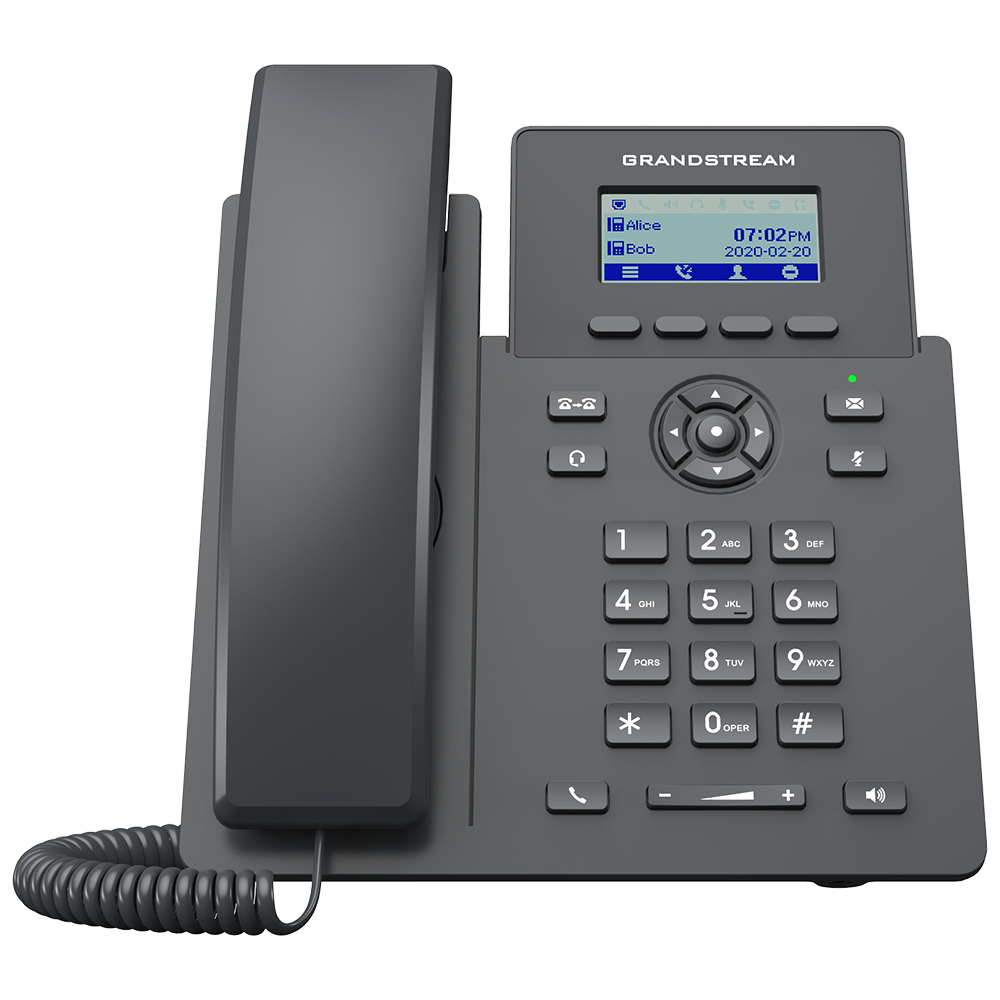
The phone supports two SIP accounts and two lines, which is enough for many everyday users who require a main extension and a secondary account, department identity or service-provider profile. Staff can manage routine calls, transfers, forwarding, hold, call pickup, waiting and a five-way audio conference from a compact endpoint. A 132 by 48 pixel LCD presents call and menu information without adding the complexity of a touchscreen. Dedicated keys for commonly used functions help users learn the phone quickly, while four context-sensitive soft keys adapt to the current screen.
For administrators, the value extends beyond the desk. Grandstream Device Management System gives authorised teams a central location for provisioning, configuration, monitoring, firmware tasks and troubleshooting of supported Grandstream endpoints. That matters when an organisation deploys phones to several floors, branches or remote employees. Rather than treating every handset as an isolated device, administrators can apply consistent settings and maintain a clearer view of the estate. Zero-touch provisioning support can also reduce manual setup when the deployment platform and network are prepared correctly.
The model fits essential rather than high-volume executive calling. It is a sensible choice when users need one or two active identities, dependable SIP capability, Wi-Fi placement flexibility and straightforward management. Buyers who need many line keys, a colour screen, Bluetooth, dual-band wireless, Gigabit pass-through or built-in PoE should compare other GRP models before ordering. FourTeck helps review the user role, network design, PBX compatibility, power arrangement, headset requirement and quantity so the selected phone matches the real deployment rather than only the model name.
Key Business Benefits
◆ Flexible Desk Placement
Integrated wireless connectivity can reduce dependence on a nearby data outlet. Businesses can place a phone where staff actually need it, provided that the desk has power and a stable 2.4 GHz network with appropriate voice quality and security.
✓ Easier Fleet Administration
GDMS support helps technical teams provision and supervise supported endpoints from a central interface. This reduces repeated desk visits, supports consistent configuration and gives growing organisations a more organised way to maintain multiple phones.
☎ Useful Daily Call Handling
Hold, transfer, forwarding, call pickup, waiting, logs and conferencing give ordinary staff the functions they need most. The phone keeps the experience focused, helping users complete calls without navigating an oversized feature set.
● Clearer Conversations
Wideband codec support, acoustic processing, Noise Shield and background-noise reduction help users hear and be heard more clearly when the PBX, service provider, network and remote endpoint support compatible audio settings.
⚙ Practical Headset Integration
The RJ9 headset connection and electronic hook switch support can help receptionists, support teams and frequent callers work hands-free. Buyers should confirm the exact headset and EHS accessory combination before purchase.
🔒 Protected Device Foundation
Secure boot, dual firmware images, encrypted storage and supported encrypted voice protocols give administrators a stronger foundation for managed deployments. Correct passwords, firmware, certificates, VLANs and access policies remain essential.
Together, these benefits make the phone well suited to controlled, repeatable communication deployments. The main value is not one headline feature. It is the combination of wireless placement, essential call functions, central management and a security-aware platform at a level that remains approachable for normal business users. The strongest results come from matching the phone to a properly designed voice environment that includes a compatible SIP service, dependable Wi-Fi, suitable power protection, sensible quality-of-service policies and ongoing administration.
Product Highlights That Matter at the Desk
Use a primary extension with a second account or line according to the PBX design.
Bring several participants together without moving the discussion to a separate room device.
Connect on supported 2.4 GHz 802.11 b/g/n/ax networks; this is not a 5 GHz model.
The 2.41-inch 132 by 48 LCD presents menus, account status and call information.
RJ9 connectivity and EHS support assist staff who need frequent hands-free calling.
GDMS, TR-069 and encrypted XML methods support planned deployment workflows.
The GRP2601W focuses on the functions that many general office users actually use. Its keypad, navigation cluster, dedicated message, transfer, headset, mute, redial, speakerphone and volume controls keep routine actions visible. Four programmable context-sensitive soft keys change with the active screen, helping the phone offer useful options without covering the desk with dozens of fixed buttons. A downloadable phonebook can hold up to 2,000 entries, while the call log supports up to 800 records, subject to configuration and firmware behaviour.
Voice codec support includes common narrowband and wideband options such as G.711, G.722, G.729, G.726, G.723.1, iLBC and Opus. The actual quality a user experiences depends on the complete call path: microphone environment, codec negotiation, PBX settings, network congestion, wireless coverage, internet service and the distant endpoint. Administrators should avoid treating any single codec or noise feature as a substitute for sound network design.
The phone can sit on its included base stand at a fixed angle and can be wall mounted with the separately available mounting accessory. This makes it useful at normal desks, service counters and selected wall positions. Its dual 10/100 Mbps Ethernet ports also allow wired connectivity when preferred, but the W variant does not provide built-in PoE. The included external power supply should therefore be planned into every installation, even when Ethernet is used for data.
Technical Specifications
| Specification | GRP2601W Details | Buyer Relevance |
|---|---|---|
| Product class | Essential two-line carrier-grade SIP IP phone | Designed for routine desktop use and repeatable deployments |
| SIP accounts and lines | 2 SIP accounts, 2 lines | Suitable for standard users with modest line requirements |
| Wireless connectivity | Single-frequency 2.4 GHz, 802.11 b/g/n/ax, Wi-Fi 6 on 2.4 GHz only | Confirm 2.4 GHz coverage, capacity and security; no 5 GHz support |
| Ethernet | Dual switched auto-negotiation 10/100 Mbps ports | Supports wired deployment and PC pass-through at Fast Ethernet speeds |
| Power | Universal input 100-240 VAC, 50-60 Hz; output 5 VDC, 600 mA; no PoE on GRP2601W | A suitable mains outlet and power protection are required at the desk |
| Display | 132 x 48 pixel, 2.41-inch LCD | Clear basic call and menu information without touchscreen complexity |
| Keys | 4 XML programmable context-sensitive soft keys, navigation and menu keys, 8 dedicated function keys | Provides direct access to frequent call actions |
| Conferencing | 5-way audio conference | Supports small collaborative calls from the desk |
| Audio and codecs | G.729A/B, G.711 µ/a-law, G.726, G.722, G.723.1, iLBC, Opus; VAD, AEC, CNG, PLC, AGC and adaptive jitter buffer | Broad codec support for compatible SIP platforms and call paths |
| Headset | RJ9 headset jack with EHS support for selected Plantronics, Jabra and Sennheiser solutions | Confirm exact headset and EHS cable compatibility before order |
| Security | Secure boot, dual firmware images, encrypted data storage, TLS, SRTP, 802.1X and supported authentication algorithms | Supports a managed security posture when configured correctly |
| Provisioning and management | GDMS, TR-069, FTP, TFTP, HTTP, HTTPS and AES-encrypted XML configuration | Useful for individual setup and larger controlled rollouts |
| Network and QoS | IPv6, VLAN and Layer 2 or Layer 3 QoS support including 802.1Q, 802.1P, ToS and DiffServ | Helps integrate voice traffic into a planned network |
| Phonebook and logs | XML or LDAP phonebook up to 2,000 items; call log up to 800 records | Supports useful contact access and recent-call visibility |
| Mounting | Base stand with one 45-degree position; wall mountable with separately sold mount | Plan the installation position and accessory requirement |
| Operating environment | 0°C to 40°C operation; 10% to 90% non-condensing humidity | Use in a protected indoor business environment |
| Dimensions and weight | 208 x 180 x 63.4 mm with handset; approximately 651 g for GRP2601W | Compact desktop footprint |
| Package contents | Phone, handset and cord, base stand, universal power supply, network cable and quick installation guide | Final package may vary by region or supplier; confirm at quotation |
| Warranty and availability | Country, supplier and order dependent | Request written guidance for the proposed supply channel |
How to Interpret the Specification
The most important selection point is the difference between the GRP2601 variants. The W model is selected for wireless connectivity and does not include integrated PoE. The P model is selected when PoE is required but does not provide the same Wi-Fi feature. Buyers should therefore decide whether the phone will use wireless data with a local power adapter or wired data with a separately planned power arrangement. Choosing by the base model name alone can lead to the wrong unit arriving for the intended desk.
The second consideration is user workload. Two accounts and two lines suit general staff, reception overflow positions, classrooms, small counters, back-office teams and remote desks with modest call demands. A busy executive assistant, contact-centre agent or manager who needs many visible line appearances may need a higher model. Display size, Ethernet speed, wireless band, Bluetooth requirement, expansion keys and headset workflow should be reviewed as part of the role rather than after delivery.
Configuration and Buyer Guidance
Begin with the voice platform. The phone uses open SIP standards, but that does not mean every feature will behave identically with every PBX, hosted provider or custom application. Confirm that the intended service supports third-party SIP endpoints, then collect the registrar or proxy address, authentication method, user credentials, codec policy, time settings, outbound rules and any certificate requirements. Where the organisation uses a Grandstream UCM platform, provisioning may be streamlined, but the specific PBX version, network path and endpoint policy still need review.
1. User Role
List the number of accounts, simultaneous call expectations, transfer frequency, conference needs and whether the user requires visible line keys.
2. Wireless Environment
Check 2.4 GHz coverage, channel congestion, client capacity, authentication type, roaming behaviour and voice quality at the actual desk.
3. Power and Resilience
Provide a stable mains outlet and consider UPS or surge protection where continued voice service is important during power events.
4. Headset Workflow
Identify the headset make, model, connector and required electronic hook switch cable before committing to a hands-free deployment.
Wireless voice is sensitive to conditions that ordinary web browsing may hide. A laptop can often tolerate brief retransmissions or variable latency without the user noticing, while a live call may reveal the same issue as clipping, delay or one-way audio. Perform a site check or controlled pilot before a large rollout. Confirm that the access point can handle the planned client count, that voice traffic receives suitable priority, and that the phone remains within reliable coverage. The fact that the device supports Wi-Fi 6 on 2.4 GHz does not remove the need for clean channel planning.
Finally, document how phones will be named, assigned, updated, recovered and replaced. Decide whether configuration will be managed through GDMS, PBX zero configuration, TR-069 or another approved method. Prepare a secure password policy and keep firmware within the organisation’s tested release process. FourTeck can help convert these questions into a clear bill of materials and deployment brief, including phones, headsets, wall mounts, power protection, switching, access points, PBX options and support requirements.
Ideal Business Use Cases
Reception and Visitor Desks
A reception point often needs a fixed extension, transfer functions, speakerphone use and optional headset operation. Wireless connectivity can simplify placement at a front counter where an Ethernet outlet is not available, while the two-line design covers modest call activity.
Small and Medium Offices
General staff who manage routine internal and external calls can use the phone as a consistent desktop endpoint. Central provisioning helps administrators standardise account settings, dial plans and firmware across a growing number of desks.
Branch Locations
A branch with a hosted SIP service or central IP PBX can deploy phones for local staff without maintaining a separate analogue line at every position. Network and security policies should be aligned with the central communication design.
Remote and Home Workspaces
Employees who benefit from a dedicated business extension can place the phone near their working area and connect it to an approved 2.4 GHz network. Secure remote access, PBX exposure and provider policies must be planned by the organisation.
Schools and Training Centres
Administrative offices, libraries, staff rooms and controlled classroom locations can use simple extensions for internal coordination and external calling. Bulk provisioning is helpful when many similar endpoints must follow one configuration standard.
Clinics and Professional Practices
Appointment desks, records offices, consulting support areas and administration teams can use a familiar phone interface. Privacy policy, call recording rules and network security should be reviewed separately for regulated environments.
Retail and Service Counters
A fixed endpoint helps staff contact managers, warehouses, suppliers or customers without relying on personal mobile phones. The compact form factor fits many counters, and the wall-mount option can help where desktop space is limited.
Temporary Project Offices
Construction teams, events, project units and short-term offices may need professional extensions before permanent cabling is complete. The device can support a planned temporary setup when power, Wi-Fi quality and SIP access are available.
The phone is less suitable for a user who needs many dedicated line appearances, large colour-screen applications, video calling, Bluetooth accessories, dual-band wireless or Gigabit desktop pass-through. In those cases, moving to a higher GRP model is usually more practical than forcing an essential phone into an advanced role. A short user-role audit helps procurement teams avoid buying one model for every employee when different departments have different calling patterns.
Grandstream GRP2601W Wireless Deployment Flexibility
Wireless connectivity is the defining feature of this variant. It gives businesses an alternative to pulling Ethernet to every position, but it should be treated as a design choice rather than a shortcut. The phone operates on the 2.4 GHz band and supports 802.11 b, g, n and ax. This band often provides broad reach and can pass through obstacles more effectively than higher-frequency options, yet it is also commonly shared by older Wi-Fi clients, printers, scanners, smart devices and neighbouring networks. Good performance therefore depends on access-point placement, channel selection, capacity and interference control.
A professional rollout starts with a walk-through or survey at the locations where phones will be used. Check the signal and call quality during normal business hours, not only when the office is empty. Test roaming only when phones are expected to move, because a desk endpoint normally benefits from staying associated with a stable access point. Use a secured staff or voice network rather than a public guest network. Confirm how authentication will work and whether the phone supports the organisation’s selected method before ordering a large quantity.
Quality of service should extend beyond the wireless link. Voice packets pass through the access point, switching infrastructure, router, firewall, internet service and PBX or hosted platform. Congestion or misconfiguration at any stage can affect the conversation. Administrators should review VLAN design, prioritisation, session timers, NAT handling, firewall rules and SIP application-layer settings. A phone that works during a small pilot may still require capacity planning when dozens of endpoints and other wireless clients share the same radio environment.
The GRP2601W also retains dual Fast Ethernet ports, so it can be connected by cable when conditions change. That flexibility helps during troubleshooting or office moves. Remember, however, that wired data does not turn this model into a PoE phone. The external 5 VDC power supply remains necessary. For locations where one cable must deliver both power and data, compare the GRP2601P or another PoE-capable model instead.
Grandstream GRP2601W Centralised Provisioning and Management
A single phone can be configured through its local interface, but business value becomes clearer when multiple endpoints must be installed and maintained. Grandstream Device Management System provides a central environment for supported device configuration, provisioning, monitoring, firmware management, alarm handling and troubleshooting. An authorised administrator can organise phones by site, group or model and apply settings in a more controlled way than repeating the same manual steps at every desk.
This capability supports several operational goals. First, it can improve consistency: extensions can receive approved network, time, language, codec and feature settings. Second, it can reduce deployment labour when devices are prepared before shipment or enrolled through a defined zero-touch process. Third, it gives support teams a clearer starting point when a user reports a problem. They can review device status and configuration before deciding whether a desk visit or replacement is required.
Central management must still follow a secure operating procedure. Accounts should use strong credentials and appropriate access roles. Two-factor authentication should be enabled where supported. Configuration templates should be tested on a small group before broad release. Firmware updates should be reviewed for compatibility with the organisation’s PBX, headset workflow and feature requirements. Administrators should keep a rollback and recovery plan, even though the endpoint includes dual firmware images as an additional resilience measure.
The phone also supports TR-069 and AES-encrypted XML configuration files, giving service providers and experienced integrators alternative provisioning methods. The correct method depends on ownership, security policy, internet access, PBX type and operational responsibility. FourTeck can help buyers identify which party will configure the phones, what information must be supplied, whether preconfiguration is required and how devices will be supported after delivery.
Grandstream GRP2601W Voice Quality and Secure Operation
Clear calling begins with the acoustic design and continues through the whole network. The phone supports wideband G.722 and Opus alongside widely used codecs such as G.711 and G.729. Echo cancellation, packet-loss concealment, automatic gain control, adaptive jitter buffering and other audio processing features help maintain intelligible conversation under suitable conditions. Noise Shield and background-noise reduction can be useful in shared offices or home environments, although microphone placement and ambient sound still matter.
The five-way conference feature gives a user a convenient way to bring several parties into one discussion. This can support a quick supplier call, a branch coordination meeting, a service escalation or a short project review. Conference behaviour can depend on call capacity, PBX features and service-provider rules, so organisations should test their intended workflow. For larger formal meetings, a dedicated conference system or collaboration platform may deliver better microphone coverage and participant management.
Security features include secure boot, dual firmware images and encrypted data storage, together with support for TLS and SRTP in compatible deployments. The phone also supports 802.1X network access control and several modern authentication algorithms. These capabilities are useful, but they only become protective when administrators enable and manage them correctly. Default or weak passwords, exposed management pages, outdated firmware and poorly controlled SIP access can undermine otherwise capable hardware.
A secure deployment should limit management access, use encrypted provisioning where practical, separate voice traffic appropriately, apply firewall rules deliberately and monitor unusual registration or call behaviour. Firmware should be sourced through approved channels and tested before broad release. Where a hosted provider manages the service, buyers should clarify which security settings are controlled by the provider and which remain the customer’s responsibility. FourTeck can help frame these questions during pre-sales review so the endpoint fits the wider communication policy.
What Buyers Should Check Before Purchase
Before requesting a quotation, buyers should confirm the exact model, user role, voice platform, network approach, power arrangement and accessory needs. The GRP2601W is frequently chosen because it includes wireless connectivity, but that does not make it the correct choice for every desk. It is a single-band 2.4 GHz model with two accounts, two lines, Fast Ethernet ports and external power. A purchasing team that expects dual-band Wi-Fi, PoE, Gigabit pass-through or many line keys should identify that gap before an order is placed.
Configuration Fit
State how many SIP identities each user needs, whether users handle simultaneous calls, which functions must be visible, and whether central provisioning is required. Provide the phone quantity and any role groups, such as reception, managers and general staff.
Compatibility Check
Name the IP PBX, hosted service or SIP provider, including version where known. Confirm that third-party endpoints are supported and ask whether registration, encryption, certificates or proprietary features create special requirements.
Wireless and Power Plan
Confirm stable 2.4 GHz Wi-Fi at each desk and provide a mains outlet. Where power cuts are common or voice continuity is important, include appropriate UPS coverage for the phone, access point, switch, router and PBX path.
Accessory Requirements
List required headsets, EHS cables, wall mounts, spare adapters, patch leads and surge protection. Headset brand alone is not enough; exact model and cable compatibility should be confirmed.
Deployment Services
Decide whether phones should arrive sealed, prelabelled, preconfigured or enrolled for remote provisioning. Clarify who will create extensions, apply firmware, test calls, train users and provide first-line support.
Availability and Warranty
Request current lead time, regional package details, warranty terms, return process and support route in writing. Availability can change with supplier status, quantity, destination and project timing.
A useful quote request includes the delivery country and city, quantity, required date, PBX or provider, Wi-Fi environment, preferred provisioning method, headset requirement and any installation support. For bulk projects, add a user-role list and rollout schedule. This information helps FourTeck identify whether the GRP2601W is the right endpoint, recommend a related model where necessary and reduce the risk of missing power supplies, mounting hardware or compatible accessories.
Africa Availability and Service Support
FourTeck supports product enquiries across Africa with practical assistance from selection through quotation. For this phone, the process can include confirming the wireless variant, reviewing SIP platform compatibility, checking the number of accounts and lines, identifying headset or wall-mount accessories and planning how the devices will be powered and provisioned. This is particularly helpful for buyers who are moving from analogue extensions, introducing hosted voice or standardising phones across several locations.
Availability may vary according to supplier status, order quantity, country, shipping route and requested delivery date. A quotation should therefore be based on the current requirement rather than an assumed stock position. FourTeck can coordinate a review of the requested quantity, provide related model options when appropriate and discuss delivery planning for a single office or multi-site project. Buyers should share any deadline early so sourcing and logistics options can be assessed realistically.
Warranty handling also depends on the supply channel and destination. FourTeck can explain the available warranty guidance at quotation stage, including the expected process for reporting a fault, the information required for assessment and any regional limitations. This avoids relying on a generic warranty assumption that may not match the proposed order. Configuration and installation support can be discussed separately according to the PBX, network, location and scale of the deployment.
Africa Country and Regional Coverage
Businesses across Africa, including Kenya, Uganda, Nigeria, Ghana, Tanzania, Rwanda, Ethiopia, South Africa, Zambia, Botswana, Senegal and neighbouring markets, can contact FourTeck for product selection, current availability, project quantities, configuration review and delivery coordination. Support is arranged around the actual requirement, destination and supply route rather than repeated location-specific product pages.
A regional request should include the receiving location, quantity, intended PBX or hosted service, preferred deadline and whether the phones will be deployed at one site or several branches. For multi-country organisations, it is also useful to define a common endpoint standard, firmware policy, extension plan and accessory list. Standardisation can simplify support, but local power, wireless, import and warranty conditions may still differ.
FourTeck can help buyers compare supply approaches and identify when a pilot shipment is sensible before a broad rollout. Regional platforms such as FourTeck Kenya and FourTeck Uganda may also provide relevant local enquiry routes, while the Africa team can coordinate broader requirements through the main FourTeck Africa platform.
GCC, Middle East and Africa Availability
FourTeck Africa can support enquiries for organisations operating across Africa while also guiding wider regional technology requirements through selected FourTeck platforms for GCC and Middle East markets. Businesses with offices or projects in the UAE, Saudi Arabia, Qatar, Oman, Bahrain and African countries may need a consistent phone standard, but supply, warranty handling, delivery options and configuration services can vary by market.
For a cross-regional project, provide a location schedule, quantities by site, PBX architecture, extension plan, wireless standard and target rollout dates. The team can help determine whether the same model remains appropriate at every office or whether some users require PoE, dual-band wireless, more line keys or a larger display. A common product family can preserve a consistent user experience while allowing role-based model selection.
Regional buyers can use FourTeck UAE for relevant Middle East enquiries and FourTeck Africa contact support for Africa-focused requirements. Current availability, delivery coordination and warranty guidance should be confirmed for each destination and order quantity before procurement approval.
Other Options Buyers May Consider
The right endpoint depends on the user’s call volume, network design and preferred power method. The following Grandstream options can help procurement teams build a role-based phone plan rather than selecting one model for every desk. Final features and availability should be verified for the chosen hardware revision and supply channel.
Grandstream GRP2601P
Consider this closely related model when a desk will use wired Ethernet and requires built-in PoE rather than Wi-Fi.
Grandstream GRP2602W
A useful step for users who need additional SIP account capacity while keeping Wi-Fi in the endpoint plan.
Grandstream GRP2612W
Consider a professional-series model for roles needing more line capability, a richer feature set and higher office call demands.
Grandstream UCM6301 IP PBX
Suitable for businesses planning an on-premises Grandstream communication platform with extensions, routing and collaboration services.
Grandstream GWN Wi-Fi Access Points
A dependable wireless phone deployment also needs suitable access-point coverage, capacity, security and management.
IP PBX and VoIP Services
Plan extensions, SIP trunks, call routing, branch communication, security and endpoint configuration as one working system.
A mixed deployment often gives better value than forcing all roles onto the same endpoint. General staff can use an essential two-line phone, reception or support personnel can receive models with more keys, and executives can use devices with larger displays or broader connectivity. FourTeck can help map users to models and create a consolidated quotation that includes infrastructure and accessories.
Why Buyers Choose FourTeck
Business communication equipment is most valuable when the complete environment works together. FourTeck approaches the enquiry as more than a request for a box. The team can help identify the right phone variant, review the proposed SIP service, consider network quality, confirm power requirements, match accessories and explain the information needed for deployment. This reduces the risk of selecting Wi-Fi when PoE was expected, ordering an incompatible headset or overlooking a required wall mount.
Assistance for single units, office refreshes and project quantities.
Review of accounts, PBX compatibility, provisioning and user roles.
Attention to Wi-Fi coverage, QoS, switching, firewall and internet factors.
Clear requirement gathering for a more relevant commercial proposal.
Planning based on destination, quantity, timing and supply route.
Explanation of the applicable process for the proposed order.
FourTeck also supports broader communication and infrastructure planning. A phone project may require an IP PBX, SIP trunks, access points, managed switches, firewall rules, structured cabling, UPS protection or ongoing support. Reviewing these dependencies at the start helps prevent avoidable call-quality and deployment problems. Buyers can discuss the phone as part of a complete solution or request product-only supply according to their own technical capability.
The objective is a practical match between product and requirement. FourTeck does not need to claim that one model suits every organisation. Instead, the team can recommend an alternative when more line capacity, PoE, Gigabit Ethernet, dual-band wireless or advanced user features are required. This buyer-guidance approach is useful for procurement teams, system integrators, resellers, SMEs and enterprises that need a clear decision path before committing to quantity.
Frequently Asked Questions
What is the GRP2601W used for?
It is an essential two-line SIP desk phone for routine business calling. It suits general office users, reception overflow desks, service counters, branch staff and remote workers who need a fixed extension, straightforward call handling and wireless network connectivity. It is intended for modest line requirements rather than users who need many dedicated keys or advanced touchscreen functions.
Does the phone support both 2.4 GHz and 5 GHz Wi-Fi?
No. The GRP2601W supports single-band 2.4 GHz Wi-Fi with 802.11 b, g, n and ax standards. Buyers who require 5 GHz or dual-band operation should compare another model. Before deployment, test the actual 2.4 GHz coverage, interference, security method and client capacity at each intended desk.
Can the GRP2601W be powered through PoE?
No. Built-in PoE belongs to the GRP2601P variant, not the GRP2601W. The Wi-Fi model uses an external 5 VDC power adapter, which is normally listed in the package contents. Confirm the regional package at quotation stage and plan a mains outlet plus suitable power protection at every desk.
Will it work with any SIP provider or IP PBX?
The phone follows common SIP standards, but service compatibility and feature behaviour still depend on the provider or PBX. Confirm support for third-party endpoints, registration details, codecs, encryption, certificates, dial plans and any proprietary features. A pilot configuration is recommended before a large deployment, especially with a hosted service that restricts supported hardware.
Can FourTeck help configure multiple phones?
Configuration support can be discussed according to the quantity, PBX, network, destination and project scope. Options may include requirement review, extension planning, template preparation, device labelling, provisioning guidance and rollout coordination. Share the preferred management method and the party responsible for the PBX so the quotation can reflect the required service accurately.
Which headsets can be used with this phone?
The phone has an RJ9 headset port and supports electronic hook switch operation with selected Plantronics, Jabra and Sennheiser solutions. Compatibility depends on the exact headset, cable and EHS accessory, not only the brand. Provide the full headset model or request a matched recommendation before purchase.
Is the phone suitable for a busy receptionist?
It can suit a reception point with modest call activity, especially when transfer, hold, speakerphone and headset features are sufficient. A high-volume receptionist who manages many simultaneous calls or needs numerous visible line keys may be better served by a higher GRP model or an expansion-capable endpoint. Review the real call pattern before ordering.
Is the GRP2601W available for delivery across Africa?
FourTeck accepts enquiries across Africa and can review current sourcing and delivery options for the requested destination. Availability depends on supplier status, quantity, model revision and timing, so buyers should request a current quotation. Include the delivery location, required quantity and target date for a more useful response.
What warranty support is available?
Warranty terms and handling can vary by supply channel and country. FourTeck can provide guidance for the proposed order, including the expected fault-reporting and assessment process. Buyers should request the applicable terms in writing before purchase rather than assuming that a warranty statement from another region applies to their delivery.
What information should I send for a bulk quotation?
Provide quantity, delivery country and city, required date, PBX or hosted provider, number of user groups, wireless environment, provisioning preference, headset requirement and any installation services. For multi-site projects, add quantities by location and a rollout schedule. These details help identify the correct model and avoid missing accessories.
Need Help Choosing the Right Wi-Fi IP Phone?
FourTeck can review your SIP platform, user roles, Wi-Fi environment, power arrangement, headset needs, quantity, delivery destination and rollout plan. Send the requirement for current availability, related model guidance and a tailored commercial quotation.

Reviews
There are no reviews yet.