

Quick Product Information
Enterprise Desktop Endpoint
Grandstream
GXV3470
Android IP video phone
Executives, reception, service desks and collaboration teams
SIP voice, desktop video and controlled Android applications
Gigabit Ethernet, Wi-Fi 6, Bluetooth 5.0 and PoE/PoE+
Contact FourTeck for current options
Guidance based on source, region and order terms
A Smarter Communications Point for Demanding Desks
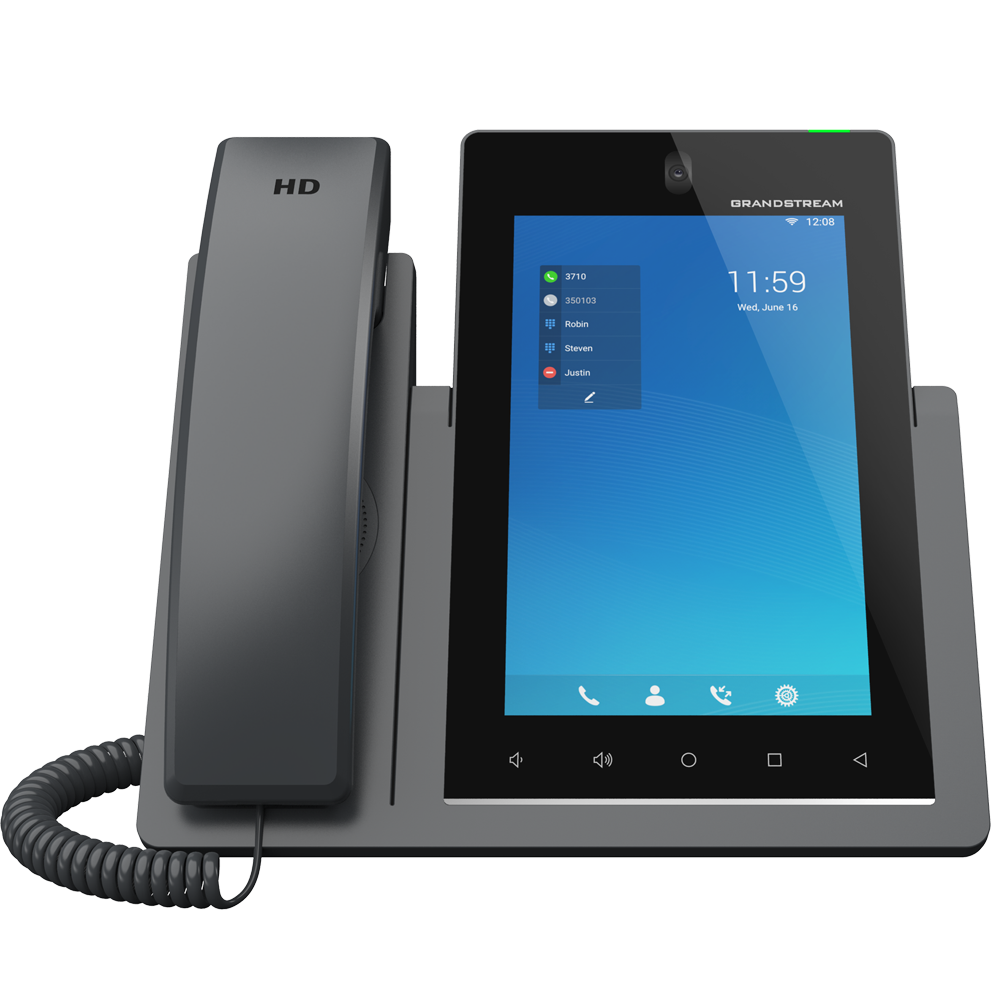
A conventional desk phone handles calls, but many modern roles need more context, quicker access to contacts, visual interaction and a simpler route into digital collaboration. The Grandstream GXV3470 brings those tasks together in a single desktop device. It is designed as a 16-line SIP endpoint with a tablet-style interface, allowing a user to manage multiple accounts, view call information, launch approved Android applications and participate in voice or video sessions from an always-available workstation device.
The 7-inch vertical IPS display gives the phone a compact footprint while providing enough screen area for call control, directories, application navigation and visual communication. A tiltable 2-megapixel camera includes a physical privacy shutter, which is important in executive offices, customer-facing spaces and regulated environments where users need visible control over video capture. Dual microphones, an HD handset and an HD speakerphone support clear everyday conversation, while Noise Shield 2.0, echo cancellation and double-talk handling help the device remain useful during speakerphone discussions.
The model runs Android 14 on a quad-core 2.0GHz ARM Cortex-A55 processor with 4GB RAM and 16GB eMMC storage. This gives organisations access to a broad application ecosystem, although business deployment should remain controlled. An IT administrator should confirm which applications are approved, how user accounts are handled, whether a particular collaboration platform is supported by the intended firmware, and how security policies will be applied. The value is not simply that applications can run; it is that the phone can become a managed communications surface for the user’s role.
Physical deployment is equally flexible. Dual Gigabit network ports allow the endpoint to sit between the LAN and a nearby computer where the network design permits. Integrated PoE and PoE+ can reduce desk-level power adapters, while Wi-Fi 6 offers an alternative connection method where structured cabling is difficult or a workspace may change. Bluetooth 5.0 supports compatible wireless headsets and mobile-device interaction. USB 2.0, USB 3.0, HDMI output, RJ9 headset support with electronic hook switch capability and a 3.5mm headset port widen the accessory choices.
For Africa business buyers, the most important decision is whether this class of phone fits the communication platform, network, security policy and user role. FourTeck can help review SIP account requirements, PBX compatibility, PoE availability, headset needs, wireless conditions, accessories, deployment quantity and regional supply factors. That preparation reduces the risk of buying an advanced endpoint that is underused, poorly integrated or missing an essential accessory.
Key Business Benefits
The practical value of this endpoint comes from how its communication, connectivity and management functions work together. The following benefits show where the device can improve a business workflow rather than merely add more specifications to a desk.
◆ One Device for Voice and Video
A user can answer SIP calls, join supported video sessions, consult a directory and access approved applications from one dedicated endpoint. This reduces dependence on a laptop for every communication task and keeps a professional calling device available even when the user’s computer is busy with other work.
◆ Better Multi-Line Control
Support for 16 lines and up to 16 SIP accounts suits roles that handle several extensions, business identities or service queues. Executives, reception teams and shared-service desks can organise communication more clearly, provided the connected PBX and account plan are configured for the intended call flow.
◆ Flexible Network Placement
Gigabit Ethernet, Wi-Fi 6 and PoE/PoE+ allow an installer to choose the connection method that matches the workspace. Wired links usually offer predictable performance, while wireless deployment can help in renovated offices, flexible desks or locations where new cabling would be disruptive.
◆ More Natural Group Conversation
Dual microphones, wideband audio, speakerphone processing and 10-way audio conferencing support collaborative discussions without immediately moving every call to a separate meeting platform. This can be useful for quick management reviews, branch coordination and customer discussions involving several internal participants.
◆ Controlled Application Access
Android 14 enables approved business applications to run directly on the phone. With suitable provisioning and policy controls, organisations can tailor the endpoint for a role, such as communication, visitor coordination, directory lookup or specialist workflow, instead of treating every desk device identically.
◆ Peripheral Choice for Real Workspaces
USB ports, HDMI output, RJ9, 3.5mm audio and Bluetooth support give buyers more ways to match headsets, displays and selected accessories. This matters because an executive office, noisy service desk and small meeting room have different audio, privacy and presentation requirements.
◆ Centralised Fleet Administration
Support for Grandstream Device Management System, mass provisioning methods and encrypted configuration options can reduce manual work when several phones are deployed. Administrators can plan consistent settings, firmware processes and account templates across sites rather than configuring every endpoint independently.
Product Highlights That Matter in Daily Use
16-Line SIP Workspace
The phone supports up to 16 SIP accounts and provides a capable interface for users managing multiple call identities. This is especially relevant where one person handles executive lines, departmental numbers, branch extensions or service queues. Account capacity alone does not define the call experience, so PBX programming, line-key layout and user training should be included in the deployment plan.
Vertical 7-Inch Touch Interface
The 800 × 1280 IPS screen uses a five-point capacitive touch interface. Its portrait orientation keeps the device desk-friendly while presenting call controls, contacts and applications in a familiar format. Adjustable stand angles help users position the display for visibility, camera framing and touch access.
Privacy-Aware Video Hardware
The tiltable 2-megapixel camera supports 1080p capture at up to 30 frames per second and includes a physical privacy shutter. Video conference capability is up to three participants at 720p and 30 frames per second. Network bandwidth, platform behaviour and remote endpoint conditions still affect the delivered experience.
Modern Wired and Wireless Links
Dual switched Gigabit ports support fast LAN connectivity, while dual-band, dual-stream Wi-Fi 6 provides 2.4GHz and 5GHz options. Bluetooth 5.0 expands headset and mobile-device possibilities. Buyers should still assess coverage, VLAN design, QoS, switch power budget and radio congestion before choosing the final connection method.
Processing resources include a 2.0GHz quad-core Cortex-A55 platform, 4GB RAM and 16GB eMMC flash. These resources support the Android interface and approved applications, but they should not be evaluated like a general-purpose computer. The endpoint is most valuable when assigned a clear communication role, provisioned with controlled applications and connected to a properly designed voice network.
Technical Specifications
| Specification Area | GXV3470 Details |
|---|---|
| Brand and model | Grandstream GXV3470 |
| Product class | High-end smart IP video phone for Android |
| Lines and accounts | 16 lines with up to 16 SIP accounts |
| Operating platform | Android 14 with controlled application deployment support |
| Processor and memory | Quad-core 2.0GHz ARM Cortex-A55 processor, 4GB RAM and 16GB eMMC flash |
| Display | 7.0-inch 800 × 1280 IPS LCD, five-point capacitive touch |
| Camera | Tiltable 2-megapixel CMOS camera, physical privacy shutter, capture up to 1080p at 30fps |
| Conferencing | Up to 10-way audio conference and three-way 720p at 30fps video conference |
| Audio system | HD handset and speakerphone, two omnidirectional microphones, wideband audio, Noise Shield 2.0 and echo cancellation |
| Ethernet | Two switched auto-sensing 10/100/1000Mbps ports |
| Wireless | Dual-band dual-stream Wi-Fi 6, 802.11 a/b/g/n/ac/ax, 2T2R; integrated Bluetooth 5.0 |
| Peripheral ports | RJ9 headset with EHS support, 3.5mm headset port, USB 2.0, USB 3.0 and HDMI output |
| Network and media security | TLS, SRTP, HTTPS, 802.1X, encrypted configuration, user and administrator passwords, secure boot and related controls |
| Provisioning and management | TFTP, HTTP, HTTPS, TR-069, encrypted XML configuration and Grandstream Device Management System |
| Power | 12VDC 1.5A adapter included; 802.3af Class 3 PoE and 802.3at Class 4 PoE+ |
| Operating environment | 0°C to 40°C operation; 10% to 90% non-condensing humidity |
| Package contents | Phone, handset and cord, adjustable base stand, universal power supply, network cable, cleaning cloth and quick installation guide |
| Availability and warranty | Source, region and order dependent; confirm current terms with FourTeck |
How to interpret the specifications
The technical table describes the endpoint, but the correct purchase depends on the surrounding environment. Sixteen SIP accounts are useful only when the PBX supports the planned account arrangement and the user interface is programmed for the role. Wi-Fi 6 does not automatically guarantee call quality; signal level, radio congestion, voice VLAN design, QoS and internet stability still matter. PoE availability must also be checked against switch standards and power budget.
Peripheral requirements deserve equal attention. A Bluetooth headset may suit an executive office, while a service desk may require a verified RJ9 or electronic hook switch combination. HDMI output can extend the visual interface to another display, but application behaviour and intended presentation workflow should be confirmed. Organisations using USB accessories should note the manufacturer guidance that a power supply or PoE+ is required when USB devices are attached. FourTeck can help buyers turn these specifications into a practical bill of materials.
Configuration and Buyer Guidance
Advanced desktop phones should be selected as part of a communications system rather than as isolated hardware. Before ordering, buyers should describe the PBX platform, number of users, account structure, network connection, headset preference, application needs and deployment locations. This allows the supplier or integrator to check whether the model’s strengths align with the actual workflow.
1. Define the user role
Clarify whether the device is for an executive, receptionist, supervisor, remote specialist, meeting space or shared service point. Each role changes the required account layout, camera use, headset type, call recording policy and application set.
2. Confirm the voice platform
Provide the IP PBX or hosted SIP service name, current firmware policy and any provisioning requirements. Open SIP support is broad, but feature behaviour, video support, contact directories, busy-lamp functions and platform-specific applications should be validated.
3. Review the network
Check wired port availability, PoE standard, switch power budget, voice VLAN, DHCP options, DNS, internet quality and QoS. For wireless use, assess signal strength and congestion at the actual desk rather than relying only on a building-wide coverage assumption.
4. List accessories
State whether the user needs a wired headset, Bluetooth headset, electronic hook switch, external display, USB accessory, surge protection, spare power adapter or network cabling. Compatibility should be checked before the quotation is finalised.
5. Set application boundaries
Decide which Android applications are permitted, who signs in, whether personal accounts are prohibited, how updates are controlled and how data is removed when a user changes role. A managed application plan protects consistency and reduces support incidents.
6. Plan support and lifecycle
Ask about firmware maintenance, configuration backup, replacement procedures, warranty route and spare-unit strategy. Multi-site organisations should also decide whether central administration through GDMS or another approved process will be used.
A clear requirement also improves commercial accuracy. Share the quantity, destination, preferred delivery window, expected warranty handling and whether the order is part of a new installation or a replacement project. FourTeck can then identify missing items, suggest a suitable alternative when availability changes and present a quote that reflects the complete deployment rather than only the phone unit.
Ideal Business Use Cases
Executive Communication Desk
Senior managers often need several lines, quick contact access, a private handset, a good speakerphone and occasional video communication. The GXV3470 can consolidate these needs while keeping the desk focused and professional. A Bluetooth or EHS headset can be added where hands-free mobility is important.
Reception and Front Office
Reception staff may manage multiple extensions, visitor calls, internal contacts and escalation paths. A large touch interface and multiple SIP accounts can simplify call handling. Deployment should include a carefully designed line layout, directory source, headset choice and clear privacy rules for the camera.
Customer Service Supervisor
A supervisor may need to coordinate agents, join internal calls, speak with customers and monitor several communication channels. The multi-line interface, conferencing capability and accessory options can support that role, although call-centre reporting and queue functions remain dependent on the connected platform.
Small Collaboration Room
The endpoint can serve a compact meeting point where a dedicated communications device is preferred. HDMI output, video calling, speakerphone processing and adjustable camera positioning can be useful. Room acoustics, viewing distance and the number of participants should be checked before treating it as a full room system.
Branch Management Point
A branch manager can use the device for local SIP calling, head-office coordination and approved collaboration tools. Central provisioning helps keep settings consistent across locations. The branch internet link, VPN design, voice QoS and failover expectations should be included in the project review.
Remote Specialist or Advisor
Professionals who consult with customers or internal teams can benefit from a dedicated voice and video endpoint that remains available beside their main computer. This can separate communication from document work, reduce application switching and create a more consistent calling setup.
The phone is less suitable when the requirement is only basic single-line calling, when users cannot make use of the display and applications, or when a room needs wide-angle video coverage for a large group. In those cases, a simpler IP phone or a dedicated conference-room system may provide better value. FourTeck can help compare the endpoint against lower-cost desk phones, larger Android video phones and purpose-built conferencing solutions.
Grandstream GXV3470 Touchscreen and Android Workflow
The screen and operating platform define much of the user experience. A portrait 7-inch display keeps call information, contacts, menus and applications close to the user without occupying the width of a conventional tablet. Five-point capacitive touch input supports familiar gestures, while dedicated Android navigation keys and volume controls provide predictable access to common actions. The adjustable base helps align the display and camera with the user’s seated position.
Android 14 expands what the endpoint can do, but business value depends on discipline. An unmanaged phone loaded with unrelated applications can become difficult to support and may expose user accounts or sensitive information. A better approach is to define a small approved application set, apply account policies, standardise firmware and provision settings centrally. The device can then support communication and role-specific tasks without becoming an uncontrolled personal tablet.
The quad-core Cortex-A55 processor, 4GB RAM and 16GB eMMC storage provide a stronger foundation than entry-level desk phones. They help the interface remain responsive while handling calling, contacts and approved applications. Buyers should still verify application requirements because Android compatibility does not guarantee that every mobile application will display correctly, support the available camera behaviour or integrate with a specific corporate identity system.
For procurement teams, the key question is not whether the phone has Android, but how Android will be used. State the intended applications, login method, update policy and data-retention expectations before purchase. FourTeck can help translate that information into a practical configuration discussion and identify when a locked-down communication endpoint, a standard desk phone or a separate tablet would be more appropriate.
Grandstream GXV3470 HD Voice and Video Collaboration
Clear communication begins with the complete audio chain. The phone combines an HD handset, HD speakerphone, two omnidirectional microphones, wideband codecs and processing features such as acoustic echo cancellation, automatic gain control and Noise Shield 2.0. This helps users move between private handset calls, hands-free discussion and headset use according to the situation. Double-talk performance is especially important in natural conversation because both sides may speak at the same time.
The endpoint supports up to 10-way audio conferencing, including the host. This can make quick internal coordination easier when several colleagues need to join a discussion. The actual experience depends on the PBX, available bandwidth and how the conference is established. Businesses should determine whether conferencing will be hosted on the phone, the PBX or an external service, because each method can affect feature control, call capacity and recording policy.
For video, the tiltable camera captures up to 1080p at 30 frames per second and the phone supports three-way video conferencing up to 720p at 30 frames per second. The physical shutter gives users an immediate visual privacy control. Good results also require appropriate lighting, camera angle and internet performance. A bright window behind the user, unstable uplink or congested wireless channel can reduce quality even when the camera specification is strong.
This combination suits individual workstations and small collaborative settings. It should not automatically be treated as a replacement for a large-room conference system with wide-angle optics, beamforming microphones and room-scale speakers. FourTeck can help assess the participant count, room size, platform, privacy expectations and peripheral needs before recommending the right endpoint class.
Grandstream GXV3470 Connectivity, Power and Management
Deployment flexibility is one of the model’s strongest practical advantages. Two switched Gigabit ports can connect the phone to the LAN and pass connectivity to a nearby computer where network policy permits. This can reduce the need for a second desk port, although voice VLAN configuration, port security and bandwidth planning must be handled correctly. Integrated 802.3af PoE and 802.3at PoE+ allow power and network connectivity through one cable, helping installers create cleaner desks and centralise power protection at the switch and UPS.
Dual-band Wi-Fi 6 provides another deployment route. It can be useful for flexible work areas, heritage buildings, temporary offices or locations where running new cable is impractical. Wired Ethernet normally remains the first choice for predictable enterprise voice, but a well-designed wireless network can support the phone where signal quality, roaming, channel planning and QoS are properly managed. The endpoint’s Wi-Fi capability should not be used as a substitute for a coverage survey.
Bluetooth 5.0, RJ9 with EHS capability, a 3.5mm port, USB 2.0, USB 3.0 and HDMI output give the device several peripheral paths. Buyers should name the exact headset or accessory model whenever possible. Electronic hook switch support can depend on the headset brand, cable and firmware combination. USB usage also affects the power plan; the manufacturer states that the supplied power unit or PoE+ should be used when USB devices are connected.
For larger rollouts, GDMS and standard provisioning methods help administrators apply accounts, firmware and configuration consistently. Security controls include encrypted configuration, TLS, SRTP, HTTPS, 802.1X and secure boot. These functions are valuable only when they are enabled within a wider policy. A rollout plan should cover administrator credentials, certificate handling, firmware approval, remote management access, device retirement and the separation of voice traffic from general user networks.
What Buyers Should Check Before Purchase
Selecting by model name alone can lead to missing accessories, unsupported workflows or an unnecessarily expensive desk deployment. Before requesting a quote, buyers should confirm the communication platform, user role, network design, application plan, delivery requirement and support expectations. FourTeck can review these points so the selected device fits the business environment rather than only matching a feature list.
Configuration Fit
Confirm how many SIP accounts are genuinely required, which line keys or virtual keys the user needs, whether video is essential and which Android applications are approved. A role-based configuration produces a cleaner interface and easier training than enabling every available function.
Compatibility Check
Provide the PBX or hosted provider, firmware requirements, directory method, VLAN details and headset model. Confirm video calling, busy-lamp fields, call recording, provisioning and application behaviour with the intended system before a large rollout.
Power and Cabling
Check whether the network switch supplies 802.3af or 802.3at power, whether sufficient PoE budget remains and whether USB accessories will be used. Include patch leads, surge protection, UPS-backed switching and the supplied adapter policy in the installation plan.
Privacy and Security
Decide when the camera may be used, whether call recording is permitted, how Android accounts are controlled and who can install applications. Plan encrypted signaling and media, administrator passwords, certificate handling and secure retirement of the device.
Availability and Warranty
Ask for the current source status, expected lead time, warranty route, return conditions and replacement procedure. These factors can vary by supplier, region and quantity, so they should be stated in the quotation rather than assumed from a model listing.
Quote Preparation
Share quantity, destination, preferred delivery period, PBX platform, user roles, accessory list and installation scope. Indicate whether the project is a new system, phased upgrade, replacement order or multi-site deployment so suitable alternatives can be considered.
Long-term cost should include more than the unit price. Consider provisioning time, headset compatibility, PoE capacity, application administration, user training, firmware maintenance and spare-device planning. For bulk or project supply, request a pilot unit or compatibility review where practical. A small validation stage can reveal account-layout issues, platform limitations and accessory problems before they affect many users. FourTeck can also suggest the GXV3450, GXV3480 or a standard Grandstream IP phone when screen size, performance, budget or use case points to a different option.
Africa Availability and Service Support
FourTeck supports business enquiries across Africa with assistance for model selection, configuration review, quotation, delivery coordination and warranty guidance. Availability can change according to the current supplier channel, firmware revision, order quantity, accessory requirements and destination. For that reason, buyers should request a current commercial response instead of treating a web listing as a fixed stock promise.
The support process can begin with a simple requirement summary: number of phones, user roles, IP PBX platform, preferred network connection, PoE status, headset needs, required Android applications and delivery location. FourTeck can use this information to identify configuration questions, suitable accessories and possible alternatives. For a multi-site project, buyers can also provide a location schedule and expected rollout phases so supply and configuration can be coordinated more effectively.
Warranty handling should be confirmed as part of the quote. Coverage, return route and turnaround expectations may depend on the source and regional terms. FourTeck can provide guidance on the applicable process and help buyers plan sensible spares for roles where communication downtime would be disruptive. Installation, remote configuration or broader IP PBX assistance can also be discussed according to project scope.
Africa Country and Regional Coverage
Businesses in Kenya, Uganda, Nigeria, Ghana, Tanzania, Rwanda, Ethiopia, South Africa, Zambia, Botswana, Senegal and other regional markets can contact FourTeck for product availability, configuration guidance and quote assistance. The team can help buyers review the phone’s fit with existing SIP systems, PoE switching, wireless coverage, headsets and deployment policies before an order is finalised.
Regional projects may involve different delivery routes, tax treatment, warranty processes and lead times. Buyers should provide the destination, quantity and preferred delivery period so the commercial response can reflect the actual requirement. Multi-country organisations can also share a rollout schedule, standard configuration and site contacts, helping maintain a consistent endpoint plan while allowing local network and support conditions to be considered.
GCC, Middle East and Africa Availability
FourTeck Africa can support product enquiries for organisations across Africa while guiding broader regional technology requirements through selected FourTeck platforms serving GCC and Middle East markets. Businesses with offices in the UAE, Saudi Arabia, Qatar, Oman or Bahrain can discuss how procurement, configuration standards and delivery planning may be coordinated alongside African sites.
Availability, delivery options, warranty handling and configuration support vary by country, source, selected accessories and order size. A regional project should therefore begin with a common technical standard and a site-by-site commercial schedule. This helps the buyer separate what must remain identical—such as SIP account policy, firmware baseline, security settings and approved headsets—from what may differ, such as power arrangements, delivery timing and local support routes.
Useful regional resources include the FourTeck Africa platform, the FourTeck Kenya platform, the FourTeck Uganda platform and FourTeck UAE. Use the relevant contact channel to confirm the commercial and support route for each location.
Other Options Buyers May Consider
A high-end video phone should be matched to the user rather than deployed uniformly across every desk. The options below can help procurement teams create a tiered communications standard, selecting a suitable screen size and feature level for each role while maintaining a coherent Grandstream environment.
Grandstream GXV3450
A compact Android video phone worth considering where a smaller 5-inch display is preferred but multi-line calling, video and modern connectivity remain important.
Grandstream GXV3480
A larger-screen alternative for users who want more visual space, expanded peripheral options and a more substantial desktop collaboration experience.
Grandstream UCM6300 Series
An on-premises IP PBX family for organisations building a wider unified communications platform around Grandstream endpoints, extensions and branch connectivity.
Grandstream PoE Switching
Managed PoE switching may be required to power endpoints, apply voice VLANs and maintain a structured network design across office deployments.
For broader project planning, visit FourTeck business IT services or return to FourTeck IT Solutions Africa. A mixed endpoint strategy can reduce cost by assigning advanced video models to roles that will use them while equipping standard users with simpler devices.
Why Buyers Choose FourTeck
Business communications purchases involve more than choosing a model and quantity. The endpoint must fit the PBX, network, power environment, user role, security policy and support plan. FourTeck approaches the requirement from this wider perspective, helping buyers identify the details that influence a successful deployment.
Assistance with current options, quantities, alternatives and commercial requirements without relying on unverified stock claims.
Review of SIP accounts, PBX fit, network connection, PoE, accessories and application expectations before quotation.
Consideration of the phone within the wider LAN, wireless, switching, security, power and user-support environment.
A structured response based on destination, quantity, timeline, accessories and project scope rather than only a bare unit listing.
Regional planning support that considers order size, destination and the practical requirements of single-site or phased projects.
Clarification of the applicable source terms, return route and support expectations before purchase.
FourTeck can support small requirements, executive upgrades, branch deployments and larger project enquiries. The aim is to help the buyer avoid incompatible headsets, insufficient PoE, unsupported application assumptions and unclear warranty handling. Where another model suits the requirement more closely, the team can discuss a relevant alternative rather than forcing the original selection.
Frequently Asked Questions
What is the Grandstream GXV3470 used for?
It is a high-end desktop SIP video phone for users who need multi-line calling, HD audio, video communication and controlled Android applications from one endpoint. Typical roles include executives, reception staff, supervisors, branch managers and small collaboration spaces. The exact workflow depends on the connected PBX, approved applications and network design.
Does the phone support 16 SIP accounts?
Yes. The model supports 16 lines with up to 16 SIP accounts. Buyers should still confirm how those accounts will be presented to the user and whether the PBX provides the required line appearance, busy-lamp, transfer, directory and video features. A practical account layout is often more important than using the maximum account count.
Can it connect through Wi-Fi and PoE?
Yes. It includes dual-band Wi-Fi 6, two Gigabit Ethernet ports and support for 802.3af PoE and 802.3at PoE+. Wired connectivity is usually preferred for predictable enterprise voice, while Wi-Fi can help where cabling is difficult. Switch power budget, signal strength, VLANs and QoS should be reviewed before deployment.
Which Android version does the current model use?
Current manufacturer information lists Android 14, supported by a 2.0GHz quad-core Cortex-A55 processor, 4GB RAM and 16GB eMMC storage. Organisations should confirm firmware and application requirements at the time of quotation, particularly for platform-specific apps, corporate sign-in methods and centrally managed deployment policies.
Can FourTeck help check IP PBX compatibility?
Yes. Provide the PBX or hosted SIP service name, current version, provisioning method and the features users need. FourTeck can help identify questions around registration, directories, video, call recording, line keys, firmware and accessories. Final interoperability may require confirmation from the platform provider or a pilot test.
Is the product available across Africa?
FourTeck supports enquiries across Africa, but current availability depends on supplier status, order quantity, destination, accessory requirements and timing. Request a current quote with the delivery location and required quantity. This allows the team to review the applicable route, expected lead time, warranty terms and suitable alternatives if needed.
What headset options are available?
The phone includes Bluetooth 5.0, an RJ9 headset port with electronic hook switch capability and a 3.5mm headset connection. Compatibility can depend on the exact headset, EHS cable and firmware. Share the preferred headset model or describe the workspace so FourTeck can help check a suitable wired or wireless option.
Can businesses request bulk or multi-site supply?
Yes. Buyers should provide a quantity schedule, destinations, rollout phases, standard configuration and accessory list. Multi-site projects benefit from a common firmware baseline, central provisioning plan and defined spare strategy. FourTeck can discuss sourcing, delivery coordination and whether a pilot unit should be validated before the wider rollout.
How do I request a quote?
Use the FourTeck contact page and include the model, quantity, destination, preferred delivery period, PBX platform and required accessories. Mention whether installation, remote configuration or warranty guidance is needed. A complete requirement helps the sales team prepare a more useful response and reduces follow-up questions about missing deployment details.
Need Help Choosing the Right Video Phone?
FourTeck can help review product availability, SIP compatibility, network power, headset options, application requirements, warranty guidance and delivery needs for your business location.

Reviews
There are no reviews yet.