

Yealink CAM50 in Africa
Turn a compatible Yealink smart desk phone into a more personal video communication point with a compact camera built for executive desks, branch management, customer discussions, internal collaboration, and professional remote meetings. The CAM50 combines HD video, simple USB attachment, adjustable positioning, automatic image controls, and a physical privacy shutter in a small accessory designed around supported Yealink T58-series phones. FourTeck helps business buyers confirm phone compatibility, supplied camera revision, project quantity, accessory requirements, warranty route, and delivery details before an order is placed.
✓ Physical privacy shutter
✓ Compatibility review
✓ Africa quote support
Quick Product Information
ModelCAM50
Product typeHD camera accessory for compatible smart IP phones
Primary fitYealink SIP-T58W and SIP-T58A, subject to revision and firmware confirmation
Video outputUp to 720p at 30 frames per second
ConnectionUSB 2.0, powered by the host phone
PrivacyAdjustable camera with physical shutter
AvailabilityContact FourTeck for current options
SupportModel review, quote assistance, delivery coordination, and warranty guidance
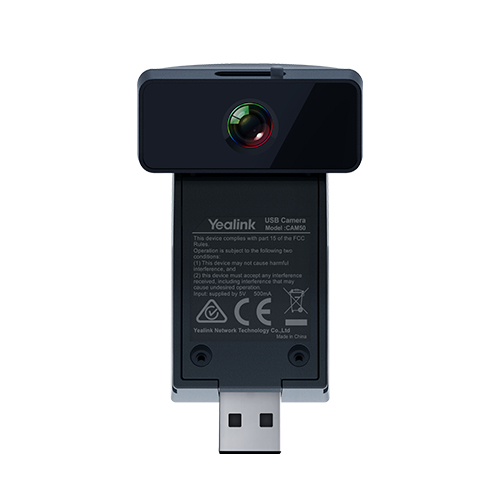
Compact hardware can still require careful selection. The USB shape does not make this a universal PC webcam. Confirm the intended host phone, firmware, camera part reference, and calling environment before purchase.
Product Overview
A video-ready desk phone can give a manager or specialist a more direct way to communicate than switching between a handset, laptop, external webcam, and separate meeting application. The Yealink CAM50 is designed to provide that camera layer for selected Yealink smart IP phones. It attaches through the phone’s USB interface and adds HD video capability while keeping the conversation centered on a familiar business communications endpoint. This makes the accessory particularly relevant where employees already rely on a Yealink T58-series phone for voice, directory access, call handling, and collaboration.
The camera is not intended to replace a room system for a boardroom or training space. Its strength is personal desktop use. An executive can hold a face-to-face discussion from an office desk. A branch manager can join a visual review without occupying a meeting room. A service lead can speak with colleagues while retaining access to normal phone functions. A remote consultant can use a dedicated business endpoint rather than depend on a consumer-style webcam arrangement. In each case, the value comes from adding visual presence to a phone that is already part of the user’s daily workflow.
The current manufacturer product information lists a five-megapixel camera reference with 720p video at 30 frames per second, automatic exposure, automatic white balance, H.264 and VP8 codec support, adjustable positioning, an activity LED, and a privacy shutter. Buyers may also encounter earlier CAM50 documentation and reseller listings that refer to a two-megapixel version or legacy compatibility with the SIP-T58V. That difference is important. The model name alone may not tell the full revision history, so a business quotation should identify the exact part being supplied and the phone on which it will be installed.
For African organizations, the practical buying task is therefore broader than asking for a camera price. The procurement team should identify the host phone model, current firmware, quantity, user role, video calling platform, expected deployment date, and preferred warranty path. FourTeck can use those details to review suitability, discuss available supply options, and help the customer avoid ordering an accessory that does not match the existing communications estate.
Key Business Benefits
◆ Visual Communication at the Desk
Adding video to a compatible smart phone allows a user to handle more personal conversations without moving to a shared room or rebuilding the desk around a separate camera. This can simplify executive calls, supplier discussions, branch reviews, and one-to-one collaboration where facial expressions and visual engagement improve understanding.
◆ Cleaner Endpoint Integration
The camera is designed around supported Yealink phones rather than being a loose general-purpose peripheral. A purpose-matched accessory can reduce desk clutter and create a more consistent user experience, provided the phone model and firmware are confirmed before ordering.
◆ Fast Physical Setup
USB attachment and host-powered operation reduce the number of separate components required at the desk. Installation planning is still necessary, but the physical connection is uncomplicated when the correct supported phone and camera revision are paired.
◆ Practical HD Video
A 720p output at 30 frames per second is suitable for personal desk video where the participant is positioned close to the phone. Automatic exposure and white balance help the camera adapt to ordinary office lighting without requiring the user to manage detailed imaging controls during every call.
◆ Visible Privacy Control
A physical shutter gives the user a direct way to block the lens when video is not required. This is valuable in executive offices, financial departments, consultation desks, and other environments where staff want a clear, tangible privacy action rather than relying only on a software setting.
◆ Scalable Standardization
Organizations that already standardize selected users on supported Yealink smart phones can add camera capability only where the role justifies it. This targeted approach can be easier to manage than equipping every desk with a full room-style collaboration setup.
These benefits depend on correct matching. A camera accessory cannot compensate for unsupported firmware, an incompatible phone, weak network quality, incorrect calling-platform settings, or poor desk lighting. FourTeck’s buying guidance is intended to connect the accessory with the wider voice and video environment so that the order is based on a usable solution rather than a model label alone.
Product Highlights for Business Buyers
Balanced personal video performance for a user seated close to the phone.
White balance and exposure are handled automatically for simpler daily use.
The user can position the camera to suit desk height, seating posture, and screen angle.
H.264 High Profile, H.264, and VP8 support aligns the camera with compatible phone video functions.
The CAM50 is best understood as a focused communications accessory. It does not include a microphone, speaker, display, operating system, or standalone meeting application. Those functions come from the supported Yealink phone and the configured communications service. The camera contributes the visual capture component, while the host device controls the call, user interface, network connection, and platform behavior.
Its stated field of view is designed for personal framing rather than a wide room. The current manufacturer specification gives approximately 62 degrees horizontal, 47 degrees vertical, and 75 degrees diagonal, with stated tolerances. That framing is practical for one person at a desk and may include a small amount of surrounding workspace. It should not be selected for a conference table where several participants need to remain visible.
Technical Specifications
| Specification | CAM50 Detail | Buyer Note |
|---|---|---|
| Brand / model | Yealink CAM50 | Confirm exact supplied part and revision. |
| Product category | HD camera accessory for compatible smart IP phones | Not a standalone conference room camera. |
| Current listed compatibility | Yealink SIP-T58W and SIP-T58A | Legacy documentation may also reference SIP-T58V; verify phone and firmware. |
| Camera reference | Current manufacturer page lists 5 megapixels | Some older CAM50 material lists 2 megapixels; confirm supplied revision. |
| Video resolution | Up to 720p at 30 fps | Suitable for personal desk video rather than room-wide capture. |
| Video codecs | H.264 High Profile, H.264, VP8 | Actual call behavior depends on phone, firmware, and service platform. |
| Field of view | Horizontal 62±3°, vertical 47±3°, diagonal 75±5° | Plan for one primary participant seated near the phone. |
| Image control | Automatic white balance and automatic exposure | Good office lighting still improves the result. |
| User controls | Adjustable angle, privacy shutter, LED indicator | Useful for framing and visible privacy management. |
| Interface | USB 2.0 | A matching connector alone does not prove compatibility. |
| Power | 5 V, less than 500 mA through USB | Powered from the supported host phone. |
| Operating temperature | 0°C to 40°C | Use in a controlled indoor office environment. |
| Operating humidity | 10% to 95% | Avoid condensation and unsuitable environmental exposure. |
| Warranty | Supply-route dependent | Request written warranty terms with the quotation. |
The most important specification is compatibility. A buyer should not choose this camera only because the resolution, USB interface, or physical design looks suitable. The host phone must support the accessory at the hardware and firmware level, and the configured call service must support the video workflow expected by the user. A procurement request should therefore include the exact label from the phone, its firmware version, the number of cameras required, and the intended video calling application or service.
The camera revision should also be recorded in the quotation. CAM50 material has existed across different product generations, and published references do not always use the same sensor description. FourTeck can help the buyer request confirmation from the supply channel so that the delivered item is understood before approval. This is especially useful for replacement orders, mixed fleets, and projects where several offices may have different T58-series phone revisions.
Configuration and Buyer Guidance
Begin with the business requirement rather than the accessory name. Who needs video at the desk, how often will it be used, and which conversations genuinely benefit from a dedicated camera? An executive who frequently speaks with regional teams may have a strong need. A general user who only joins occasional large meetings may be better served by a shared room or an existing computer setup. Role-based selection prevents unnecessary accessories while ensuring priority users receive the right capability.
1. Identify the Host Phone
Provide the complete phone model, hardware revision if shown, and firmware version. Do not rely on a description such as “Yealink touchscreen phone,” because several visually similar endpoints may have different accessory support.
2. Confirm the Calling Platform
Explain whether the phone uses a SIP PBX, hosted voice service, video calling application, or organization-specific platform. The camera supplies video capture, but the endpoint and service determine whether the intended call can be made.
3. Review Network Readiness
Video traffic uses more bandwidth than voice. Check internet stability, LAN performance, quality-of-service policy, firewall rules, and remote-site conditions where necessary. Poor connectivity can reduce image quality even when the camera and phone are correctly matched.
4. Plan the Desk Environment
Consider lighting direction, screen height, seating distance, background privacy, and cable clearance. Personal video works best when the user faces soft front lighting and the phone is positioned near eye level.
5. State the Quantity and Rollout
A single replacement and a fifty-desk project have different purchasing needs. Project buyers should provide quantities by site, required dates, phone inventory, and whether installation will be performed centrally or by local teams.
6. Request Written Commercial Detail
Ask the quotation to identify the exact item, condition, included contents, warranty route, delivery destination, and any exclusions. This gives procurement, finance, and IT a common reference before approval.
Future planning matters as well. Where an organization is replacing older T58A or T58V phones, it may be more practical to compare the cost of adding cameras with the cost of moving selected users to a newer video-capable endpoint. FourTeck can help present compatible options and suitable alternatives without assuming that the accessory is always the correct answer.
Ideal Business Use Cases
Executive and Management Desks
Senior staff often handle confidential supplier calls, regional reviews, investor discussions, and internal approvals from private offices. A camera integrated with a supported smart phone can provide visual presence while preserving the familiar calling workflow and reducing dependence on a shared meeting room.
Branch Coordination
Managers responsible for distributed offices can use personal video for short operational check-ins, document discussions, service escalation, and team supervision. The accessory is most suitable when one primary participant appears on camera rather than a whole branch team gathered around the desk.
Professional Services
Consultants, accountants, legal teams, project coordinators, and technical advisers may benefit from a dedicated video endpoint for scheduled one-to-one conversations. The privacy shutter is useful when the phone remains on a desk where sensitive papers or visitors may be present between calls.
Customer and Supplier Discussions
Video can help establish rapport during complex quotations, remote demonstrations, project clarification, and support escalation. The CAM50 does not replace screen-sharing tools or a larger room system, but it can make a direct conversation more engaging for a user already working from a compatible phone.
Education and Administration
School administrators, department heads, and remote coordinators can use desk video for planning sessions and management discussions. Selection should be based on the communication platform already used by the institution and should not be confused with a classroom camera intended to capture groups or teaching boards.
Hospitality and Service Operations
Hotel managers, reservation leaders, and multi-property operations staff may use personal video for coordination with head offices, service partners, and remote departments. A controlled desk setup can be useful where the manager requires visual communication but the front desk or guest area should not be recorded.
The accessory is less suitable for large-group capture, wide conference tables, mobile field work, outdoor operation, or general laptop use. Those requirements should be matched to a dedicated USB webcam, meeting bar, room camera, rugged mobile device, or another purpose-built option. FourTeck can help separate personal desk video from room collaboration so that the product category matches the actual number of participants and operating environment.
Yealink CAM50 Desktop Video Quality
Personal desk video has different requirements from a boardroom camera. The user is normally seated within arm’s reach of the phone, so the camera does not need an ultra-wide lens or optical zoom. Instead, it needs stable framing, predictable exposure, and a smooth image that lets the other party see facial expressions without excessive setup. The CAM50’s 720p output at 30 frames per second addresses this close-range role. It offers enough detail for ordinary business conversations while keeping the accessory compact and host-powered.
Automatic exposure and white balance reduce the number of controls the user must understand. When a call begins, the camera can respond to ordinary variations in office light and color temperature. That does not eliminate the need for sensible placement. A bright window directly behind the user can still create a dark face, while overhead lighting may produce shadows. A modest desk lamp or soft front light can make a meaningful difference. Procurement teams planning many units should consider a short user guide that covers camera angle, lighting, background, and shutter use.
The field of view supports a single participant rather than a room. This is useful because a narrower personal frame keeps attention on the speaker and limits unnecessary background. It also means buyers should not expect the device to capture several people seated around a desk. When two or more participants regularly join from one location, a small huddle-room solution may provide better framing, audio pickup, and display placement.
Yealink CAM50 Plug-and-Play Integration
Plug-and-play describes the physical simplicity of connecting the correct accessory to the correct host. It should not be interpreted as universal compatibility. In a supported deployment, the camera receives power through USB and works with the phone’s software environment, avoiding a separate power adapter and independent driver installation. That is attractive for IT teams because the endpoint remains a managed business device rather than an assortment of unrelated desk peripherals.
For a small deployment, installation may involve confirming firmware, attaching the camera, checking that the phone recognizes it, positioning the lens, and completing a test call. A larger rollout should add inventory records, packaging checks, acceptance testing, and user communication. It is wise to test one sample with the actual phone model and service platform before approving a bulk order. This is particularly important where the organization has acquired phones at different times, because hardware revisions and firmware histories may not be identical across the estate.
The camera also depends on the quality of the wider communications design. A supported phone may still deliver a poor video experience when the network has congestion, the internet link is unstable, or firewall policy blocks required media traffic. FourTeck can help the buyer frame the right pre-sales questions, while the customer’s PBX provider, cloud service partner, or internal network team may need to confirm platform settings and bandwidth policy.
Yealink CAM50 Privacy and Camera Control
A camera positioned on a desk may face the user for many hours, even though video calls occupy only a small part of the day. The physical privacy shutter offers a simple response: the user can cover the lens when visual communication is not required. This visible action can build confidence in offices where confidential conversations, visitor interactions, financial documents, or personal information may appear within the camera’s view.
The shutter should be included in user training rather than treated as a decorative feature. Employees should know when to open it, how to confirm the camera indicator, and when to close it after a call. Organizations may also set policies for video use, background selection, consent, and sensitive meetings. The camera itself does not create those policies, but a physical control makes good behavior easier to follow.
Adjustable positioning gives another form of control. The user can frame the face rather than expose the full desk or office. A careful angle can reduce distracting background, improve eye contact, and protect information outside the intended view. In high-privacy environments, buyers should combine the shutter with appropriate phone security, access control, network protection, and platform settings. Physical privacy and digital security are complementary, not interchangeable.
What Buyers Should Check Before Purchase
Before requesting a quote, buyers should gather enough information to distinguish a compatible accessory from a visually similar item. The correct choice depends on the phone, firmware, platform, user role, deployment environment, commercial terms, and project scale. FourTeck can review these details so the selection is based on operational fit rather than only the CAM50 name or a low advertised amount.
Exact Model Selection
Send a photograph or written record of the phone’s product label. Confirm whether it is SIP-T58W, SIP-T58A, SIP-T58V, or another model. Similar appearance is not sufficient evidence of camera support.
Revision Difference
Ask the supplier to state the sensor reference, manufacturer part number, and compatibility description for the item offered. CAM50 documentation has changed over time, so the quote should make the supplied revision clear.
Firmware and Platform
Record the phone firmware and identify the PBX, cloud calling service, or application expected to use video. Compatibility may require support from both the endpoint and the service configuration.
New, Replacement, or Expansion
A replacement for a failed unit should match the existing environment. An expansion project may allow a newer camera or phone option. State whether the requirement is like-for-like, additional capacity, or a communication upgrade.
Network and Media Readiness
Confirm bandwidth, firewall policy, quality of service, and remote-site connectivity. Video can expose weaknesses that were not noticeable during voice-only calls.
Required Accessories
The camera is powered by the phone, but the wider desk may still need a suitable phone power method, network cable, headset, screen arrangement, or surge-protected power source. List the complete user setup.
Warranty Expectations
Request the warranty duration, responsible party, return procedure, exclusions, and documentation in writing. Terms can vary by supply source and destination.
Project Supply Detail
For bulk orders, provide quantity by site, desired rollout sequence, receiving contacts, packaging preference, and whether one sample must be approved before the balance is released.
Long-term cost should include more than the camera. Consider the remaining life of the host phones, firmware support, platform direction, network readiness, installation time, spare-unit policy, and future standardization. Adding a camera to a supported phone may be efficient when the endpoint estate remains current and stable. Replacing an aging phone with a newer integrated video device may be more sensible when the organization is already planning a platform refresh.
A useful quote request should therefore state: organization name, destination country, phone model, firmware, communication platform, quantity, preferred condition, required date, warranty expectation, and whether alternatives may be proposed. Those details allow FourTeck to prepare a more relevant response and reduce time lost to repeated compatibility questions.
Africa Availability and Service Support
FourTeck supports Yealink CAM50 Africa enquiries for organizations that need a clear path from product identification to quotation. Support may include checking the intended host phone, reviewing the requested camera revision, discussing quantity, preparing a commercial offer, coordinating delivery information, and explaining the warranty route associated with the selected source. Availability can vary according to supplier status, product lifecycle, exact revision, order volume, destination, and project timing.
Because the CAM50 has appeared in both current and legacy phone environments, buyers should allow time for compatibility confirmation. FourTeck may request the phone model, firmware, serial-label information, or photographs before recommending an option. This is not unnecessary delay; it helps prevent a small accessory from becoming a larger return or deployment problem. Where the original part is not appropriate or commercially practical, a suitable Yealink endpoint or alternative video solution can be discussed.
Delivery planning begins after the item, quantity, destination, and commercial conditions are understood. No fixed lead time should be assumed until the supply route is confirmed. Buyers can also request written warranty guidance and ask whether the quotation covers new equipment, replacement units, or another condition. For a project order, FourTeck can help structure a sample-first approach where appropriate.
Africa Country and Regional Coverage
African procurement teams often need more than a product listing. They need to know whether the accessory fits the installed phone, whether the supplied revision matches the technical expectation, how many units can be sourced for a project, what documentation accompanies the shipment, and which commercial details should be approved before dispatch. FourTeck supports this process through product selection, configuration review, quotation preparation, delivery coordination, related product guidance, and warranty information.
The correct plan may differ between a single executive desk and a regional rollout. A one-unit request can focus on exact compatibility and replacement urgency. A multi-site project may require a phone inventory, test unit, standardized firmware, receiving plan, installation checklist, and spare policy. Availability, lead time, accessories, support options, and delivery arrangements can change according to model revision, quantity, supplier status, destination, and project scope. These variables should be confirmed in the quotation rather than assumed from another market’s retail listing.
The sections below provide more focused guidance for Tanzania, Libya, and Seychelles. They do not represent fixed stock or guaranteed delivery claims. They explain how organizations in different operating contexts can prepare a stronger request and evaluate whether this personal desk camera is the right fit. Buyers anywhere in the region can begin through the FourTeck Africa platform or send the requirement through the business contact page.
Yealink CAM50 in Tanzania
A Tanzanian organization considering personal video at selected desks should first map the accessory to the way its people actually communicate. Yealink CAM50 in Tanzania may suit an executive office, financial institution, public-sector department, school administration, healthcare management team, system integrator, growing company, or branch operation that already uses compatible Yealink smart phones and wants a more direct visual channel for one-to-one meetings. The buying discussion should cover the exact T58-series phone model, firmware, video service, user count, and whether the requirement is a replacement or a new capability. Infrastructure conditions can vary between headquarters and remote branches, so the customer should also review internet stability, LAN quality, firewall policy, and power protection for the host phone. For a larger rollout, it is useful to group users by site and role, approve one tested sample, document the installation steps, and decide who will update firmware or support users after deployment. Delivery coordination should identify the receiving location, order quantity, contact person, and any project schedule without assuming a fixed arrival date before supply is confirmed. A useful quotation request will include photos or labels from the existing phones, the expected camera revision, and written warranty requirements. FourTeck can help Tanzanian procurement teams compare the accessory with newer Yealink video-capable endpoints when the installed phone estate is mixed or approaching replacement. This practical review supports a cleaner decision: add cameras where the existing platform remains suitable, or choose an alternative where compatibility, lifecycle, or long-term management makes another approach more sensible.
Yealink CAM50 in Libya
For a Libya-based business or project buyer, the decision should be framed around operational continuity and a clearly documented technical match. Yealink CAM50 in Libya can be considered where compatible Yealink smart phones already support management, supplier, branch, or specialist video calls from individual desks. The project team should begin by identifying the phone hardware and firmware at each intended location, because a mixed estate may contain models that look alike but differ in camera support. The communication platform should then be checked for video capability, media policy, user licensing where applicable, and network requirements. Rather than ordering only by name, procurement should ask the quotation to state the camera revision, condition, included contents, host compatibility, warranty route, and any assumptions. A continuity-focused deployment may also include one spare unit, documented installation instructions, and a test process that confirms image, audio, call establishment, and shutter operation before the equipment is distributed. Accessories such as network cables, phone power arrangements, surge protection, and headsets should be reviewed as part of the complete desk rather than after the camera arrives. Delivery coordination can be planned once quantity, destination, receiving responsibility, and supply route are confirmed; no transport or timing claim should be treated as final before that stage. FourTeck can help project owners structure these requirements and can suggest a suitable alternative when the original accessory is not the best fit for the installed phone generation. This creates a commercially useful request that protects the buyer from revision uncertainty and supports a more predictable handover to the local IT or integration team.
Yealink CAM50 in Seychelles
Organizations in Seychelles often operate in compact offices, hospitality properties, government departments, professional firms, education environments, financial services, retail sites, and small groups of distributed locations. In that setting, Yealink CAM50 in Seychelles may be useful when a manager or specialist needs personal video from an existing compatible phone without dedicating additional desk space to a full room system. The strongest case is a controlled one-person position: a hotel operations manager speaking with a regional office, a finance lead reviewing a matter with external advisers, or an administrator joining a short visual coordination call. Buyers should verify the exact phone, firmware, platform, and camera revision, then consider desk lighting, background privacy, network resilience, and host-phone power protection. Compact deployments can still benefit from standardization. A business with several properties or offices may select a small group of approved user roles, test the camera at one site, and document settings so that later installations remain consistent. Because island-market procurement benefits from careful consolidation, the quote request should list all required quantities, destinations, related phone or headset needs, and warranty expectations at the beginning. Delivery arrangements should be reviewed only after the product and supply route are confirmed. FourTeck can help compare the add-on camera with newer integrated Yealink endpoints where remote manageability, lifecycle, space planning, or long-term support makes a replacement device worth considering. The objective is not to add video to every desk, but to create a tidy, supportable communication point for the users who gain real value from visual collaboration.
Other Yealink Options Buyers May Consider
The right alternative depends on whether the buyer needs a host phone, a newer Teams-oriented endpoint, cordless mobility, or a broader Yealink communication plan. The cards below are not direct specification comparisons. They provide useful navigation for organizations that may need to build the complete solution around the camera or select a different endpoint family.
Yealink Product Guide for Africa
Review Yealink desk phones, wireless systems, meeting devices, headsets, and accessory planning from one brand-focused page.
Yealink MP58-WH E2
Consider a modern Microsoft Teams phone option when the organization is reviewing a wider endpoint refresh rather than only adding a legacy camera.
Yealink W75
A multi-cell DECT family may be relevant where staff mobility matters more than personal desk video.
Yealink W76P
Suitable for organizations comparing a cordless communication bundle for mobile users, service teams, or flexible workplaces.
Yealink W77P
Explore a rugged cordless endpoint when the requirement involves warehouses, service areas, or demanding movement rather than a fixed executive desk.
FourTeck can also help a buyer identify the supported SIP-T58W or another suitable host-phone option when only the camera requirement is known. The comparison should account for platform, user role, endpoint lifecycle, support model, and total deployment cost rather than treating every Yealink device as interchangeable.
Why Business Buyers Contact FourTeck
Compatibility Guidance
Quote Assistance
Delivery Coordination
Warranty Direction
FourTeck approaches the CAM50 as part of a business communications environment. The team can ask the practical questions that reduce selection risk: Which phone will host the camera? Is the firmware current? Which service handles video? How many users need the accessory? Is this a replacement for an existing unit or a new deployment? What warranty evidence does procurement require? Where must the order be delivered? These questions turn a product enquiry into a clearer technical and commercial request.
Configuration guidance is especially valuable when product generations overlap. A buyer may find a current manufacturer page, an older data sheet, and several reseller listings that describe the same model differently. FourTeck can help identify what should be confirmed in the offered item rather than repeating every specification without context. The goal is to establish the exact part, supported phone, condition, and warranty route before the customer approves payment.
Project buyers can also request help organizing quantities and alternatives. A fleet refresh may include cameras for a small group of executives, newer phones for users whose current endpoints are not suitable, cordless devices for mobile staff, and headsets for call-intensive roles. Looking at the broader requirement can produce a more consistent deployment than purchasing isolated accessories department by department.
FourTeck supports small businesses, enterprise procurement teams, resellers, system integrators, education environments, hospitality groups, public organizations, healthcare administration, and professional service firms across African markets. Supply, timing, and warranty terms remain dependent on the confirmed quotation. Buyers receive a practical route to discuss the requirement without unverified claims about fixed stock, guaranteed lead time, or universal compatibility.
Frequently Asked Questions
What is the CAM50 used for?
It is an HD camera accessory for selected Yealink smart IP phones. The camera adds personal video capture for one-to-one business calls, executive discussions, branch coordination, and similar desktop use. It is not a standalone room system and does not provide its own display, microphone, speaker, network connection, or meeting application.
Which Yealink phones support this camera?
The current manufacturer product page identifies SIP-T58W and SIP-T58A compatibility. Older materials may also refer to SIP-T58V. Buyers should provide the exact phone model and firmware before ordering because a similar appearance or USB port does not prove support. FourTeck can help review the intended host and requested camera revision.
Can the CAM50 be used as a normal computer webcam?
It should not be purchased as a general PC webcam unless specific manufacturer documentation confirms the intended computer use. The product is designed around compatible Yealink phones and their software environment. Buyers who need a camera for a laptop, desktop, or meeting room should request a purpose-built USB or room collaboration camera instead.
Why do some descriptions say 2 MP and others say 5 MP?
CAM50 documentation has appeared across different product periods. The current manufacturer page lists a five-megapixel camera, while older data and reseller references may state two megapixels. The quotation should identify the exact part and revision being supplied. The supported video output remains listed as 720p at 30 frames per second.
Does the camera include a privacy feature?
Yes. The unit includes a physical privacy shutter that can cover the lens when video is not required. It also has an activity indicator and adjustable positioning. Organizations should still apply appropriate phone security, platform controls, user policy, and network protection because a lens shutter addresses physical visibility rather than the full digital security environment.
Is the Yealink CAM50 available across Africa?
FourTeck accepts Africa-focused product enquiries and can discuss current supply options, compatibility, quantity, quotation, delivery coordination, and warranty guidance. Availability may vary by revision, supplier status, order volume, destination, and project timing. A confirmed quotation is required before a buyer relies on any commercial or delivery detail.
What information should I send for a quote?
Provide the host phone model, firmware version, communication platform, camera quantity, destination country, preferred condition, required date, and warranty expectation. For replacement orders, add the existing camera part number or a clear label photograph. This information helps FourTeck prepare a more relevant offer and identify alternatives when necessary.
Can businesses request bulk or multi-site supply?
Yes. Project buyers can submit quantities by location, rollout sequence, receiving details, and test requirements. A sample-first plan may be useful when the organization has several phone revisions or communication platforms. Bulk availability, pricing, delivery, and warranty terms remain subject to the final supply route and written quotation.
What should I consider if my T58 phone is old?
Review the phone’s remaining lifecycle, firmware support, platform compatibility, and replacement plans before investing in an accessory. Adding a camera may be practical when the endpoint remains supported and stable. A newer integrated video phone may offer better long-term value when the organization is already planning a communications refresh. FourTeck can help compare both paths.
Need Help Confirming the Right Camera and Phone Match?
Send FourTeck the host phone model, firmware, required quantity, destination, and intended video platform. The team can review compatibility, current availability, quotation detail, suitable alternatives, delivery coordination, and warranty guidance before you place the order.


Reviews
There are no reviews yet.