

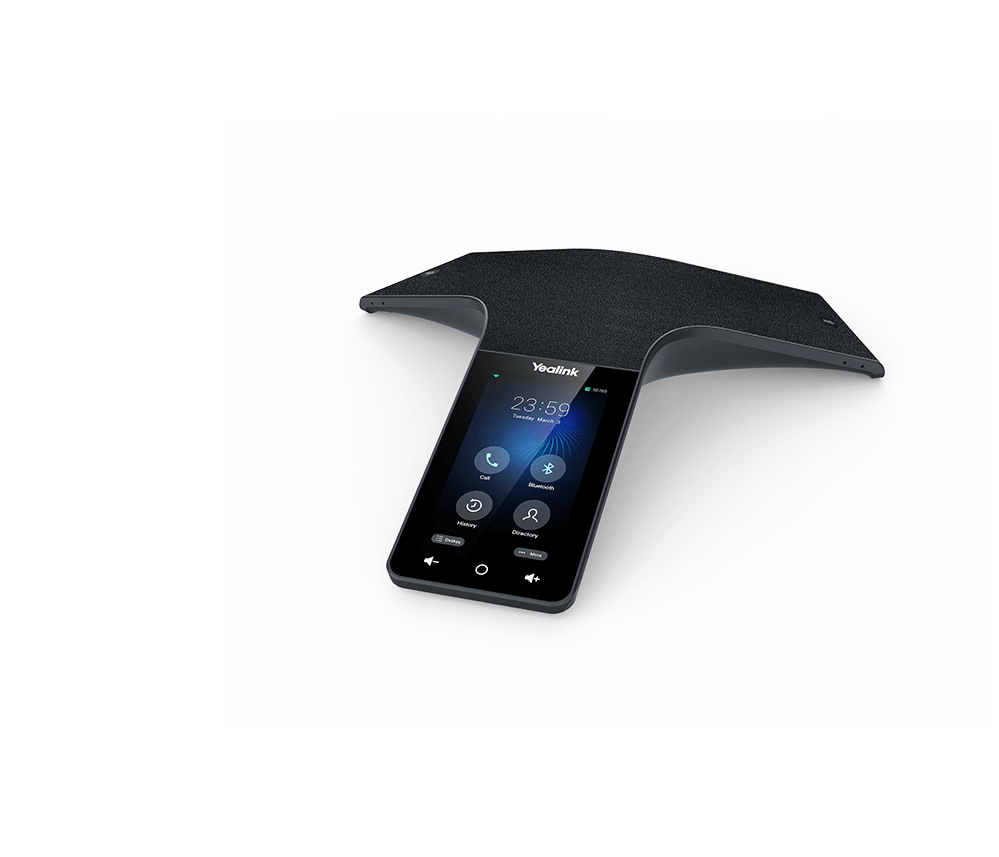
Quick Product Information
Yealink
CP965
IP conference phone
Medium and large meeting rooms
360-degree pickup with 12 pickup microphones and one noise-control microphone
5-inch capacitive touch display
Ethernet, PoE, Wi-Fi, Bluetooth, USB-A and USB-C
CPW65 wireless microphones and CPN10 PSTN accessory, subject to edition compatibility
Model, edition, quantity and supplier dependent
Selection, quote, delivery coordination and warranty guidance
Product Overview
Modern meeting rooms often combine people seated around one table with colleagues, customers or partners joining from another office. In that environment, weak laptop microphones, uneven speaker volume and complicated call controls quickly become barriers to productive discussion. The CP965 addresses those problems as a dedicated tabletop voice endpoint. Its microphone arrangement is designed to collect speech from all directions, while full-duplex operation allows participants to speak and hear at the same time without the unnatural stop-start pattern associated with basic speakerphones. A dedicated microphone assists with noise control, and Yealink audio processing is intended to reduce distracting background sounds that can make long calls tiring.
The device is especially relevant for boardrooms, training rooms, management meeting spaces, customer briefing rooms and shared conference areas where several people regularly join the same call. The 5-inch touch interface gives users a central place to start, manage and end meetings instead of passing a laptop around the table. Its low-profile black design and acoustic fabric help it fit into formal business interiors, while Power over Ethernet can simplify installation where suitable network switching is already available. Built-in Wi-Fi and Bluetooth add alternative connection choices, and USB interfaces support selected hybrid workflows and accessories.
Buyers should pay attention to the exact edition. The standard SIP-oriented model and platform-specific variants can differ in software, call experience and management options even when the hardware appearance is similar. A company using a SIP service, hosted PBX, Microsoft Teams or another collaboration environment should therefore confirm platform requirements before purchasing. Room dimensions also matter. The built-in microphone system provides a stated pickup radius of up to 6 metres under suitable conditions, but room acoustics, table shape, participant seating and background noise influence real-world results. Optional expansion microphones may be appropriate for long tables or wider seating arrangements.
For Africa-focused projects, the purchase decision extends beyond choosing a model name. Network power, VLAN policy, firewall access, provisioning, account licensing, cabling, mounting position, delivery destination and support expectations should be reviewed together. FourTeck helps buyers translate these operational details into a clearer product request, reducing the risk of receiving the wrong edition or overlooking required accessories. This approach is useful for a single executive room as well as multi-site deployments that need repeatable room standards.
Key Business Benefits
◆ More Inclusive Table Discussion
A 360-degree pickup pattern helps capture voices from different seats around the table. This is valuable when meetings involve several departments or external guests, because participants do not need to lean toward one microphone or move a laptop whenever the speaker changes.
◆ Natural Two-Way Conversation
Full-duplex speakerphone operation supports simultaneous speaking and listening. Teams can interrupt, clarify and respond in a more natural rhythm, which is particularly helpful during negotiations, management reviews and collaborative problem-solving sessions.
◆ Cleaner Meeting Audio
Noise Proof technology, smart filtering and a dedicated noise-control microphone are designed to reduce common distractions. Better audio intelligibility can shorten repetition, limit misunderstandings and help remote participants remain engaged throughout longer calls.
◆ Simpler Room Operation
The touch display provides a clear control point for everyday call tasks. A dedicated appliance is easier to standardize than relying on whichever laptop happens to be in the room, reducing setup variation and helping occasional users start meetings with greater confidence.
◆ Flexible Connection Choices
Ethernet, PoE, wireless networking, Bluetooth and USB interfaces give deployment teams several ways to integrate the conference phone. That flexibility is useful when meeting rooms differ in cabling, network policy or the devices users bring into the space.
◆ Room Growth Without Immediate Replacement
Support for compatible expansion microphones allows selected rooms to extend voice coverage. A buyer can begin with the built-in array and add coverage where table length, seating pattern or acoustic conditions show a genuine need.
Together, these benefits support a more predictable meeting-room experience. The practical value is not only louder sound; it is the ability to create a repeatable communication standard that staff can understand, administrators can manage and procurement teams can scale across multiple rooms. The correct result still depends on platform fit, network preparation and room assessment, so FourTeck recommends reviewing those elements before confirming quantity.
Product Highlights
The CP965 combines dedicated conference-room audio hardware with a modern touch interface. Twelve microphones are arranged for voice pickup around the device, while an additional microphone supports noise cancellation. Yealink specifies a 360-degree pickup range of up to 20 feet, or 6 metres, making the unit suitable for many medium and large meeting spaces when placed correctly. The integrated speakerphone supports full-duplex conversation with acoustic echo cancellation, helping speech remain understandable when people at both ends talk naturally.
Clear visual call control and menu access for shared meeting rooms.
Useful for multi-party SIP calls, subject to service and edition support.
Can receive network and power through compatible PoE infrastructure.
Compatible accessories can extend pickup or add selected PSTN functions.
The product also includes built-in Wi-Fi and Bluetooth, one USB Type-A port and one USB Type-C port. These interfaces support flexible deployments, but their exact role depends on the chosen firmware and edition. The acoustic fabric is designed to resist accidental water, oil and stain exposure; this should be treated as a practical surface feature rather than a claim that the device is waterproof. Centralized administration is supported through Yealink device-management capabilities, helping IT teams provision and maintain multiple endpoints when the required platform is available.
Technical Specifications
| Specification Area | Details |
|---|---|
| Brand and model | Yealink CP965 |
| Product category | Touch-sensitive HD IP conference phone |
| Recommended room profile | Medium and large conference rooms; final suitability depends on room acoustics, table shape and seating |
| Operating system | Android-based; standard SIP edition commonly uses Android 9.0, while platform-specific editions may differ |
| Display | 5-inch capacitive multi-touch display, 720 × 1280 resolution |
| Microphone system | Built-in 12-microphone voice-pickup array plus one microphone for noise cancellation |
| Pickup coverage | 360 degrees; stated pickup range up to 20 feet or 6 metres under suitable conditions |
| Audio functions | Optimal HD audio, Noise Proof technology, smart noise filtering, full-duplex speakerphone and acoustic echo cancellation |
| Conference capability | Up to 10-way local conference on supported SIP configurations; service dependent |
| Network interface | 1 × RJ45 10/100 Mbps Ethernet port |
| Wireless connectivity | Built-in dual-band Wi-Fi and Bluetooth; features may depend on firmware and edition |
| USB connectivity | 1 × USB 2.0 Type-A port and 1 × USB 2.0 Type-C port |
| Power | Power over Ethernet, IEEE 802.3at Class 4 on the standard model; confirm switch or injector compatibility |
| Optional accessories | Yealink CPW65 DECT wireless expansion microphones and CPN10 PSTN box, subject to required function and edition support |
| Management | Phone, browser, auto-provisioning and supported Yealink device-management platform options |
| Network and security | SIP support, IPv4/IPv6, static or DHCP addressing, HTTP/HTTPS, SRTP, IEEE 802.1X and TLS features; firmware dependent |
| Dimensions | Approximately 328 × 322 × 62 mm |
| Configuration note | Confirm SIP, Teams or other platform edition, firmware, license requirements, accessory compatibility and package contents before ordering |
Choosing the Correct Configuration
The first decision is the communication platform. A standard SIP deployment normally requires compatible SIP accounts, PBX settings and network access, while a Microsoft Teams environment requires the correct Teams edition, account licensing and administrative policy. The external appearance alone is not enough to confirm compatibility. Buyers should provide the intended platform, tenant or PBX type, number of rooms and expected call workflow when asking for a quote.
The second decision is room coverage. Measure the table, note the number and position of seats, and identify noise sources such as air-conditioning outlets, glass walls or nearby open workspaces. The built-in array may be sufficient for many rooms, but optional microphones can be considered where participants sit beyond the practical pickup zone. Also confirm whether the network switch supplies the required PoE standard. Where it does not, an appropriate injector or power option may be needed. A brief room and network checklist gives FourTeck enough information to recommend a more complete configuration rather than supplying the main unit without necessary supporting items.
Configuration and Buyer Guidance
A conference phone should be selected as part of a room system, not as an isolated desk accessory. Before purchasing, document how the room is used and who will support it. This prevents common problems such as ordering a SIP model for a platform that expects a native application, overlooking PoE requirements or discovering after installation that the table is too long for the chosen microphone layout.
1. Define the Meeting Platform
State whether the room will use a SIP PBX, hosted voice service, Microsoft Teams or another approved environment. Include the service provider and any existing room standards so edition and account requirements can be checked.
2. Measure the Room and Table
Provide room dimensions, table length, seat count and the approximate distance from the device to the furthest participant. This information helps determine whether the integrated microphones are enough or expansion units should be included.
3. Review Network and Power
Confirm Ethernet availability, PoE standard, VLAN assignment, DHCP or static addressing, firewall rules, Wi-Fi policy and access to provisioning services. A stable wired connection is often preferred for permanent room systems.
4. Plan Administration
Decide who will create accounts, apply firmware, manage certificates, monitor devices and handle user support. Multi-room projects benefit from a repeatable naming, configuration and update process.
Buyers should also confirm package contents, optional power accessories, security-slot requirements, expansion microphones and any cabling that must pass through a table or floor box. Warranty terms can vary by source and destination, so request written guidance for the offered unit rather than assuming every supply route has identical coverage. For phased projects, ask whether the same edition can be maintained across later purchases. Standardization reduces training effort and makes support easier, but it depends on product lifecycle and supplier availability.
Ideal Business Use Cases
Executive and Board Meetings
The touch interface and all-around pickup suit formal rooms where directors, finance teams, auditors and external advisers need clear voice participation without placing several unrelated devices on the table.
Project Coordination Rooms
Construction, technology, engineering and consulting teams can use a dedicated conference endpoint for recurring progress calls, supplier discussions and cross-site issue resolution where multiple people contribute.
Education and Training
Universities, colleges and training departments can support guest lectures, administrative meetings and staff development sessions. Room assessment remains important because teaching spaces may have reflective surfaces or wider seating.
Hospitality and Multi-Site Operations
Hotel groups, property operators and regional service businesses can standardize management calls between sites, helping staff join scheduled discussions from a familiar room device rather than relying on personal equipment.
Public-Sector Collaboration
Departments and agencies can use the phone in committee rooms, procurement meetings and inter-office discussions, provided the chosen edition aligns with approved communication platforms and network-security policies.
Customer and Supplier Calls
Sales, legal, procurement and support teams can gather around one room endpoint for contract reviews, service escalations and account planning, giving remote parties a more consistent audio experience.
The model is primarily an audio collaboration endpoint. Organizations requiring room video, content cameras or advanced wireless presentation should evaluate whether the conference phone will operate alongside existing video equipment or whether an integrated video-room system is more appropriate. FourTeck can help compare a voice-first deployment with related Yealink meeting solutions when the project scope includes cameras, displays or room scheduling.
CP965 360-Degree Audio Coverage and Noise Control
The defining feature of a conference phone is not the size of its speaker; it is how evenly it captures and reproduces speech around a shared table. The CP965 uses twelve built-in microphones for voice pickup and one additional microphone dedicated to noise reduction. This arrangement supports a 360-degree listening pattern so participants can sit around the device rather than forming a narrow line in front of it. Yealink states a pickup range of up to 6 metres, but buyers should interpret that value as a planning reference rather than a guarantee for every room.
Acoustic conditions make a major difference. Hard floors, glass partitions, high ceilings and empty walls can produce reverberation, while air-conditioning, projectors and nearby open offices introduce constant noise. Smart noise filtering and Noise Proof processing are designed to reduce distracting sounds, and acoustic echo cancellation helps prevent remote speech from returning as an echo. These functions improve clarity, yet they cannot fully correct a poorly designed room. Soft furnishings, sensible device placement and appropriate speaking distance remain valuable.
For long conference tables, place the unit where the microphone array has the most balanced relationship to all seats. Avoid hiding it behind laptops, documents or decorative objects. When important participants sit well beyond the practical coverage area, compatible expansion microphones may be a better choice than increasing speaker volume. The business benefit is a fairer meeting: quieter speakers, people seated at the ends of the table and remote participants all have a better opportunity to follow the conversation without repeated requests to move closer or speak again.
CP965 Touch Control, Connectivity and Hybrid Meeting Flexibility
Shared meeting rooms work best when controls are visible and predictable. The 5-inch capacitive screen provides a dedicated interface for call handling, directories, settings and other functions supported by the selected edition. Staff do not need to locate an unfamiliar application on a visitor’s computer before making a basic room call. This is particularly useful for executive spaces, training rooms and bookable meeting areas used by people with different technical skill levels.
Connection flexibility is another practical strength. A wired Ethernet link can provide stable network access and PoE power through compatible infrastructure, reducing the number of adapters on the table. Built-in Wi-Fi may help in rooms where installing a new data cable is difficult, although permanent business deployments should still consider wireless coverage, security policy and congestion. Bluetooth can link supported mobile devices, while USB-A and USB-C interfaces allow selected accessory and bring-your-own-device workflows. The exact behaviour of these interfaces depends on firmware, edition and connected equipment, so the intended use should be verified before procurement.
A useful buying conversation therefore starts with the meeting journey: how users receive invitations, which account places the call, whether guests bring laptops, whether the room needs PSTN access and who supports failures. FourTeck can map these questions to a suitable edition and accessory list. This avoids paying for functions that will not be used while ensuring the room has the connectivity required for its real operating pattern.
CP965 Expansion, Management and Room Scalability
A conference-room endpoint often remains in service longer than the laptop carried into the room. Buyers should therefore consider how the system can adapt when seating, room layout or communication standards change. The CP965 supports compatible Yealink CPW65 wireless expansion microphones, allowing selected deployments to increase coverage without running microphone cables across the table. This can be valuable for long boardroom tables, U-shaped layouts or rooms where the main unit must remain near a network outlet.
Expansion should be based on measured need. Adding microphones does not automatically correct echo or poor room acoustics, and accessory compatibility should be confirmed for the exact hardware and software edition. Buyers requiring an analog PSTN connection may also consider the optional Yealink CPN10, but they should verify the call scenario, local line interface and edition support. These accessories can make the device more flexible, yet they also affect budget, package planning and installation time.
For organizations deploying several units, centralized provisioning and management are equally important. Supported Yealink management tools can help administrators apply configuration, maintain firmware and review endpoint status. A repeatable device template reduces manual errors and makes it easier to open additional rooms. Before a bulk purchase, the IT team should decide naming conventions, network segments, certificate handling, firmware approval and account ownership. Scalability is therefore not only about adding hardware; it is about creating an operational model that can be maintained by the people responsible for business communications.
What Buyers Should Check Before Purchase
A useful quote depends on more than the model name. Buyers should provide enough operational detail for the supplier to distinguish between editions, accessories and deployment requirements. Start with the calling platform, room dimensions, quantity and delivery destination. Then identify the network environment, account ownership and any standards already used in other meeting rooms. This information helps prevent compatibility mistakes and makes commercial comparison more meaningful.
Correct Edition
Confirm whether the requirement is standard SIP, Microsoft Teams or another supported platform. Similar-looking editions may use different operating software, account processes and management tools.
Room Coverage
Share table length, room width, seat count and the location of noisy equipment. Ask whether built-in coverage is sufficient or whether CPW65 microphones should be included.
Network Readiness
Check PoE class, switch capacity, VLANs, DHCP, DNS, time service, firewall access, certificates and Wi-Fi policy. Network readiness affects installation more than the physical unboxing process.
Licensing and Accounts
Platform accounts, SIP credentials, tenant policies and subscriptions are normally separate from the hardware unless specifically included in the quotation. Clarify who supplies and administers them.
Accessories and Cabling
Review expansion microphones, PoE injectors, Ethernet length, table pass-throughs, security locks and optional PSTN connectivity. Small missing items can delay an otherwise straightforward installation.
Support Expectations
Ask what warranty applies to the offered source, what information is required for a claim and whether installation, remote configuration or user training is included or quoted separately.
For bulk or project supply, include the desired deployment schedule, number of sites and whether all rooms must use an identical configuration. If the exact model is unavailable, ask for a technically appropriate alternative rather than accepting a substitute based only on price. FourTeck can review the requirement and explain differences in room size, microphone expansion, platform compatibility and management. A complete request enables a clearer quotation and reduces the chance of extra purchases after the main units arrive.
Africa Availability and Service Support
FourTeck supports conference-phone inquiries from business, government, education, hospitality, healthcare, reseller and integration customers across Africa. Assistance can include edition selection, room-coverage review, compatible accessory guidance, quotation preparation and delivery coordination. The aim is to help buyers identify a workable configuration before commercial confirmation rather than treating every meeting room as identical.
Availability may vary according to the selected edition, supplier status, order quantity and project timing. Some requirements involve the standard SIP unit, while others need a platform-specific variant or expansion microphones. FourTeck can review these differences and request current commercial information. Delivery planning also depends on destination, shipment size and the final supply route; confirmed arrangements should therefore be stated in the quotation rather than assumed from a general product page.
Warranty guidance is based on the offered product source and applicable terms. Buyers should share the destination country, business name, room count, platform, required accessories and expected deployment window. This enables the sales team to prepare a more useful response and highlight any items that need separate licensing or technical work.
Africa Country and Regional Coverage
Meeting-room procurement across Africa can involve very different network standards, room sizes, collaboration platforms and commercial processes. FourTeck approaches each inquiry by reviewing the technical fit first: which edition is required, whether the existing switch can supply PoE, how users will join calls, whether expansion microphones are necessary and which accessories must be included in the same shipment. This helps buyers compare a complete solution rather than an incomplete device-only price.
For multi-site organizations, standardization can reduce user training and simplify support, but the proposed design should still account for local room acoustics, available cabling and approved network policy. Product availability, lead time, suitable configuration, support options and delivery arrangements can change with model, quantity, destination and project scope. Written quotation details are therefore more reliable than general assumptions about stock or delivery.
The following country guidance focuses on Tanzania, Libya and Seychelles, each with a different business and deployment context. Buyers in these markets can use the FourTeck Africa platform to review related solutions and the Africa contact page to submit room, platform and quantity information. A clear requirement allows the team to coordinate product selection, compatible accessories, commercial terms and warranty guidance more effectively.
Yealink CP965 in Tanzania
Organizations evaluating the Yealink CP965 in Tanzania should begin with the practical conditions of the meeting room and the communication platform already used by the business. Corporate offices, banks, schools, universities, healthcare institutions, public-sector departments, resellers and system integrators may all use conference rooms differently. A management boardroom may need simple scheduled calls and consistent voice pickup, while a training room may have wider seating, more background movement and a greater need for expansion microphones. Buyers should provide room dimensions, table length, seat count, SIP or collaboration-platform details and the available network connection so the proposed configuration reflects actual use. Infrastructure planning is equally important: confirm whether the switch supports the required PoE standard, whether the voice device will use a dedicated VLAN, and whether firewall or certificate policies affect provisioning. For growing organizations, it can be helpful to define one standard room design and then adjust microphone coverage for larger spaces, rather than purchasing unrelated devices for each site. Delivery coordination depends on the destination, quantity and supplier route, so commercial timing should be confirmed in writing. FourTeck can assist Tanzanian buyers with edition review, accessory matching, quote preparation and warranty guidance without assuming that every package includes the same power or licensing items. Sharing the desired deployment date, number of rooms and support expectations at the start enables a more complete quotation and reduces the risk of missing cables, accounts or expansion components during installation.
Yealink CP965 in Libya
When planning the Yealink CP965 in Libya, procurement teams should frame the purchase around operational continuity and compatibility rather than selecting only from a catalogue description. The most useful starting point is a room-by-room requirement: identify the PBX or meeting platform, the number of regular participants, the longest speaking distance, the type of internet and local network connection, and the staff responsible for administration. Businesses with headquarters, project offices or distributed teams may value a consistent conference endpoint because familiar controls reduce setup time between recurring coordination calls. However, the correct edition must match the organization’s approved platform, and account or subscription requirements should be documented separately from the hardware. Project planners should also verify PoE availability, cable routing, security-slot needs and whether CPW65 expansion microphones are necessary for long tables. If analog PSTN participation is part of the workflow, the optional CPN10 and its compatibility should be checked before quotation. FourTeck can help structure a bill of materials that includes relevant accessories and identifies configuration-dependent items. Availability, delivery coordination and warranty terms must be based on the offered supply route, order quantity and destination; they should not be inferred from another market or an older project. A strong quote request includes the required quantity, destination, preferred edition, room measurements, target deployment period and any installation or remote-configuration expectations. That level of detail helps Libyan organizations, integrators and project buyers evaluate a complete operational solution and plan implementation with fewer last-minute changes.
Yealink CP965 in Seychelles
For buyers considering the Yealink CP965 in Seychelles, the strongest value often comes from creating dependable meeting spaces within compact offices or across several operating sites. Hospitality groups, financial services firms, government departments, schools, healthcare providers, professional practices, retailers and tourism-related organizations may need managers and specialists to collaborate without travelling between locations for every discussion. A dedicated conference phone can provide a familiar audio endpoint, but it should be matched carefully to each room. Smaller boardrooms may use the built-in microphone array effectively, while longer tables or flexible training layouts may justify compatible expansion microphones. Because space and cable routes can be limited, the deployment team should decide whether wired PoE, Wi-Fi or a combination of approved connectivity methods is most suitable, while maintaining the organization’s security and reliability standards. Remote manageability is useful where several rooms must follow the same configuration, but administrators should confirm firmware policy, account ownership and access to the selected management platform. Energy use, table placement, ventilation around network equipment and secure cable routing are also practical considerations in neatly designed hospitality or customer-facing environments. FourTeck can review edition compatibility, accessories, delivery coordination and warranty information for the offered supply route. A helpful request should state the island destination, business type, room count, platform, table size, required call features and desired implementation window. This allows the proposal to focus on long-term usability and supportability rather than simply supplying a device that may not fit the room workflow.
Other Options Buyers May Consider
The right alternative depends on room size, mobility, platform and whether the project needs audio only or a broader video-collaboration system. The following related Yealink options can help buyers compare a smaller conference endpoint, a wireless room design, microphone expansion and an integrated video-room path. Availability and exact specifications should be confirmed for each model.
Yealink CP925
A compact touch-sensitive conference phone for smaller meeting spaces where buyers need a dedicated tabletop audio endpoint with a simpler room-coverage requirement.
Yealink CP935W
A wireless touch-sensitive conference phone for rooms where flexible placement is important and the network design supports the required wireless deployment.
Yealink CPW65
A DECT wireless expansion microphone option for compatible CP965 installations that need additional pickup coverage around a longer table or wider seating area.
Yealink CPN10
An optional PSTN accessory for supported conference-phone scenarios. Buyers should verify the required analog call workflow and compatibility before including it.
Yealink MeetingBar A30
A video-collaboration alternative for organizations that need an integrated camera, microphones and room system rather than a voice-first conference phone.
FourTeck can help compare these options according to participant count, room dimensions, platform, video requirements, cable availability and budget scope. A smaller room may not need the coverage or expansion path of the flagship model, while a larger collaboration project may be better served by a complete video system. The objective is to match the endpoint to the meeting workflow rather than automatically choosing the largest device.
Why Buyers Choose FourTeck
Business communication products often look straightforward until edition, licensing, room coverage and network requirements are considered together. FourTeck supports buyers by turning those details into a clearer supply request. The process can begin with a simple description of the room and platform, then expand into configuration, accessory, quantity, destination and support questions that affect the final quotation.
Guidance for single-room purchases, multi-site standards and project quantities.
Edition, platform, network, room size and accessory requirements considered together.
Commercial requests prepared around quantity, destination and project scope.
Delivery requirements reviewed after the product and supply route are confirmed.
Alternatives considered when room, platform or video requirements point elsewhere.
Terms explained according to the offered source and applicable documentation.
FourTeck does not rely on unsupported promises about immediate stock, fixed delivery dates or identical warranty coverage in every market. Instead, the team helps buyers confirm the current position for the requested model and destination. This is especially valuable for integrators and procurement teams that need a documented bill of materials, compatible accessories and a repeatable deployment plan. Clear pre-sales discussion can save more time than correcting an incomplete room system after delivery.
Frequently Asked Questions
What is the CP965 used for?
It is a dedicated IP conference phone for group voice calls in medium and large meeting rooms. The device combines a touch interface, 360-degree microphone pickup, full-duplex audio and network connectivity so several people around a table can join the same business call more naturally than with a basic laptop speakerphone.
Is the conference phone available for Africa orders?
FourTeck can review Africa-based inquiries and request current availability for the required edition and quantity. Availability may differ by supplier status, platform variant, accessories and destination. Submit the business location, quantity, preferred platform and target deployment period so the quotation can reflect the current supply position.
Can FourTeck help choose between SIP and Teams editions?
Yes. The correct choice depends on the organization’s PBX, hosted voice service, Microsoft tenant, account licensing and preferred user experience. Buyers should not select an edition only from the physical appearance. FourTeck can review the intended platform and identify the edition information that should be confirmed in the offer.
How large a room can the built-in microphones cover?
Yealink states a 360-degree pickup range of up to 20 feet, or 6 metres, under suitable conditions. Actual performance depends on room acoustics, table shape, seating distance and background noise. Provide measurements and a seating plan so built-in coverage and optional expansion microphones can be considered realistically.
Does the device support wireless expansion microphones?
The CP965 supports compatible Yealink CPW65 DECT wireless expansion microphones. They can extend pickup coverage for longer tables or wider seating arrangements. Accessory quantity, edition compatibility and the specific room requirement should be confirmed before ordering rather than adding microphones without assessing placement and acoustics.
Can it be powered from a network switch?
The standard model supports Power over Ethernet, with Yealink listing IEEE 802.3at Class 4. The network team should confirm the switch standard, available PoE budget and port configuration. Where compatible PoE is not available, an appropriate injector or power option may need to be included in the project.
What information is needed for a quotation?
Provide the destination country, organization name, quantity, room dimensions, table length, participant count, required platform, network power availability, accessory needs and desired deployment period. Mention whether installation, account setup, remote configuration or user guidance is expected so these services can be discussed separately.
Is Wi-Fi suitable for permanent installation?
Built-in Wi-Fi provides deployment flexibility, but suitability depends on coverage, security policy, congestion and business continuity requirements. A wired Ethernet connection is often preferred for a permanent room endpoint where cabling is available. The network team should choose the method that fits its reliability and administration standards.
What warranty applies?
Warranty coverage depends on the offered source, destination and applicable product terms. FourTeck can provide guidance based on the specific quotation. Buyers should request the warranty period, claim procedure, required serial information and exclusions in writing rather than assuming every market or supplier provides identical conditions.
Can businesses request multiple units for a project?
Yes. For bulk or multi-site requirements, share the number of rooms, preferred standard configuration, delivery locations and rollout sequence. FourTeck can review whether the same edition and accessory set should be used throughout the project and request current commercial information for the required quantity.
Need Help Planning Your Conference Room?
Send FourTeck your room size, platform, quantity, destination and accessory requirements. The team can help review the suitable edition, current availability, configuration considerations, warranty guidance and delivery coordination before a commercial offer is prepared.



Reviews
There are no reviews yet.