

Quick Product Information
A Focused Collaboration Upgrade for Compact Rooms
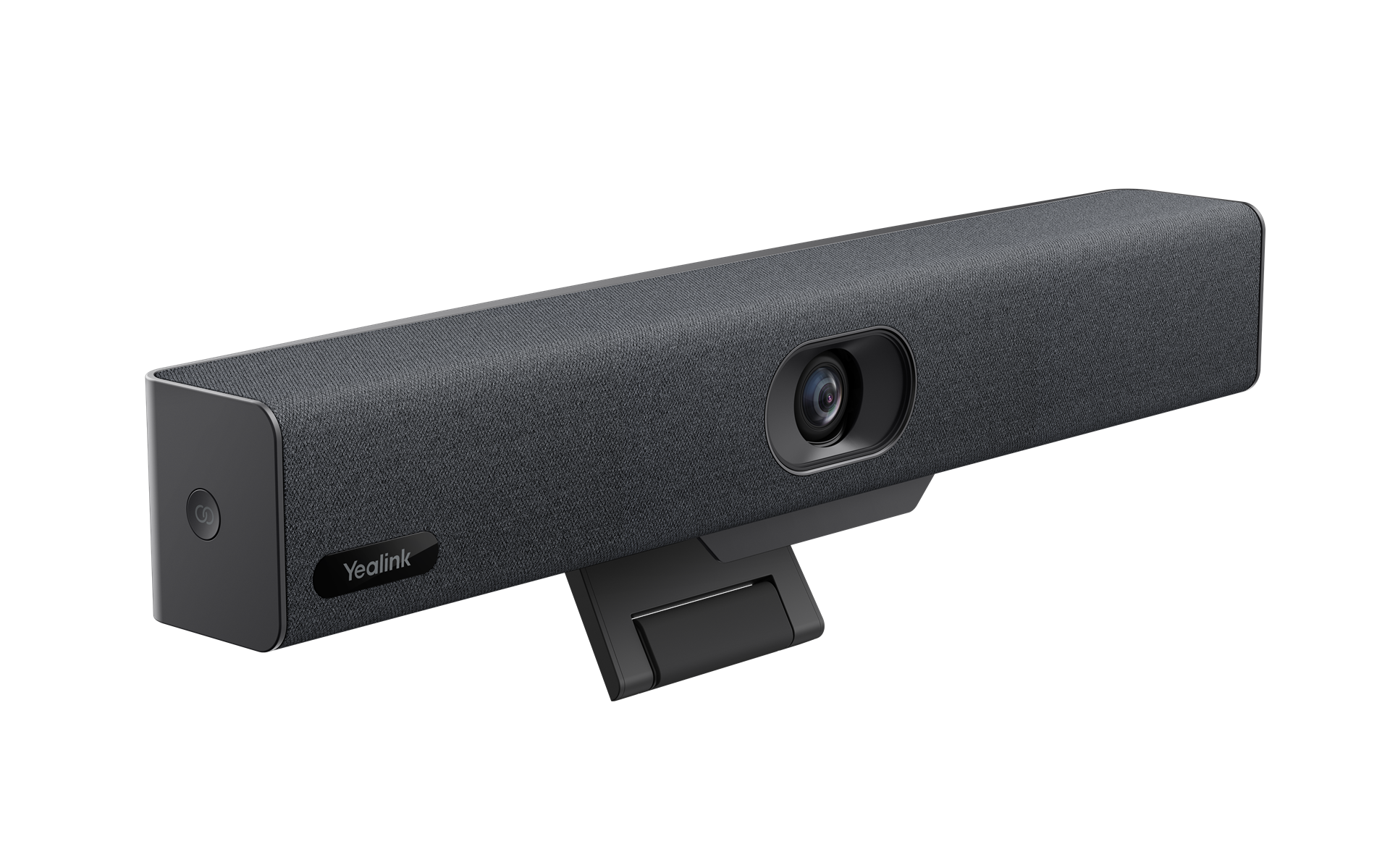
Small meeting rooms often receive less technology planning than large boardrooms, even though they may host more frequent calls. Employees enter with a laptop, connect to a television, try to find the correct microphone, adjust a narrow webcam and then discover that participants at the edges of the table are not visible. The Yealink UVC34 addresses this practical problem by placing the camera, microphone array and speaker in one enclosure. Instead of assembling separate desktop devices, a business can create a neater USB-based meeting point that users operate through the application already running on their computer.
Its 8 MP camera supports video up to 4K at 30 frames per second and uses a 120-degree field of view. That wide perspective is valuable when participants sit close to a screen in a shallow room, because the camera can include more of the table without being mounted far away. Five-times digital zoom and electronic camera control help administrators or users refine the view. Automatic framing can adjust the composition as people join or leave, while face enhancement is intended to present participants more clearly. These functions are helpful, but room lighting, camera height and seating position still influence the final image and should be planned rather than left to software alone.
Audio is handled by eight built-in MEMS microphones with a stated voice pickup range of up to five metres, together with a five-watt speaker. Noise reduction, dereverberation and full-duplex operation are designed to make conversation feel more natural by reducing common room distractions and allowing both sides to speak without the rigid turn-taking that weak speakerphones can create. The microphone range makes the unit appropriate for compact spaces, but buyers should not treat it as a replacement for a professionally designed audio system in a long boardroom, training hall or highly reverberant room.
The product is particularly relevant to organisations that want platform flexibility. The host laptop runs the meeting software, so users can work with supported conferencing applications according to company policy, operating-system support and the chosen service. This approach can suit mixed-platform environments, visiting staff and rooms that do not need a permanently licensed appliance. FourTeck helps buyers translate the room requirement into a sensible quotation by reviewing participant count, table layout, display position, mounting surface, cable distance, computer ports, meeting applications, delivery destination and expected quantity. The aim is a usable room, not merely a camera with an impressive resolution figure.
Key Business Benefits
The value of a small-room video bar appears in everyday use: shorter setup, clearer participation and a more consistent meeting experience. The following benefits connect the technical design to operational needs faced by procurement teams, IT administrators and room users.
◆ One-Device Room Simplicity
Combining the camera, microphones and speaker reduces the number of separate peripherals that users must select inside a meeting application. This can simplify support documentation, produce a cleaner room appearance and make it easier to standardise several similar huddle rooms.
✓ Wider Participation
A 120-degree field of view helps capture people seated across a compact table, including participants near the sides. Wider coverage can reduce the need to reposition the device during a call and helps remote attendees see the group as one working team.
● More Natural Conversation
The eight-microphone array, room speaker and full-duplex processing support two-way conversation without requiring every participant to crowd around a laptop. Better voice pickup can improve supplier calls, interviews, project reviews and management discussions where accurate understanding matters.
⚙ Flexible Application Choice
Because the meeting runs on a connected computer, the same room can serve teams that use different supported applications. This is useful for businesses that regularly join customer, partner or vendor meetings hosted on platforms outside their own standard environment.
🔒 Visible Privacy Control
The electric lens cap provides a clear physical indication that the camera is covered when not active. This is valuable in executive rooms, consulting spaces and shared offices where users want immediate reassurance that the lens is not left open after a meeting.
↗ Easier Room Replication
A compact all-in-one format makes it easier to define a repeatable room standard for branches or departments. IT teams can document the same mounting position, cable route, application settings and user instructions rather than supporting a different mixture of webcams and speakers in every room.
◈ Better Use of Small Spaces
The bar format can be mounted with the supplied bracket or positioned according to the approved installation method, helping preserve table space. This matters in huddle rooms where laptops, notebooks and presentation materials already compete for limited working area.
Product Highlights That Matter in Daily Meetings
The camera system is built around an 8 MP sensor and a wide lens rather than an optical pan-tilt mechanism. This is an important buying distinction. In a shallow huddle room, wide coverage is often more useful than long-range zoom because participants sit close to the display. The UVC34 can capture up to 4K at 30 frames per second, but the resolution delivered in a real call also depends on the host computer, meeting service, account level, network bandwidth and the remote participant’s display. Buyers should view 4K capability as image headroom rather than a promise that every meeting will be transmitted at 4K.
Automatic framing helps keep the group visible without continuous remote-control adjustments. AI face enhancement is designed to improve how faces appear, especially when people are at different positions in the image. Nine camera presets can support repeatable compositions for a meeting table, presenter position or alternative seating arrangement. Five-times digital zoom provides flexibility for closer views, although digital zoom crops the sensor image and is not the same as optical zoom. A buyer planning a deeper room should therefore check whether a PTZ camera or a larger-room system would produce better results.
The audio design is equally central. Eight microphones create a broader pickup area than a laptop microphone, while Yealink Noise Proof processing, echo cancellation, dereverberation and full-duplex operation assist speech clarity. The built-in five-watt speaker is intended for the same small-room environment. Room materials still matter: glass walls, bare floors, loud air-conditioning and an open doorway can reduce intelligibility. A short acoustic review can be more valuable than increasing speaker volume.
Built-in Wi-Fi supports remote device management rather than acting as the primary path for the laptop’s meeting traffic. The unit connects to the host computer through USB, and the package normally includes a seven-metre USB-B to USB-A cable, a VCR20 remote control, power adapter, wall bracket, mounting accessories and batteries. Package contents and regional supply terms should be confirmed in the quotation. The product does not replace a room computer, display or meeting-platform account, so those parts should be included in the total room plan.
Technical Specifications
| Specification Area | Details |
|---|---|
| Brand / Model | Yealink UVC34 |
| Product Type | All-in-one intelligent USB video bar for small and huddle rooms |
| Image Sensor | 8 MP, 1/2.8-inch CMOS |
| Maximum Video Output | Up to 4K at 30 frames per second; meeting output depends on host, software, network and service |
| Field of View | 120° super-wide-angle lens |
| Zoom and Framing | 5× digital zoom, electronic pan/tilt/zoom control, automatic framing and camera presets |
| Image Functions | Auto Framing and AI Face Enhancement |
| Privacy | Electric lens cap |
| Microphones | Built-in array of eight MEMS microphones |
| Voice Pickup | Up to 5 metres under suitable room conditions |
| Audio Processing | Noise reduction, echo cancellation, dereverberation and full-duplex audio |
| Speaker | Built-in 5 W high-fidelity speaker |
| Host Connection | USB Type-B connection to a compatible computer; included cable is commonly USB-B to USB-A |
| Additional Connections | USB Type-A and Yealink microphone interface; confirm accessory compatibility before ordering |
| Management Connectivity | Built-in Wi-Fi for supported remote device management |
| Mounting | Integrated stand and supplied wall-mount accessories; verify display or wall arrangement |
| Approximate Dimensions | 380 × 55 × 55 mm |
| Approximate Net Weight | 1.28 kg |
| Typical Package Items | Video bar, VCR20 remote, power adapter, 7 m USB cable, wall bracket, mounting accessories and batteries; confirm quoted bundle |
| Compatibility | Common USB video-conferencing platforms through a compatible host computer; verify current OS, application and security policy |
| Availability / Warranty | Supplier, destination, quantity and quoted terms dependent |
How to Read These Specifications
Begin with room geometry rather than maximum resolution. A wide-angle bar works best when people sit relatively close to the camera and need to fit within one broad frame. Measure the distance from the intended mounting point to the nearest and farthest chair, then compare that layout with the five-metre microphone pickup guidance. A room may technically fall inside the stated distance yet still sound poor if glass, concrete, open doors or mechanical noise create strong reflections and distractions.
Confirm the computer connection as carefully as the camera. The standard package uses a USB-B to USB-A cable, while many current laptops provide mostly USB-C ports. A buyer may need a suitable business-grade adapter, dock or compatible cable solution. Check that the host computer can supply the required USB performance, that the conferencing application recognises external camera and audio devices, and that users have permission to select them. FourTeck can help identify these dependencies before the purchase order is raised.
Configuration and Buyer Guidance
A good quotation starts with a room description, not only a model number. The UVC34 is positioned for small and huddle rooms, so buyers should confirm that the space genuinely matches that profile. Share room dimensions, table shape, expected participant count, camera-to-seat distance and photographs of the intended display wall. These details help determine whether the wide lens and integrated microphone system are suitable or whether the organisation should consider a larger video bar, expansion microphones or a modular camera and audio design.
Room Fit
Measure the room, count seats and note how close participants sit to the camera. Include the table width and any presenter position outside the normal seating area.
Host Computer
Confirm laptop operating systems, available USB ports, docking stations and whether users can select external camera, microphone and speaker devices.
Meeting Platforms
List the applications used internally and for guest meetings. Verify current support, account policy and any organisational security restrictions.
Display and Mounting
Identify screen size, mounting height, wall material, shelf space and cable route. The camera should sit close to eye level without blocking the display.
Network Quality
The connected laptop still depends on stable internet, suitable Wi-Fi or Ethernet, firewall access and enough bandwidth for the selected meeting service.
Support Ownership
Decide who will manage firmware, device settings, room instructions, replacement accessories and escalation when users report audio or camera problems.
The power and cabling plan should be documented before installation. The video bar needs its power adapter, a USB route to the host computer and an appropriate location beneath or near the display. A seven-metre cable gives useful flexibility, but it should not be stretched across walking areas or routed where it will be repeatedly unplugged. If a laptop dock or USB-C adapter is required, test the proposed model because low-quality adapters can create intermittent camera or audio detection problems.
For multi-room projects, create a small-room standard that lists the video bar, mount, display connection, USB adapter where needed, power protection, user instruction card and room naming convention. This turns a one-off purchase into a maintainable deployment. FourTeck can help group rooms by size and identify where the UVC34 fits, where a lower-complexity personal device may be enough and where a more scalable room system is required.
Ideal Business Use Cases
This product is best considered as a compact collaboration endpoint rather than a universal conference-room solution. The following use cases show where its all-in-one USB approach can provide practical value when the room, host computer and meeting workflow are matched correctly.
Project Huddle Rooms
Small project teams can connect a laptop for daily stand-ups, design reviews, supplier discussions and short decision meetings. Wide camera coverage helps include people seated around a compact table, while integrated audio avoids passing one laptop between speakers.
Executive and Management Rooms
A private management room can use the video bar for board updates, investor discussions, regional operations calls and confidential consultations. The electric lens cap is a useful visible privacy feature when the room is also used for in-person conversations.
Recruitment and Interviews
Human-resources teams can create a consistent interview point for candidate calls and panel discussions. A stable camera position, clear room audio and a simple laptop connection help staff focus on the conversation instead of troubleshooting several peripherals.
Education Administration
Schools, colleges and training providers can use compact meeting rooms for faculty coordination, parent meetings, external examiner sessions and administrative collaboration. It is not intended to cover an entire lecture hall, so classroom teaching requirements should be assessed separately.
Professional Consultation
Legal, financial, engineering and consulting firms can use the unit in client rooms for document reviews and specialist discussions. The organisation remains responsible for platform security, access control, recording policy and confidentiality procedures.
Hotel and Hospitality Offices
Hospitality groups can place a compact collaboration bar in management, sales or supplier meeting rooms. Regional property teams may use it for operational reviews, procurement calls and training coordination without dedicating a complex room appliance to every small site.
Healthcare Administration
Clinics and healthcare organisations can use it for internal planning, supplier meetings, remote administration and approved professional consultations. Clinical use, patient data, platform approval and privacy requirements must be governed by the organisation’s own policies.
Branch and Distributed Teams
Businesses with several branch offices can standardise a small room for management updates, sales coordination and operational reviews. Consistent mounting, labelled cables and a common user guide can reduce support effort across sites.
The UVC34 is less suitable when a room requires optical zoom across a long table, multiple expansion microphones, presenter tracking across a wide stage, dual-screen room control or a completely computer-free meeting workflow. Those requirements point toward a larger video bar, PTZ camera, native room appliance or modular audio-video system. FourTeck can help buyers compare the room objective rather than forcing the same device into every space.
Yealink UVC34 Camera Coverage and Intelligent Framing
Camera selection should follow the shape of the room. In a huddle space, participants may sit only one or two metres from the display and extend across the width of a small table. A conventional narrow webcam can cut off people at the edges or require an awkward mounting distance. The UVC34 uses a 120-degree field of view to capture a broader scene from close range. This makes it particularly effective for shallow rooms where there is not enough depth to move the camera farther back.
Automatic framing adds convenience by adjusting the composition around detected participants. When someone joins late or leaves the table, the device can update the group view rather than requiring a user to pick up the remote during the discussion. Face enhancement is intended to improve participant presentation, while the 8 MP sensor provides sufficient image information for detailed output and digital cropping. Nine presets can also support defined views, such as the full table, a primary speaker position or a nearby whiteboard, although the whiteboard must remain within the fixed camera coverage.
Intelligent framing cannot correct every room issue. A bright window behind participants can darken faces, a display mounted too high can create an unnatural eye line, and a table ornament may obstruct people seated near the camera. Camera height should normally be close to seated eye level and near the screen showing remote participants. This encourages a more natural sense of eye contact. Lighting should illuminate faces from the front or side without creating strong glare on the lens.
Digital zoom should be used with realistic expectations. It is valuable for refining a view or focusing on a smaller group, but it crops the image rather than moving optical elements closer to the subject. In a long room, distant faces may therefore look less detailed than they would through optical zoom. Buyers should provide FourTeck with the farthest seating distance and a room photograph so the camera architecture can be matched to the space before purchase.
Yealink UVC34 Eight-Microphone Audio and Full-Duplex Conversation
Meeting participants usually forgive a small reduction in picture quality more easily than missing words. For that reason, audio should be treated as a primary room requirement. The UVC34 integrates eight MEMS microphones with a stated pickup range of up to five metres, a five-watt speaker and processing for noise reduction, echo control, dereverberation and full-duplex communication. This combination is designed to give a compact room a more balanced voice experience than a laptop microphone and speaker positioned at one end of the table.
Full duplex allows people on both sides to speak at the same time with less aggressive audio cut-off. This matters during natural discussion, where short confirmations, questions and interruptions occur frequently. Echo cancellation helps prevent remote participants from hearing their own voices returned through the room speaker. Noise processing can reduce predictable distractions, while dereverberation helps manage room reflections. The result depends on placement and acoustics, so the device should not be hidden behind a display, enclosed inside furniture or placed immediately beside a loud air-conditioning outlet.
A five-metre pickup specification does not mean every five-metre room will sound equally good. Speech volume, ceiling height, wall materials and table position all influence clarity. Glass partitions, tiled floors and bare concrete can reflect sound repeatedly, making words less distinct. Simple room treatments such as curtains, carpet, acoustic panels and soft furniture may improve the experience more than changing software settings. Doors should close properly, and the bar should face the speaking area without physical obstructions.
Before a multi-room rollout, test one representative room using the organisation’s real meeting platform and typical laptops. Ask participants at the nearest and farthest seats to speak at normal volume, then collect feedback from remote listeners. Confirm speaker volume, echo behaviour and device selection after laptops wake from sleep or reconnect through docks. FourTeck can use the test results to decide whether the design is ready for replication or whether the room needs acoustic changes, a different placement or a larger audio system.
Yealink UVC34 USB Deployment, Privacy and Device Management
The product follows a bring-your-own-device workflow. A user connects a compatible computer, opens the approved meeting application and selects the video bar as the camera, microphone and speaker. This gives the room flexibility because the computer supplies the application, user identity and meeting invitation. It also means the computer remains part of the solution. Processor capability, operating system, USB controller, dock, security software and application settings can all affect the experience.
The included seven-metre USB-B to USB-A cable suits many display-to-table arrangements, but newer laptops may require USB-C connectivity. The safest approach is to standardise a tested adapter or dock rather than rely on whatever a user brings. Cable routing should prevent trips and repeated connector strain. In a shared room, a short labelled lead at the table or a managed connection point can make the start process clearer. Organisations should also decide whether the room laptop is permanent or whether every user brings a personal device, as the support model differs.
Privacy is supported by an electric lens cap that closes when the camera is not in active use. This physical cover is easier for users to understand than an application icon alone. Nevertheless, a secure meeting environment also depends on account permissions, device access, screen-lock policy, guest joining controls and recording rules. The privacy cover protects the camera view; it does not replace organisational governance for confidential conversations or data.
Built-in Wi-Fi enables supported remote management, helping administrators maintain visibility and apply device settings without visiting every room. The exact management functions, platform requirements and licensing should be confirmed for the planned deployment. IT teams should document firmware ownership, update windows, network access and recovery procedures. FourTeck can help buyers include these operational questions in the quotation discussion so the product is treated as a managed business endpoint rather than an unmanaged accessory.
What Buyers Should Check Before Purchase
Before requesting a quote, buyers should confirm the room, computer workflow, accessories and commercial expectations. Choosing only by the model name can lead to missing adapters, an unsuitable room size or confusion about what the device does on its own. The UVC34 is a USB peripheral, not a native room appliance, so it needs a compatible host computer, meeting application, display and network connection. FourTeck can help review these elements as one working environment.
Configuration Fit
State the room dimensions, seats, table layout, farthest participant and intended camera position. A small-room video bar should not be selected for a deep boardroom simply because it offers 4K output.
Compatibility Check
List operating systems, laptop models, docks, USB policies and conferencing applications. Confirm whether users have USB-A or USB-C and whether security controls allow external audio-video devices.
Accessories and Mounting
Check the included remote, power adapter, cable and wall bracket. Identify any required display mount, shelf, USB-C adapter, cable channel, extension solution or UPS protection.
Application Workflow
Decide whether each user brings a laptop or the room has a dedicated computer. Document how users sign in, share content, select devices and join guest meetings from other platforms.
Availability and Warranty
Ask for current availability, exact package contents, supplier route, serialised product details and applicable warranty terms. These points can vary by destination, quantity and quotation date.
Quote Preparation
Provide required quantity, country, delivery location, target deployment period, room photographs, preferred platform and installation expectations. This produces a more useful bill of materials.
Buyers should also compare the UVC34 with nearby room-system options. A native Teams or Zoom appliance may be more appropriate when users need one-touch joining without a laptop. A PTZ camera may fit a long room where optical zoom is important. A simpler personal webcam and speakerphone may be enough for a one-person office. A larger video bar with expansion microphones may be needed when the table grows beyond the intended pickup area. The correct alternative depends on business workflow, not a generic claim that one model is superior.
Long-term cost includes installation, adapters, replacement cables, room displays, laptop docks, platform subscriptions, management services and support time. For bulk orders, request a room schedule that separates small huddle rooms from executive rooms and larger conference spaces. FourTeck can review replacement models and suitable alternatives if supply changes, while explaining differences in camera coverage, audio reach, platform mode and included accessories before the buyer approves a substitute.
Africa Availability and Service Support
FourTeck supports business enquiries across Africa for compact video bars, conference cameras, room systems, microphones, displays, mounting accessories and related network infrastructure. Support for this model can include requirement review, room-fit guidance, quotation preparation, accessory identification, delivery coordination and warranty direction. Availability may change according to supplier status, regional bundle, order quantity, destination and the exact date of the request, so the written quotation should be treated as the current commercial reference.
A useful enquiry explains how the room will operate. Buyers should share the display size, room dimensions, participant count, primary meeting platform, laptop connection type, quantity and deployment country. FourTeck can then check whether the standard package is sufficient or whether the project also needs USB-C adapters, display cables, cable management, power protection or a different room solution. For organisations planning several rooms, the review can group spaces by size and create consistent equipment bundles.
Warranty coverage and support procedures depend on the quoted supply route and applicable terms. Buyers should keep the final quotation, invoice, serial information and delivery documents. No immediate-stock or guaranteed-delivery claim is made on this page. The sales team can confirm current options after reviewing destination, quantity and project scope.
Africa Country and Regional Coverage
FourTeck approaches Africa-focused collaboration projects by reviewing technical fit and commercial requirements together. A video bar may appear simple, yet the final result depends on the room, display, host computer, meeting service, power, network and user process. Procurement teams can send one-room requirements or a schedule covering several branches. The review can identify common configurations, different room sizes and accessories that should be included in each bundle.
Availability, lead time, warranty terms and delivery arrangements may vary by supplier position, destination, quantity and project scope. Buyers should avoid approving a quotation that lists only the video bar without confirming the included remote, power adapter, mounting components and cable. It is equally important to confirm whether laptops need USB-C adapters, whether displays are already installed and whether the organisation expects installation, user training or only product supply.
The dedicated country sections below address Tanzania, Libya and Seychelles with different operating contexts. They do not imply local stock, a branch office or a fixed delivery period. Instead, they show the information buyers in each market can prepare so FourTeck can provide a clearer quotation. Organisations elsewhere in Africa can follow the same process through the FourTeck Africa technology portal and the regional sales contact page.
Yealink UVC34 All-in-One USB Video Bar in Tanzania
For Tanzanian organisations, the practical value of a compact USB video bar often lies in making everyday remote collaboration more consistent across growing offices, project rooms and branch environments. Yealink UVC34 All-in-One USB Video Bar in Tanzania enquiries may come from enterprises, public-sector departments, universities, schools, financial institutions, healthcare administrators, resellers, system integrators and professional firms that need a cleaner alternative to using a laptop camera and microphone alone. Before quotation, the buyer should describe the room dimensions, seating count, screen position, laptop types and main meeting applications. This is especially important where different departments use different computers or where equipment will be deployed across more than one site. The wide camera view can suit shallow rooms with participants seated close to the display, while the integrated microphone array reduces table clutter. Nevertheless, room acoustics, power stability and network quality should be assessed as part of the full deployment. A suitable UPS or protected power arrangement may be considered for the display, computer and collaboration equipment where business continuity requires it. Buyers should also confirm whether the seven-metre USB-A cable matches the local laptop fleet or whether standardised USB-C adapters or docks are needed. For project supply, provide the quantity per site, proposed installation period, delivery destination and whether mounting assistance is required. FourTeck can help review the requested bundle, identify compatible accessories, prepare a quotation, coordinate delivery planning and explain warranty terms based on the selected supply route. This approach helps Tanzanian teams purchase a room solution that matches their working environment rather than choosing only by headline camera resolution.
Yealink UVC34 All-in-One USB Video Bar in Libya
Operational planning should guide a Yealink UVC34 All-in-One USB Video Bar in Libya request. Businesses and project teams may be equipping an executive room, a compact branch meeting space, a training coordination office or a customer-facing consultation room. The first task is to confirm that the room is within the product’s intended small-room profile. A long conference table or distant seating may require optical zoom and expandable audio, while a shallow room can benefit from the 120-degree field of view and integrated microphone array. Procurement documents should identify the host computers, operating systems, USB port types and conferencing applications expected at the site. This reduces the risk of receiving the main unit without the adapter, dock or cable arrangement required by current laptops. The project team should also plan display mounting, camera height, mains power, cable protection and a stable network path for real-time calls. Where operational continuity is important, spare critical accessories and a documented support process may be more useful than relying on improvised replacements. FourTeck can review model suitability, package contents, quantity, destination, accessory needs and the preferred supply schedule before issuing commercial terms. Delivery coordination is handled according to the confirmed quotation and project details; no assumption is made here about routes, local inventory or fixed lead time. Warranty expectations should be stated during the enquiry so the applicable terms and handling route can be explained clearly. By providing room photographs, a bill of materials, meeting-platform requirements and installation responsibilities, Libyan buyers can obtain a quotation that reflects the complete deployment rather than an isolated hardware item.
Yealink UVC34 All-in-One USB Video Bar in Seychelles
Compact and distributed operating environments make careful room standardisation valuable for a Yealink UVC34 All-in-One USB Video Bar in Seychelles project. Hospitality groups, professional services firms, government departments, education providers, healthcare administrators, financial organisations, retailers and tourism-related businesses may need reliable collaboration between properties, offices and external partners without building a complex boardroom at every site. The all-in-one design can reduce visible equipment and preserve table space in smaller meeting areas, while USB operation allows a compatible laptop to run the organisation’s preferred supported meeting application. Buyers should first check the room depth, seating pattern and acoustic conditions. A small office with reflective walls may benefit from simple acoustic treatment, and the camera should be mounted near seated eye level to keep remote interaction natural. Space planning should include the display, power adapter, seven-metre USB cable and any USB-C dock used by staff. For multi-site deployments, a common room guide covering cable labels, device selection, privacy-cover use, firmware ownership and troubleshooting can make long-term support easier. Energy and continuity planning may include protected power for the display, computer and video bar according to organisational policy. When requesting a quotation, provide the number of rooms, delivery destination, preferred deployment window, meeting platforms, laptop connector standard and any mounting or installation requirements. FourTeck can review the configuration, discuss suitable alternatives where a room is too large, coordinate commercial and delivery details and clarify the warranty route attached to the proposed supply. This structured approach supports long-term value without making assumptions about local inventory or guaranteed island delivery timing.
Related Models and Collaboration Resources
The correct product depends on room size, operating platform and whether the organisation wants laptop-led or dedicated room operation. The links below help buyers explore same-brand communication products, the wider meeting-room category and alternatives for different spaces. They are not direct one-for-one replacements; each option should be reviewed against the intended workflow.
Yealink Product Africa
Explore Yealink voice, video, headset and collaboration families for offices and multi-site communication projects.
Video Conferencing Systems Africa
Compare USB cameras, video bars, room kits, microphones, controllers and related meeting-room components.
Grandstream GVC3220
A dedicated room conferencing endpoint for larger rooms that need PTZ camera capability, content sharing and room-based operation.
Yealink MP58-WH E2
A premium Microsoft Teams desk phone for executive and professional users who need a dedicated voice endpoint.
Yealink W76P
A DECT IP phone system for organisations that need cordless SIP mobility across offices, hotels, clinics or operational sites.
Yealink W77P
A rugged cordless communication option for teams working in busier operational environments where handset durability matters.
For buyers comparing compact video bars, the most important alternative questions are whether a laptop is acceptable, whether the room needs optical zoom, whether microphone expansion is necessary and whether a dedicated touch controller is preferred. Contact FourTeck with these answers to narrow the shortlist before commercial comparison.
Why Business Buyers Contact FourTeck
Business technology procurement works best when the supplier understands the environment around the product. FourTeck helps buyers discuss meeting-room equipment as part of a complete workflow that includes room size, display, computer, network, power, mounting, meeting platform and support ownership. This reduces the chance of receiving a device that is technically capable but difficult for staff to use in the intended space.
Guidance for single-room purchases, branch requirements and multi-site project quantities.
Review of room fit, host devices, meeting applications, cables, adapters and mounting needs.
Preparation of a clearer commercial request with quantities, destinations and required accessories.
Commercial and delivery planning based on the confirmed destination, order and supply route.
Clarification of applicable terms, documentation and support route attached to the quotation.
Discussion of suitable room-system alternatives when size, workflow or availability changes.
FourTeck supports procurement teams, IT managers, resellers, system integrators, education providers, hospitality groups, healthcare administrators, professional firms and growing businesses. The sales discussion can remain as simple or detailed as the project requires. A buyer needing one room can share a photograph and laptop details. A larger rollout can provide room drawings, standards, quantities and installation responsibilities.
No claim is made that every model is immediately available or that one configuration suits all locations. The value of the process is careful confirmation before ordering. Buyers receive a clearer understanding of what is included, what is optional and what information still needs verification. This helps internal approvals, reduces avoidable changes and creates a more supportable meeting environment after deployment.
Frequently Asked Questions
What is the Yealink UVC34 used for?
It is an all-in-one USB video bar for small meeting rooms, huddle spaces and professional home offices. A compatible computer runs the meeting application and uses the unit as its camera, microphone and speaker. The product is intended to create a cleaner, wider and more consistent meeting experience than relying on a laptop’s built-in audio and camera alone.
Does the UVC34 work without a computer?
The standard UVC34 is a USB peripheral and normally needs a compatible host computer to run Microsoft Teams, Zoom, Google Meet, Webex or another supported application. It is not the same as a native room appliance with its own meeting operating system and touch controller. Buyers wanting computer-free room operation should ask FourTeck to review appliance-based alternatives.
What room size is suitable?
The product is designed for small rooms, huddle rooms and similar compact spaces. Suitability depends on room width, depth, table layout, participant distance and acoustics. The stated microphone pickup reaches up to five metres under suitable conditions, but long tables and reflective rooms may require a larger or expandable audio system. Share room measurements before ordering.
Does every meeting run in 4K?
No. The camera supports output up to 4K at 30 frames per second, but actual call resolution depends on the connected computer, USB path, meeting application, subscription, bandwidth, platform processing and remote participant capabilities. Many business meetings operate at a lower resolution. The 4K-capable sensor still provides useful image detail and digital-framing headroom.
Can FourTeck help confirm platform compatibility?
Yes. Provide the meeting applications, laptop operating systems, docks, USB ports and company security requirements. FourTeck can help review the intended workflow and identify questions that should be confirmed before quotation. Application support can change through software and operating-system updates, so organisations should test important guest-joining and device-selection processes before a large rollout.
What normally comes in the package?
A typical package includes the UVC34 video bar, VCR20 remote control, power adapter, seven-metre USB-B to USB-A cable, wall bracket, mounting accessories and batteries. Regional bundles can vary, so buyers should check the quotation line by line. A display, room computer, platform account, USB-C adapter and installation service are not automatically assumed to be included.
Is the product available for delivery in Africa?
FourTeck supports Africa-focused enquiries and can review current supply options, quantity, destination and delivery requirements. Availability and lead time may vary according to supplier status, order size, regional bundle and project timing. Contact the sales team with the exact country, delivery location, required quantity and preferred deployment period for a current quotation.
What warranty applies to the Yealink UVC34?
Warranty terms depend on the supplier route, destination, product documentation and written commercial agreement. Buyers should request the applicable period, coverage, exclusions and handling process before approval. Keep the quotation, invoice, delivery record and device serial number. FourTeck can provide guidance on the warranty route associated with the proposed supply without making a universal coverage promise.
Can businesses request several units for multiple rooms?
Yes. For multi-room or branch projects, prepare a room schedule showing dimensions, seating, displays, laptop standards, meeting platforms, mounting needs and quantity per location. FourTeck can help separate rooms that suit the UVC34 from rooms needing a larger video bar or dedicated appliance. A standardised bill of materials can make rollout, training and later support more consistent.
How do I request a useful quotation?
Send the product model, quantity, country, delivery location, room dimensions, participant count, primary applications, laptop port type and whether mounting or installation is required. Include room photographs when possible. This information helps FourTeck identify missing accessories, confirm the intended configuration and prepare a quotation that is easier for procurement and IT teams to review.
Need Help Planning a Small Meeting Room?
Share your room size, seating count, meeting applications, laptop connection, required quantity and delivery country. FourTeck can help review suitability, identify accessories, prepare a quotation, coordinate delivery requirements and explain the warranty terms attached to the proposed supply.



Reviews
There are no reviews yet.