
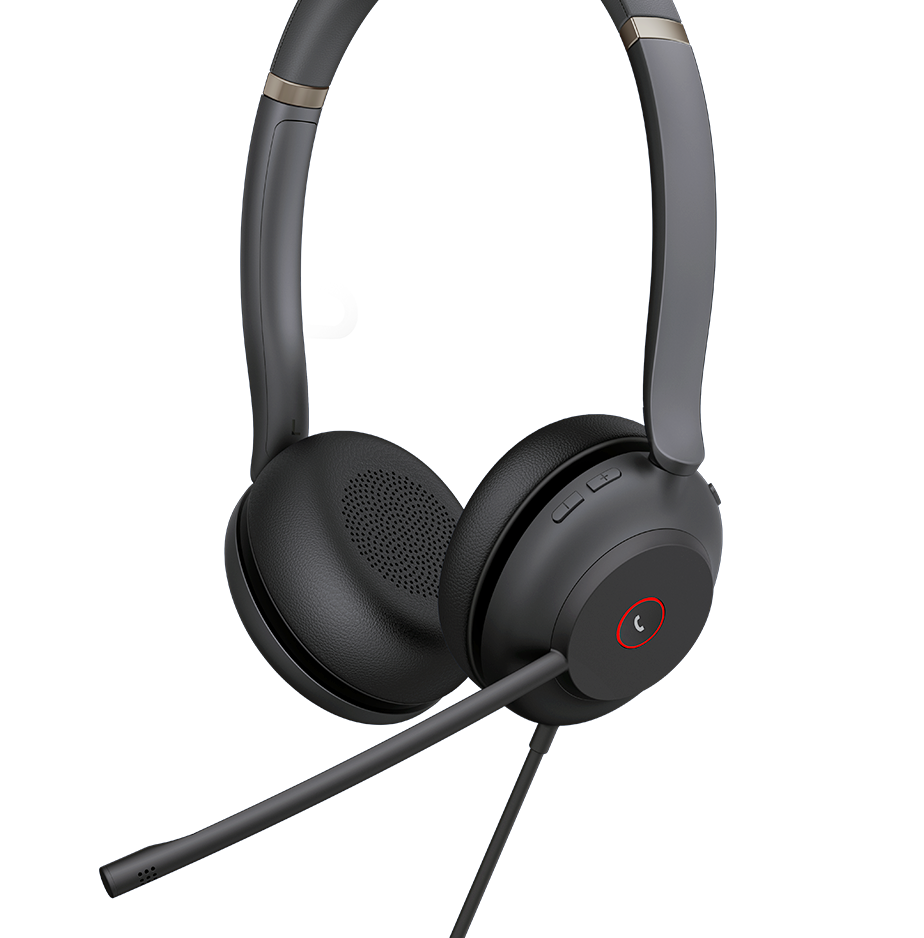
Quick Product Information
Yealink
Business communication headsets
USB, Bluetooth, DECT and QD-to-RJ, model dependent
Office, contact centre, reception, remote and mobile teams
UC or Microsoft Teams versions on selected models
Mono, dual, convertible, on-ear or over-ear, model dependent
Based on model, version, quantity and supplier status
Selection, compatibility, quotation and delivery coordination
A Business Headset Range Built Around Different Ways of Working
A professional headset is not simply a pair of headphones with a microphone. It is a daily communication tool that can affect how clearly an employee is heard, how easily calls are answered, how comfortably the device can be worn and how effectively the user moves between desk phones, computers and mobile devices. Yealink addresses these varied requirements through a broad family of business headsets rather than one universal design. The portfolio includes straightforward wired USB models for dependable workstation use, DECT wireless headsets for users who need greater movement around an office, Bluetooth models for flexible computer and mobile workflows, and QD-to-RJ options intended for compatible desk-phone connections.
This range is useful because business roles are rarely identical. A contact-centre agent may prefer a dual-ear wired headset that stays connected throughout the shift and does not require battery management. A receptionist may need a mono design that keeps one ear open to nearby visitors. A manager who alternates between a laptop and mobile phone may value Bluetooth multipoint capability on a suitable model. A warehouse supervisor or service coordinator may need wireless freedom, clear call controls and a base that integrates with the organization’s phone environment. Choosing according to the role produces a better result than purchasing one model for every employee without examining their daily tasks.
Yealink’s current business headset families cover Bluetooth wireless, DECT wireless and wired products, with selected models offering noise-reducing microphone systems, busylights, UC-platform support, Microsoft Teams variants, hearing-protection functions, adjustable boom microphones and management through compatible Yealink tools. Exact capabilities differ considerably between models. That difference is important: a feature shown on a premium Bluetooth or DECT model should not be assumed to exist on an entry-level wired option. Buyers should therefore identify the required connection, work distance, audio style, wearing comfort, device compatibility and call-control expectations before requesting a commercial offer.
For Africa-focused deployments, Fourteck can help translate a user list into practical model choices. The discussion can cover the number of staff, existing Yealink phones, laptop port types, collaboration platform, office noise level, shift duration, desk-sharing policy, replacement-ear-cushion needs and whether charging stands, adapters or busylights are required. This planning helps procurement teams order a usable package instead of discovering after delivery that a connector, adapter, platform edition or wearing style was overlooked.
Key Business Benefits
The value of a business headset comes from the workflow it improves. The following benefits explain why different Yealink models may suit offices, service teams and distributed workforces when selected carefully.
◆ Clearer customer conversations
Noise-reducing microphone designs on selected models help separate the user’s voice from surrounding office activity. This matters for customer service, sales, support and consultation calls where repeated questions, misheard details or distracting background sound can reduce confidence and lengthen each interaction.
◆ Choice for every work role
Wired, Bluetooth, DECT, mono, dual and convertible options allow an organization to match the device to the employee rather than force every user into the same pattern. Role-based selection can improve comfort, adoption and the practical return from a bulk rollout.
◆ Movement without losing calls
Suitable DECT and Bluetooth models give employees freedom to leave the immediate desk while remaining available. This can support reception supervisors, operations staff, managers and hybrid workers who need to collect documents, consult colleagues or move between work areas during calls.
◆ Better platform consistency
Selected UC and Microsoft Teams versions provide controls and indicators designed for the intended collaboration environment. Standardizing the correct edition can reduce user confusion and help IT teams maintain a more consistent calling experience across a department or multi-site project.
◆ Comfort for long sessions
Lightweight frames, adjustable headbands, replaceable cushions and alternative wearing styles are available across parts of the range. Comfort is not cosmetic: users who wear a headset for many hours need balanced pressure, suitable ear coverage and a microphone position that stays usable throughout the day.
◆ Controlled interruptions
Integrated or optional busylight features on suitable products can show colleagues when a user is occupied. In open offices, this simple visual signal can reduce avoidable interruptions and help call-focused employees protect periods of concentration without isolating themselves from the team.
These benefits depend on choosing the right model and accessories. A wired headset may deliver the most predictable experience for a fixed desk, while a wireless device adds mobility but introduces battery, range and charging considerations. Fourteck can help balance those trade-offs against user roles and project budget.
Product Highlights Across the Yealink Headset Family
Yealink organizes its business audio portfolio around several connection families. Bluetooth products such as the BH range are designed for professionals who move between computers and mobile devices and may require active noise cancellation, longer battery operation or a more portable form. DECT products in the WH range are intended for professional office communication where dedicated wireless performance, desk-phone or PC integration, charging bases and extended workplace movement are important. USB wired products in the UH family suit users who want straightforward connectivity, consistent power and a predictable desk setup. QD-to-RJ products in the YHS family support compatible desk-phone workflows where a simple wired connection is preferred.
Suitable for mobile and computer users who need cable-free working and flexible device pairing.
Built for office users who need dependable wireless movement around a defined work environment.
Practical for fixed desks, softphone users, training rooms and high-volume seat deployments.
QD-to-RJ and compatible adapter choices support selected Yealink desk-phone environments.
Across these families, buyers may find mono and dual-ear designs, convertible wearing options, Teams and UC editions, USB-A or USB-C variants, charging stands, detachable adapters, acoustic protection functions, boom-to-mute controls, call buttons and device-management support. The exact package contents are model specific. A procurement specification should therefore state not only the product family but also the full model, mono or dual format, platform edition, USB connector, required adapter and whether a stand or charger is expected.
An important practical highlight is the relationship between Yealink headsets and Yealink phones. Selected combinations can provide deeper call control and easier device handling than a generic audio accessory. Compatibility still needs to be checked against the exact phone model, firmware, cable or adapter and the desired call-control function. Fourteck can help capture these details in the quotation request so the supplied bundle is clear.
Technical Specification Guide
Because this page covers a product family, specifications vary by selected model. The table explains the principal choices buyers should confirm rather than presenting one set of values as though it applies to every headset.
| Specification area | Available choices or guidance | Why it matters |
|---|---|---|
| Brand | Yealink | Supports coordinated deployment with compatible Yealink communication devices. |
| Product families | BH Bluetooth, WH DECT, UH USB wired and YHS QD-to-RJ families; current models vary | The family indicates the broad connection and work style. |
| Wearing format | Mono, dual, convertible, on-ear or over-ear, configuration dependent | Affects concentration, awareness, comfort and user preference. |
| Connectivity | USB-A, USB-C, Bluetooth, DECT, QD-to-RJ or accessory-assisted phone connection | Must match computers, phones, mobile devices and call-control expectations. |
| Microphone system | Single or multi-microphone noise-reducing designs, model dependent | Influences voice pickup in quiet rooms, open offices and customer-service floors. |
| Listening noise control | Passive isolation or active noise cancellation on selected products | Helps users concentrate where background sound is persistent. |
| Wireless range | Depends on Bluetooth or DECT model, site layout and radio conditions | Determines whether users can move to nearby rooms or work areas while connected. |
| Battery and charging | Model-specific talk time, standby time, cable charging, base charging or optional wireless charging | Must cover shift length and the organization’s charging routine. |
| Platform edition | UC or Microsoft Teams variants on selected models | The correct edition helps align buttons, indicators and supported integration. |
| Call controls | Answer, end, mute, volume and other functions vary by model, device and platform | Not every connected device exposes the same remote-control features. |
| Accessories | Adapters, charging stands, busylights, cables, trainer cables, replacement cushions and carrying options | Missing accessories can prevent the intended deployment or reduce usability. |
| Warranty and support | Based on supplied model, source, destination and commercial terms | Should be reviewed before purchase, especially for project quantities. |
How to select the correct specification
Start with the devices at each seat. Record the exact Yealink phone model, computer operating system, available USB connector and collaboration platform. Then define whether the user remains at the desk or needs wireless movement, whether one or both ears should be covered, and how noisy the workplace is. For wireless models, compare expected talk time with the shift length and decide where charging will occur. For phone integration, verify whether a direct cable, electronic hook switch adapter or base connection is required. For bulk projects, obtain a sample for user testing where practical, particularly when comfort and open-office microphone performance are important.
Configuration and Buyer Guidance
A reliable headset project begins with a user and device survey. Purchasing only by model popularity can lead to avoidable problems because two departments may have very different needs. Fourteck recommends grouping users into practical profiles and selecting a model for each profile rather than assuming one headset should serve the whole organization.
1. Define the calling device
Confirm whether each user calls from a Yealink desk phone, Windows or macOS computer, mobile phone, thin client or a mixture. Record exact phone models and connector types.
2. Measure movement needs
A fixed agent can often use wired USB efficiently. A supervisor, receptionist or operations user may benefit from DECT or Bluetooth freedom, subject to the site layout.
3. Assess the acoustic environment
Quiet private offices have different needs from busy contact centres. Consider microphone noise reduction, listening isolation, active noise cancellation and whether users need awareness of colleagues.
4. Plan for the full shift
Check wearing comfort, cushion style, headset weight and battery duration. Shared desks may also need cleaning procedures, replaceable cushions and individual issue policies.
5. Confirm platform controls
State whether the organization uses Microsoft Teams or another UC application and which buttons must work. The platform edition and software integration should be confirmed.
6. Include accessories
List adapters, bases, chargers, busylights, trainer cables, storage cases and replacement parts in the request. A complete bill of materials avoids partial deployment.
For project orders, provide the number of users in each profile, delivery location, preferred implementation schedule and any standardization requirement. Fourteck can then help map suitable Yealink choices to those profiles and identify details that require confirmation before a final quotation.
Ideal Business Use Cases
Contact centres and help desks
Agents need consistent microphone positioning, comfortable ear cushions and dependable call controls. Wired USB dual-ear models can suit fixed seats, while supervisors may use wireless options for floor movement. Trainer cables may be relevant for coaching and quality monitoring.
Reception and front-office teams
Receptionists often balance callers with visitors and colleagues. A mono or convertible design can preserve awareness, while suitable call controls and phone compatibility help users answer efficiently without repeatedly reaching for the handset.
Hybrid and remote professionals
Employees who alternate between a laptop, mobile device and office desk may benefit from a Bluetooth or hybrid wireless model. Portability, battery life, USB adapter type and the ability to move between devices should be reviewed carefully.
Executive and management desks
Managers may need polished audio, wireless movement, active noise cancellation and multi-device access. A suitable premium model can support calls, online meetings and focused listening, provided the chosen edition matches the business platform.
Education and training operations
Administrative staff, online instructors, admissions teams and support desks may use headsets for lessons, consultations and service calls. Durable wired models can simplify shared-room deployment, while wireless options may suit instructors who need to move.
Healthcare and service coordination
Appointment teams, administrative desks and internal coordinators need clear communication while protecting workflow continuity. Selection should consider cleaning routines, shared use, nearby conversations, wearing comfort and compatibility with the approved calling device.
Other suitable environments include hospitality reservations, financial-service contact teams, government service counters, logistics coordination, retail support, professional services and multi-branch administration. The common requirement is not a particular industry label; it is a repeatable communication workflow in which users need clear voice pickup, reliable device control and a comfortable wearing experience. Fourteck can help buyers turn those workflow details into a concise headset specification for each department.
Yealink Headsets: Microphone Clarity and Workplace Focus
A business caller is judged partly by what the other person hears. In a quiet office, most professional headsets can transmit an understandable voice. The real test appears when colleagues are speaking nearby, keyboards are active, air-conditioning is audible or the user works from a shared environment. Selected Yealink models use multi-microphone processing and the company’s Acoustic Shield technologies to reduce unwanted background pickup and emphasize the speaker’s voice. The exact generation and microphone arrangement vary by model, so buyers should not treat every headset in the range as acoustically identical.
Microphone noise control should also be separated from active noise cancellation. The microphone system mainly affects what the remote participant hears. Active noise cancellation mainly reduces what the headset wearer hears from the surrounding environment. A contact-centre operation may prioritize microphone isolation because customer calls must sound professional. A manager working in an open office may value both microphone performance and listening-side cancellation. A receptionist may need less isolation so nearby visitors remain audible. These are distinct requirements and should be written separately in the project brief.
Boom design matters as well. A microphone positioned consistently near the mouth usually produces more predictable voice capture than an unspecified placement. Some models support mute by raising the boom, while others provide dedicated buttons or inline controls. Users should be trained on the chosen method so silent calls and accidental unmuting are reduced. For teams that record calls or handle important customer details, a pilot test using the real office environment is more useful than judging audio quality only from a quiet meeting room.
Fourteck can help compare models according to noise level, user role and preferred wearing style. The objective is not to purchase the most feature-rich option for every person, but to place the right level of microphone and listening performance where it delivers measurable operational value.
Yealink Headsets: Wired, Bluetooth and DECT Connectivity
Connection type is the central choice in this product category. Wired USB headsets receive power through the cable and avoid daily charging, making them practical for fixed workstations, training rooms and large agent deployments. They can also simplify inventory because there is no radio base to assign and fewer charging components to manage. The trade-off is limited movement and the need to match USB-A or USB-C ports. In laptop fleets where ports differ, buyers should specify the required connector or choose a model and adapter strategy that supports the installed equipment.
Bluetooth models are useful for professionals who work across mobile devices and computers. Their flexibility suits hybrid work, travel and changing desk arrangements. Buyers should check whether the model supports the desired devices simultaneously, whether a USB adapter is included, which Bluetooth profiles and call controls are supported, and whether the battery can cover a full workday. Radio performance depends on the building, nearby wireless activity and the connected device, so headline range figures should not be treated as guaranteed movement in every site.
DECT headsets are designed around professional workplace wireless use. Suitable models can provide a dedicated base, broader office movement and integration with computers or compatible phones. For example, Yealink’s WH64 family combines DECT and Bluetooth modes in selected variants and can connect through a base to a computer and IP phone. Model-specific datasheets should be checked for range, battery, supported ports, included cables and regional frequency version. DECT deployment also needs attention to base placement and user density, particularly in contact centres or offices planning many wireless seats.
QD-to-RJ wired options serve another need: direct connection to compatible desk phones. These can be cost-effective for users who do not require computer audio, but compatibility must be confirmed because headset ports and call-control behavior differ. Fourteck can help create a connection matrix covering each user group, exact endpoint, preferred headset family and any required adapter.
Yealink Headsets: Comfort, Wearing Style and Daily Usability
A headset can meet every technical requirement and still fail if users find it uncomfortable. Comfort depends on weight, clamping pressure, ear-cushion material, headband adjustment, heat buildup, spectacle use and whether one or both ears are covered. Personal preference matters, which is why a small evaluation group can be valuable before a large purchase. The evaluation should involve real working sessions rather than a brief fitting at a desk.
Mono headsets leave one ear open and can suit receptionists, supervisors and employees who must remain aware of nearby conversations. Dual-ear designs improve focus and may be preferred in contact centres or noisy open offices. Over-ear cushions can provide stronger passive isolation, while on-ear designs may feel lighter to some users. Convertible models offer alternative wearing methods for users who dislike a traditional headband. None of these formats is universally superior; the right choice follows the work environment and the wearer’s responsibilities.
Daily usability includes more than fit. Consider how easily users can locate mute and volume controls, whether the microphone can be worn on either side, whether a busylight is visible, how the headset is stored and charged, and how shared units are cleaned. Wireless teams need a clear charging routine and spare capacity for unexpected long calls. Wired deployments need cable management that does not snag on desks or restrict movement unnecessarily. Replaceable ear cushions and accessible accessories can extend useful service life in high-use environments.
For multi-site standardization, document the agreed wearing style and user profile alongside the full model code. This prevents a mono edition from being substituted for a dual edition, or a UC version from being confused with a Teams version. Fourteck can include these distinctions in quote preparation and help buyers compare practical alternatives when a preferred configuration is unavailable.
What Buyers Should Check Before Purchase
Before requesting a quotation, buyers should confirm the required configuration, usage environment, compatibility needs, warranty expectations and delivery location. A headset model name alone is not enough because editions, connectors, wearing styles and accessory bundles may differ. Fourteck can help review these details so the selected products match the business requirement instead of being chosen only by appearance or an isolated feature.
Correct model and edition
State the full model, mono or dual version, UC or Teams edition, and USB-A or USB-C requirement. Similar model names can represent materially different packages.
Compatibility with endpoints
Provide the exact Yealink phone model, computer platform, softphone and mobile-device requirement. Confirm whether remote answer and end-call controls are expected.
Accessories and deployment items
Check whether the project needs an EHS adapter, telephone cable, charging stand, busylight, trainer cable, carrying case, replacement cushions or spare chargers.
Wireless environment
For DECT or Bluetooth, describe the required movement area, walls, floor layout and number of concurrent wireless users. Real range depends on the site.
Battery and shift coverage
Compare talk-time requirements with the longest expected shift, include break and charging behavior, and decide how users will handle low-battery situations.
Commercial and support terms
Ask which accessories are included, how warranty information applies to the destination, whether project quantities affect lead time and what alternatives can be offered.
Long-term cost should include more than the initial unit price. Wireless devices may need spare chargers or replacement batteries over time, depending on design and usage. High-use wired headsets may need cushions, cables or trainer accessories. Shared equipment requires cleaning materials and a replacement process. Standardizing too many different models can increase support complexity, while forcing one model on every role can reduce user satisfaction. A balanced design often uses two or three approved profiles: a dependable wired agent model, a wireless office model and a premium mobile or management option.
For a useful quote, send the quantity per profile, destination country, intended endpoint, platform, connector, wearing style and required accessories. Note whether samples, staggered delivery or project documentation are needed. This information allows Fourteck to propose a clearer bill of materials and suggest a replacement or alternative model when the requested version is not suitable or currently obtainable.
Africa Availability and Service Support
Fourteck supports headset inquiries from businesses, institutions, resellers, integrators and project teams across Africa. Assistance can begin with a short requirement review: how many people need headsets, which devices they use, whether they work at fixed desks or move around, and what level of noise control is appropriate. From there, Fourteck can help compare suitable Yealink families, clarify model variants and prepare a quotation request with the required accessories.
Availability may vary according to the chosen model, UC or Teams edition, mono or dual format, connector, accessory bundle, order quantity and supplier status. Delivery arrangements also depend on destination, project scope and the commercial terms confirmed for the order. For that reason, this page does not present a universal stock statement or fixed delivery promise. Buyers receive more useful guidance when they share the complete requirement and acceptable alternatives.
Support can include compatibility review for Yealink desk phones, general guidance for computer and collaboration use, accessory planning, bulk-order structure, quote comparison between wired and wireless profiles, delivery coordination and available warranty information. For larger projects, procurement teams should identify a technical contact who can confirm endpoint models and platform details. This reduces delays caused by incomplete specifications and helps each user group receive an appropriate configuration.
Share user quantities, device models, platform, preferred wearing style and delivery destination.
Contact Fourteck Sales
Africa Country and Regional Coverage
Africa-focused headset procurement often involves more than choosing a device from a list. Organizations may be standardizing offices in several countries, extending an existing Yealink phone environment, opening a customer-service team or equipping hybrid workers who use different laptops and mobile devices. Fourteck helps buyers organize these requirements before commercial confirmation. The process can include reviewing technical fit, separating users into practical profiles, checking compatible accessories, preparing quantities and discussing delivery arrangements for the selected destination.
Suitable configuration, availability, lead time, accessories, support options and warranty information may change according to model, order volume, supplier position, destination and project scope. A wired USB headset may be easier to standardize for hundreds of fixed desks, while a DECT or Bluetooth choice may deliver better mobility for supervisors and managers. Some teams require Teams-specific controls; others use a general UC platform or a Yealink desk phone. Each of these details affects the recommended item code and package.
Fourteck’s role is to help buyers request the correct product for the operating environment rather than select only by family name. Tanzania, Libya and Seychelles are covered in greater detail below because their buyers may approach deployment from different organizational, site and delivery perspectives. The same careful principle applies throughout the continent: confirm the user, endpoint, connection, platform, accessories and destination before the order is finalized.
Businesses can use the Fourteck Africa technology platform to review related solutions and then send a structured requirement through the Africa sales contact page.
Yealink Headsets Africa in Tanzania
Yealink Headsets Africa in Tanzania can support organizations that are strengthening customer communication, expanding office capacity or standardizing audio devices around an existing IP-phone and collaboration environment. Tanzanian enterprises, public-sector teams, schools, healthcare administrators, financial institutions, resellers and system integrators may have a mixture of fixed desks, shared service counters, branch offices and mobile managers. That mixture makes role-based selection especially useful. A contact-centre or admissions desk may benefit from a durable wired USB dual-ear model that avoids battery management, while a receptionist may prefer a mono design that preserves awareness of visitors. Managers and operations coordinators may need DECT or Bluetooth movement, but the intended range should be reviewed against the actual building layout rather than assumed from a laboratory figure. Buyers should provide the exact Yealink phone model, computer port, calling platform, number of users, desired wearing style and expected daily call duration. Where power continuity or charging discipline is a concern, wired models can simplify operation, while wireless deployments should include a clear charging plan and any spare accessories. Delivery coordination depends on the selected configuration, project quantity, supplier status and destination, so a complete quotation request should also state the site, implementation schedule and acceptable alternative models. Fourteck can help Tanzanian procurement teams compare models, check likely compatibility, identify adapters or trainer cables, structure bulk quantities and review available warranty guidance before the order is confirmed.
Yealink Headsets Africa in Libya
For organizations considering Yealink Headsets Africa in Libya, the purchasing discussion should begin with operational continuity and a precise bill of materials. A headquarters, service desk, education institution, healthcare administration team or project contractor may need to equip users across different buildings or phases, making consistency of model, connector and accessory bundle important. The first question is whether the calling workflow relies on Yealink desk phones, computers, mobile devices or a combination. From there, buyers can decide between wired USB reliability, DECT office mobility, Bluetooth multi-device flexibility or a QD-to-RJ option for a compatible phone. In a noisy service environment, microphone performance and dual-ear focus may take priority; in management or reception work, awareness and device switching may be more valuable. The quotation request should identify UC or Microsoft Teams requirements, USB-A or USB-C ports, mono or dual preference, wireless movement area, shift duration and any need for charging stands, electronic hook switch adapters, busylights or replacement cushions. Project planners should also define whether all units must be identical or whether several approved user profiles are acceptable. Availability and delivery coordination need to be confirmed against the chosen models and quantities without assuming local inventory, transport route or fixed arrival date. Fourteck can assist with configuration review, suitable alternatives, accessory checks, commercial preparation and available warranty information so the order supports the intended communication environment rather than creating mismatched devices at deployment.
Yealink Headsets Africa in Seychelles
Yealink Headsets Africa in Seychelles may be relevant to hospitality groups, professional-service firms, government departments, schools, healthcare organizations, financial services, retailers and growing small or mid-sized businesses that operate compact offices or several distributed sites. These buyers often need equipment that is easy to deploy, comfortable for repeated daily use and straightforward to support with a small IT team. A wired USB model can be attractive for reservations, finance, admissions and service desks because it connects predictably and does not depend on a charging routine. Bluetooth can suit managers or mobile professionals who move between laptop and phone, while DECT can support staff who need dependable movement around a reception, administration area or operations workspace. Space planning also matters: charging bases, cable routes and storage points should be considered before quantities are finalized. For sites where users share desks, buyers may need replaceable cushions, cleaning procedures and clear assignment rules. Remote manageability and platform consistency should be reviewed when several offices use the same collaboration service. A useful quote request should include user roles, endpoint models, preferred connector, platform edition, wearing style, wireless requirement, accessories and delivery destination. Product availability, delivery coordination and warranty guidance depend on the final configuration and commercial terms. Fourteck can help Seychelles organizations compare compact deployment options, avoid missing adapters or chargers and select a balanced range that delivers long-term value without over-specifying every seat.
Related Yealink Products and Suitable Options
Headsets work best when they are planned with the surrounding communication environment. Buyers may need a compatible desk phone, DECT base, Teams endpoint or a different headset profile for another department. The following Fourteck pages provide useful starting points for related Yealink projects.
Yealink T87W business phone
A premium SIP desk endpoint for professional users who may also require compatible Bluetooth or USB headset workflows.
Yealink MP58-WH E2 Teams phone
Suitable for organizations building a Microsoft Teams desk-phone environment and reviewing personal audio integration.
Yealink W70B DECT base
A DECT IP base for compatible cordless handset and headset environments where mobile SIP communication is required.
Wired agent profile
Consider UH-series USB headsets for fixed computers and YHS-series options for compatible phone-focused seats.
Wireless office profile
Consider WH-series DECT models where office movement, charging bases and professional call handling are priorities.
Mobile professional profile
Consider BH-series Bluetooth models for laptop, mobile and hybrid-work users who need portable audio and cable-free flexibility.
A related model should not be treated as an automatic substitute. Before changing products, compare connection type, platform edition, wearing style, accessories, battery requirement and supported call controls. Fourteck can help identify a suitable alternative when a specific model is unavailable or when another family better matches the user profile.
Why Business Buyers Contact Fourteck
Headset procurement often looks simple until model variants, connectors, phone compatibility and accessories are considered. Fourteck approaches the request as a small communication project. The aim is to understand who will use the headset, which device carries the call, what the workplace sounds like and how the organization plans to deploy and support the equipment.
This support is valuable for small organizations that do not have a dedicated voice engineer and for enterprise procurement teams that need consistent item codes across many users. Fourteck can work from a simple user list or a more formal bill of materials. The most effective requests include endpoint models, platform, quantities, destination, accessories and any project deadline that must be considered.
Fourteck does not assume that the highest-priced model is the correct choice. A straightforward wired device may be the strongest fit for a fixed agent, while a premium wireless headset can be justified for a manager who moves between devices and work areas. Matching cost to operational value helps buyers maintain a sensible standard across the organization.
Frequently Asked Questions
What are Yealink business headsets used for?
They are used for professional calls, online meetings, contact-centre work, reception, customer service, hybrid work and office communication. The range includes wired, Bluetooth, DECT and phone-focused models. The best option depends on the calling device, user role, workplace noise, movement requirement and preferred wearing style.
Are Yealink headsets available for buyers across Africa?
Fourteck supports Africa-focused inquiries and can help review current options. Availability varies by exact model, platform edition, connector, mono or dual format, accessories, quantity and supplier status. Buyers should provide the delivery destination and acceptable alternatives so the quotation can reflect the actual requirement.
How do I choose between wired, Bluetooth and DECT?
Choose wired USB for predictable fixed-desk operation and no battery management. Consider Bluetooth for portable computer and mobile-device use. Consider DECT for professional office movement with a dedicated base. The final choice should also account for call controls, range, battery, platform and accessories.
Will every Yealink headset work with every Yealink phone?
No. Compatibility depends on the headset family, phone model, firmware, connector, cable or adapter and the call-control functions required. Some combinations support deeper integration than others. Share the exact phone model with Fourteck so the connection method and any required accessory can be reviewed.
Can Fourteck help with Teams and UC editions?
Yes. Selected Yealink models are offered in Microsoft Teams or general UC versions. Fourteck can help buyers identify the intended collaboration platform and include the correct edition in the quote request. The exact supported controls should still be confirmed for the connected device and software.
What information is needed for a headset quotation?
Provide quantities, user roles, endpoint models, operating system, calling platform, USB connector, mono or dual preference, wireless requirement, accessories and delivery destination. Also mention whether the project needs samples, trainer cables, charging stands, busylights, replacement cushions or alternative model options.
Does availability depend on the configuration?
Yes. A model may have different mono or dual versions, Teams or UC editions, USB-A or USB-C connectors and optional charging or phone-integration accessories. Quantity and destination can also affect commercial planning. Confirm the complete part requirement before relying on a general model name.
Can businesses request bulk supply?
Businesses can submit project quantities for review. A bulk request should separate users into profiles, specify exact item codes and list required accessories. Fourteck can help organize the request, discuss suitable alternatives and coordinate commercial details based on supplier status, destination and confirmed order terms.
What warranty guidance is available?
Warranty information depends on the supplied product, source, destination and commercial terms. Buyers should request the applicable details before purchase and retain invoices, serial information and packaging where required. Fourteck can provide available guidance for the proposed item without assuming that every model or destination has identical coverage.
Need Help Choosing the Right Yealink Headset?
Fourteck can help you review user roles, phone and computer compatibility, wired or wireless options, platform editions, accessories, availability and delivery requirements for your Africa project.