

Quick Product Information
Product Overview
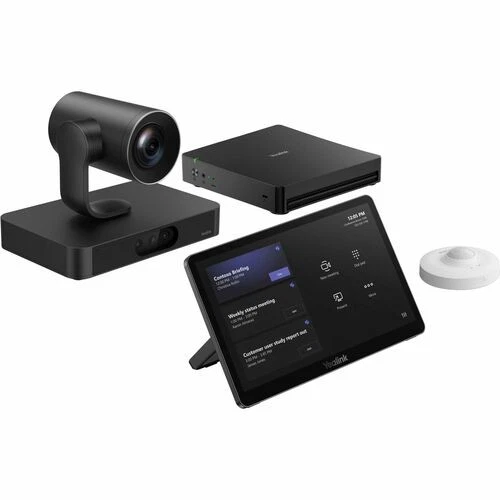
Large meeting rooms create a different set of collaboration problems from small huddle spaces. Participants may sit many metres from the display, speakers can move between a presentation area and a long conference table, and the room may need more than one screen. A conventional webcam or compact all-in-one video bar can struggle to show distant faces with useful detail or to support the audio and control architecture expected in a formal boardroom. The Yealink MVC S80 addresses that gap with a modular Microsoft Teams Rooms platform designed around a powerful multi-lens camera, a dedicated Windows room computer, a purpose-built touch interface and an environmental occupancy sensor.
The SmartVision 80 camera is the centre of the visual experience. It combines one motorised PTZ lens with panoramic and telephoto views so the system can cover the room broadly while also producing close views of active participants. The 20x optical zoom is especially relevant where people sit far from the front display or where a presenter needs to be followed across a stage or teaching area. Camera functions such as IntelliFocus, speaker tracking, presenter tracking, auto framing, IntelliFrame, picture-in-picture and video fence provide different ways to direct remote attention. The correct mode should be selected according to meeting style, seating pattern and privacy expectations rather than enabled without planning.
The MCore 4 room PC provides the Windows-based processing platform. It uses an Intel Core Ultra 5 processor with a built-in neural processing unit, 16 GB of DDR5 memory and a 256 GB SSD. Three HDMI outputs with CEC support can help simplify multi-display control, while HDMI input supports 4K content sharing. The MTouch Plus gives users an 11.6-inch Full HD touch surface for joining meetings, managing participants and sharing content. The RoomSensor adds occupancy and environmental awareness through Bluetooth connectivity.
For Africa buyers, the most important purchasing point is that a meeting-room system is a complete design exercise, not simply a boxed camera decision. FourTeck can help review room dimensions, participant count, table shape, display plan, audio pickup, speaker coverage, network readiness, Microsoft tenant requirements, mounting, power, cabling and accessory choices. This reduces the risk of receiving a capable core system that still lacks the practical parts needed for installation and daily use.
Key Business Benefits
The value of a large-room conferencing platform is measured by how consistently it helps people communicate, how easily staff can operate it and how well it fits the organization’s wider AV and IT standards. The following benefits connect the MVC S80 platform to practical business outcomes.
◆ Better Visibility in Deep Rooms
Optical zoom and coordinated camera views help remote attendees see people seated far from the display. This is valuable in long boardrooms, lecture-style spaces and meeting areas where a fixed wide-angle camera would make distant faces too small.
◆ Familiar Teams Room Operation
A native Microsoft Teams Rooms workflow reduces dependence on a personal laptop for every scheduled meeting. Users can view the room calendar, join sessions and manage calls from a dedicated console, subject to correct tenant setup and room licensing.
◆ Flexible Audio Architecture
The system can be paired with Yealink professional audio components and an appropriate room design. Buyers can choose table, ceiling or processed audio approaches instead of accepting a fixed microphone arrangement that may not suit room size or acoustics.
◆ Multi-Display Readiness
Three HDMI outputs with CEC support give system designers options for layouts that separate remote video, shared content and supplementary information. Final display behaviour depends on the Teams Rooms configuration and selected room design.
◆ Structured Content Sharing
Wired HDMI or USB-C sharing helps guests and employees present from common business laptops. Wireless sharing can be added with a compatible accessory, allowing organizations to match convenience requirements with their security and support policies.
◆ Easier Room Awareness
The RoomSensor can detect occupancy, temperature, humidity and light. This information can support a more responsive room experience and gives facilities or IT teams an additional view of how a collaboration space is being used.
◆ Project-Based Scalability
A modular design lets buyers specify displays, audio, presentation accessories, mounting and services according to the room. That approach supports phased modernization and standardization across multiple sites without forcing every room into one identical layout.
Product Highlights
3+1 Lens Camera Design
One PTZ lens works with panoramic and telephoto cameras to balance whole-room awareness with close views. This supports different seating depths and meeting formats without relying only on digital enlargement.
20x Optical Zoom
Optical zoom helps retain detail when framing distant seats or a presenter. Its practical advantage depends on camera placement, room depth, lighting and whether the selected tracking mode matches how participants move.
Modern MCore 4 Platform
Intel Core Ultra 5 processing, an integrated NPU, 16 GB DDR5 memory and a 256 GB SSD provide the room computer foundation for current Teams Rooms workflows and advanced video functions.
Dedicated 11.6-Inch Console
The MTouch Plus offers a 1920 × 1080 IPS display with flexible placement. It can be used on a table, fixed to a surface or wall mounted, subject to the chosen installation plan.
Professional AV Integration
SmartVision 80 supports NDI|HX3 and Dante compatibility, while the broader solution can integrate with professional audio components. Design validation remains important for network, DSP and room-control requirements.
RoomSensor Included
Bluetooth BLE 5.2 connectivity allows sensor placement without a separate data cable. Its stated reach is up to 30 metres, but walls, interference and room materials can affect practical performance.
The core MVC S80-C5U-000 package is commonly described as including the SmartVision 80 camera, MCore 4, MTouch Plus and RoomSensor. Audio devices are not part of the basic core kit, so microphones, loudspeakers, DSP equipment and related cabling must be selected separately where required. Bundle contents can vary by supplier or project package; FourTeck will confirm the quoted bill of materials before order approval.
Technical Specifications
| Specification | Details |
|---|---|
| Brand and Model | Yealink MVC S80; common bundle designation MVC S80-C5U-000; part number 1106798 |
| System Type | Native Microsoft Teams Rooms on Windows system for large meeting rooms |
| Core Bundle | SmartVision 80 camera, MCore 4 mini-PC, MTouch Plus console and RoomSensor; final supplier package must be confirmed |
| Camera Architecture | 3+1 eye design: PTZ camera, panoramic lens and two telephoto lenses |
| Camera Zoom | 20x optical zoom on the PTZ camera |
| Camera Field of View | PTZ: 69° diagonal, 61.5° horizontal, 36° vertical; panoramic: 110° diagonal, 98° horizontal, 82° vertical; telephoto: 51° diagonal, 41.6° horizontal, 32° vertical |
| Camera Processing | Qualcomm QCS8550 platform; stated 48 TOPS computing capability |
| Camera Functions | IntelliFocus, speaker tracking, presenter tracking, video fence, picture-in-picture, auto framing and IntelliFrame |
| Camera Microphones | Built-in four-microphone array for camera functions; complete room audio should be separately designed |
| AV Compatibility | NDI|HX3 and Dante compatible; integration requirements depend on the wider AV design |
| MCore 4 Processor | Intel Core Ultra 5 with integrated NPU; stated 34 TOPS computing capability |
| Memory and Storage | 16 GB DDR5 memory configured as 2 × 8 GB; 256 GB SSD |
| Video Connections | Three HDMI outputs with CEC support; HDMI input for 4K content sharing |
| Other MCore Connections | Four USB 3.0 ports, one Yealink MTouch RJ45 port, IP touch-console connection, Bluetooth and Wi-Fi |
| MTouch Plus Display | 11.6-inch narrow-bezel IPS touch display, 1920 × 1080 resolution, adjustable 30°–70° angle |
| Content Sharing | HDMI and USB-C video input; wireless sharing supported with a compatible WPP30 accessory |
| Console Placement | Desktop, fixed desktop or wall-mounted deployment |
| RoomSensor | Occupancy, temperature, humidity and light detection; Bluetooth BLE 5.2; 2.4 GHz; stated reach up to 30 m; maximum four simultaneous devices via BLE mesh |
| Operating Platform | Windows 11 IoT Enterprise with Microsoft Teams Rooms application; organization licensing and tenant setup must be confirmed |
| Audio in Core Kit | No complete room audio device included; select compatible microphone, loudspeaker and DSP design as required |
| Warranty and Availability | Warranty coverage and availability vary by quoted bundle, supplier, destination and order terms; confirm with FourTeck |
Technical selection should begin with the physical room rather than the model number. Measure the distance from the planned camera position to the nearest and farthest seat, note the table width and shape, identify whether presenters stand or remain seated, and decide where remote video and shared content should appear. A long room may benefit greatly from optical zoom, but a wide or irregular space can still require careful mounting and framing tests. Audio should be treated as a separate engineering decision because microphone pickup and speaker coverage depend on ceiling height, surface materials, ambient noise and participant behaviour. Buyers should also confirm the number and resolution of displays, network switch capacity, VLAN or security policy, cable routes, power outlets, rack or cabinet space, remote management requirements and Microsoft Teams Rooms licensing. FourTeck can use this information to build a more accurate bill of materials and reduce last-minute accessory changes.
Configuration and Buyer Guidance
A correct large-room solution is the result of several coordinated choices. The camera, room computer and touch console are important, but they cannot compensate for poor acoustics, unsuitable displays, inadequate cabling or an unsupported Microsoft account. Use the following questions to prepare a meaningful requirement before requesting a quotation.
1. What is the room geometry?
Share length, width, ceiling height, table shape, screen wall location and distance to the farthest seat. Include photographs or a floor plan when available. These details influence camera mounting, field of view and microphone selection.
2. How are meetings conducted?
A seated board meeting, lecturer-led session and executive presentation require different framing behaviour. Explain whether speakers move, whether a whiteboard must be visible and whether remote participants need individual close-up views.
3. What audio experience is required?
Confirm participant count, ambient noise, ceiling type and preference for table or ceiling microphones. The core kit needs a planned room-audio solution, and larger spaces may require DSP processing or multiple pickup zones.
4. Which displays will be used?
State the number, size, resolution and mounting plan. Three HDMI outputs provide flexibility, but the complete Teams Rooms display behaviour and cable lengths should be verified before installation.
5. Is the network ready?
Provide available Ethernet points, switch details, internet capacity, wireless policy, VLAN design and firewall requirements. Meeting quality depends on stable connectivity, appropriate quality-of-service planning and compliant access to Microsoft services.
6. What services are expected?
Clarify whether the requirement covers supply only, remote guidance, local installation by an integrator, commissioning, user orientation, extended support or multi-site standardization. Service scope affects the commercial quotation.
The strongest quote request includes the destination country, quantity, desired schedule, room drawings, preferred audio approach, display count, mounting constraints, licensing status and the accessories already available. FourTeck can then identify missing items such as cable extensions, mounting brackets, wireless sharing pods, BYOD adapters, microphones, loudspeakers, DSP equipment, network upgrades or power protection.
Ideal Business Use Cases
The system is best suited to organizations that use Microsoft Teams as an established collaboration platform and need a more engineered room experience than a portable webcam or basic video bar can provide. Practical use cases include the following.
Executive Boardrooms
Long tables and formal decision-making sessions need clear views of speakers at both near and far positions. Multi-display capability can separate shared documents from participant video, while the touch console provides a predictable control point.
Training and Teaching Rooms
Presenter tracking and optical zoom can support instructor-led sessions where a speaker moves across the front of the room. Audio coverage and content capture should be designed around seating density and teaching style.
Corporate Collaboration Hubs
Regional offices can use a standard Teams Rooms platform for management reviews, technical workshops and cross-site planning. Consistent room control can reduce user confusion across a multi-office deployment.
Government and Public-Sector Meetings
Large committee spaces may require distant-seat visibility, controlled content sharing and a repeatable joining process. Procurement should include security review, tenant policy, support responsibilities and formal acceptance criteria.
Financial and Professional Services
Client consultations, board reviews and distributed management sessions benefit from clear participant framing and secure, managed room access. Network segmentation, identity policies and content-sharing controls should be agreed with IT governance teams.
Hospitality Conference Facilities
Hotels and conference venues can use a modular room system where different events require camera presets, presentation inputs and professional audio. Operational procedures should account for guest devices and rapid room handover.
Healthcare Administration and Education
Administrative briefings, remote education and multidisciplinary discussions can use a dedicated room endpoint. Organizations must still follow applicable privacy, data-handling and clinical or academic policies.
Project and Engineering Reviews
Teams reviewing drawings, schedules and technical content may need large shared displays and clear speaker views. Wired sharing can provide a dependable presentation route, while wireless options can be added for controlled convenience.
The product is not automatically the right choice for every room labelled “large.” Very wide spaces, divisible rooms, auditoriums or rooms with more than one presentation zone may need multi-camera or AVHub-based designs. Conversely, a smaller room might be better served by a simpler Yealink Teams Rooms system. FourTeck can help compare room size, required camera angles, participant capacity and budget before selecting the final model.
Yealink MVC S80 Multi-Lens Visual Intelligence
A single wide-angle camera can show everyone in a room, but it often makes distant participants appear very small. Pure PTZ systems can create the opposite problem: they produce a strong close-up yet may lose awareness of what is happening elsewhere while the main lens moves. SmartVision 80 combines a motorised PTZ lens with panoramic and telephoto views, allowing the system to maintain broader room awareness while selecting more useful close framing. This architecture is particularly relevant to long meeting tables and spaces where speakers are distributed across different depths.
IntelliFocus can emphasize recent speakers; speaker tracking follows the active voice; presenter tracking is designed for a moving speaker; auto framing adjusts the overall view; IntelliFrame can present participants in individual frames within supported Teams experiences; video fence helps define the active camera area; and picture-in-picture can retain context while showing a close view. These tools should be treated as meeting modes rather than universal settings. A board discussion may favour speaker-focused views, while a training room may prioritise presenter tracking and a collaborative workshop may need stable full-room framing.
Camera placement remains decisive. Mounting too high, too low or too far to one side can reduce eye-line quality and create awkward framing. Strong backlight from windows, reflective tables and dim presentation lighting can also affect image consistency. Before commissioning, test the closest seat, farthest seat, standing presenter position and any whiteboard area. Confirm privacy boundaries so the camera does not frame corridors or unrelated work areas. A considered setup turns the multi-lens hardware into a practical communication tool instead of relying on default behaviour.
Yealink MVC S80 MCore 4 Performance and Room Control
The MCore 4 separates the room-computing function from the camera and touch panel. This architecture allows the Windows room PC to be installed in a cabinet, behind a display or in another managed location while users interact through MTouch Plus. The Intel Core Ultra 5 processor, integrated NPU, 16 GB DDR5 memory and 256 GB SSD provide the system resources required for the current Teams Rooms application and intelligent collaboration workloads. Because the platform is a managed room appliance, IT teams should treat firmware, Windows updates, Teams Rooms application updates, account security and device management as part of the ongoing service plan.
Three HDMI outputs with CEC support can simplify display power and source behaviour in supported designs. HDMI input provides a route for 4K content sharing, while USB-C and HDMI inputs on the touch-console side support common presentation workflows. Wireless sharing can be added with WPP30 where policy permits. The appropriate sharing method depends on visitor requirements, laptop standards, network controls and whether the room must operate during temporary wireless restrictions.
The MTouch Plus screen is large enough to present meeting controls clearly and its adjustable angle supports different table positions. Wall mounting can suit training rooms or spaces where table clutter must be minimized, while fixed desktop placement may be preferable for a permanent boardroom. Cable routing, user reach, disability access, security and cleaning procedures should be considered before choosing the console position. Multiple touch panels may be possible in supported room designs, but the exact bill of materials and system configuration should be confirmed before purchase.
Yealink MVC S80 Audio and Pro AV Integration
Visual quality receives much of the attention in conferencing, yet poor audio causes meetings to fail more quickly than imperfect video. The core MVC S80 bundle does not include a complete room-audio device. Buyers therefore need to choose microphones, loudspeakers and processing according to room size, ceiling construction, acoustic treatment, table layout and expected participant movement. Yealink identifies compatible options such as CM50 or CM20 ceiling microphones, CS10-D ceiling loudspeakers, AP08 digital signal processing and other room-audio products. The exact combination should be designed rather than selected solely from a compatibility list.
Ceiling audio can keep tables clear and support a polished installation, but it requires suitable ceiling access, cable routes and accurate pickup planning. Table microphones can simplify some deployments and provide visible mute control, although cable management and seating flexibility must be considered. A soundbar may suit particular large-room layouts but should be checked against room width and listening distance. DSP-based systems provide greater control over echo cancellation, mixing and zoning, yet they require more detailed commissioning and trained support.
SmartVision 80 supports NDI|HX3 and Dante compatibility, creating opportunities for professional networked AV integration. These standards can be useful in managed conference facilities, teaching spaces and more complex collaboration rooms, but they introduce network design requirements. Switch capacity, multicast policy, VLAN structure, clocking, bandwidth, security and support ownership should be agreed before deployment. FourTeck can help identify the required equipment and coordinate with the buyer’s AV integrator or internal infrastructure team so the quotation reflects the intended architecture.
What Buyers Should Check Before Purchase
Before requesting a quote, buyers should confirm the complete operational requirement rather than selecting only by the MVC S80 model name. Similar room systems can differ in camera arrangement, audio inclusion, computing generation, accessories and recommended space. A careful checklist helps avoid missing parts, compatibility mistakes and avoidable project changes.
Configuration Fit
Confirm the exact bundle code, room size, participant count, camera distance, display count and required meeting modes. Ask whether audio, mounts, cables and presentation accessories are included or quoted separately.
Compatibility Check
Review Microsoft tenant policies, Teams Rooms licensing, display inputs, network security, room-control interfaces, USB devices, audio components and any existing AV equipment that must remain in service.
Installation Environment
Check wall construction, ceiling access, mounting height, cable pathways, power outlets, ventilation, equipment security, ambient light and acoustic conditions. These practical factors can influence accessory selection and labour.
Licensing and Accounts
The room computer includes the operating platform and Teams Rooms application, but the organization should confirm the correct Microsoft room licence, resource account, conditional-access policy and calendar integration.
Accessories and Add-Ons
Common additions may include WPP30 wireless sharing, BYOD extension, microphones, speakers, DSP equipment, extra mounting hardware, cable extensions, displays, network switches and UPS protection.
Warranty Expectations
Ask how warranty applies to each quoted component, where service is handled, what documentation is needed and whether optional support coverage is available. Do not assume every accessory has the same term.
Long-Term Operating Cost
Budget for Microsoft licensing, network support, device management, software maintenance, replacement accessories, cleaning, room changes and eventual display or audio upgrades—not only the initial hardware purchase.
Quote Preparation
Provide country, delivery location, quantity, room drawings, preferred schedule, display plan, audio approach, available cabling, licensing status and service scope so FourTeck can prepare a more useful offer.
Buyers comparing the MVC S80 with the MVC S60, MVC S90 or other Yealink room systems should focus on room depth, camera strategy, participant count, audio architecture and expansion requirements. A lower-cost system can be the better choice for a medium room, while a multi-camera platform may be more suitable for an extra-large or divisible environment. FourTeck can help identify an alternative when the original request does not match the room.
Africa Availability and Service Support
FourTeck supports Africa-focused inquiries for the Yealink large-room collaboration platform with help covering product identification, bundle review, compatible accessory selection, commercial quotation preparation, delivery coordination and warranty guidance. Availability can change according to the exact model, supplier position, order quantity, chosen audio design, accessory requirements and destination. For that reason, the product page does not present an unverified stock promise or fixed regional delivery time.
A useful inquiry should state whether the requirement is for supply only or a complete project bill of materials. FourTeck can review the core room kit alongside displays, wireless presentation, BYOD capability, microphones, loudspeakers, DSP equipment, mounting, structured cabling, network switching, power protection and support expectations. This is especially important where different components may be sourced from separate supply channels or where an integrator will complete local installation.
Warranty terms should be checked against the actual part numbers on the quotation. Coverage, service process and return arrangements may vary by component and destination. FourTeck can provide available warranty information before order confirmation so procurement teams can align the purchase with their internal asset and support policies.
Africa Country and Regional Coverage
FourTeck helps business buyers across Africa turn a model request into a more complete collaboration-room requirement. The process can include reviewing the technical fit, checking the intended room layout, identifying compatible audio and presentation accessories, preparing a commercial quotation, coordinating delivery information and clarifying available warranty documentation. This approach is useful for enterprises, institutions, integrators and project teams that need a repeatable solution across one or several locations.
Commercial and deployment details can vary significantly. Lead time may depend on supplier status, order quantity and bundle composition. The suitable configuration may change according to room depth, ceiling type, display count, participant behaviour and existing infrastructure. Licences, optional microphones, loudspeakers, DSP equipment, wireless sharing accessories, mounting and cable extensions may need to be added. Delivery arrangements also depend on destination and project scope. FourTeck therefore confirms these items through a tailored quotation rather than treating the room system as a universal fixed package.
Tanzania, Libya and Seychelles are covered in greater detail below because each market can present a different procurement and deployment context. The objective remains consistent: help the buyer request the correct system and accessories for the operating environment, while avoiding unsupported claims about local branches, immediate stock, fixed pricing or guaranteed delivery dates. Visit the FourTeck Africa technology platform or use the Africa contact page to share the project requirement.
Yealink MVC S80 in Tanzania
Organizations evaluating Yealink MVC S80 in Tanzania should begin by documenting how the meeting room supports daily operations, not simply by classifying it as large. A headquarters boardroom in Dar es Salaam, a training facility, a university collaboration room, a financial-services meeting space or a public-sector project room can each place different demands on camera distance, microphone pickup and presentation control. The SmartVision 80’s optical zoom and coordinated lenses are useful where participants sit along a deep table or where a trainer moves at the front, but the room’s lighting, wall position and seating geometry still need review. Tanzanian enterprises and integrators should also confirm the condition of structured cabling, available Ethernet ports, internet resilience, display power, equipment ventilation and any UPS requirement for the room computer, screens and network equipment. Audio may be the largest configuration variable because the core bundle does not include a complete room sound system. Ceiling construction, ambient noise and the organization’s preferred support model will influence whether table microphones, ceiling microphones, loudspeakers or DSP components are appropriate. For a useful quotation, share the quantity, destination, room dimensions, photographs or drawings, display count, Microsoft Teams Rooms licensing status, required accessories and whether local installation will be handled by an appointed integrator. FourTeck can then review compatible components, prepare a clearer bill of materials, coordinate available delivery information and provide warranty guidance tied to the quoted parts. This practical preparation helps growing offices, schools, healthcare organizations, banks, resellers and project buyers avoid receiving a sophisticated room kit without the cabling, audio or mounting needed for deployment.
Yealink MVC S80 in Libya
Planning Yealink MVC S80 in Libya calls for a structured project approach centred on operational continuity and compatibility with the buyer’s existing collaboration environment. A large executive room, corporate training space, energy-sector project office or institutional meeting facility may need to connect participants across several sites while maintaining predictable room control. The first decision is whether the MVC S80 camera strategy matches the room’s dimensions and meeting style. Long rooms with distant seats can benefit from 20x optical framing, while very wide or divisible spaces may require an alternative multi-camera design. Next, the buyer should map the supporting system: displays and their mounting, network access, Microsoft tenant policies, room account and licence, audio pickup zones, speaker coverage, presentation inputs, cable routes and equipment power. The base bundle’s separate-audio approach can be an advantage when a room needs tailored microphones and loudspeakers, but it also means that audio engineering cannot be left until after the hardware arrives. Quote preparation should identify all accessories, installation responsibilities, preferred service scope and any requirement for spare units or project documentation. FourTeck can review compatible configurations, suggest related Yealink components, confirm the commercial bundle being offered and coordinate delivery details based on the destination and current supply position. Warranty expectations should be discussed component by component, including the process for documentation and support requests. No assumption should be made about local inventory, transport timing or a standard package for every project. A careful Libya requirement gives procurement and technical teams a stronger basis for comparing offers, managing installation dependencies and keeping the meeting-room design maintainable over its service life.
Yealink MVC S80 in Seychelles
For buyers considering Yealink MVC S80 in Seychelles, the design often needs to balance professional large-room capability with compact facilities, distributed operations and careful delivery planning. Hospitality groups may use a premium conference room for management meetings or guest events; government departments and financial institutions may connect teams across islands or overseas offices; education and healthcare organizations may require dependable teaching or administrative collaboration; and growing professional-services firms may want one room that handles both internal and client sessions. The modular system allows these buyers to choose audio and presentation accessories around the actual room instead of accepting a single fixed arrangement. That flexibility should be supported by early measurement of the room, confirmation of display and camera mounting positions, review of available Ethernet and power points, and a realistic plan for microphones, loudspeakers and cable routes. Remote manageability and clear user procedures can be especially valuable where specialist technical staff are not present in every office, although the organization must define who owns Windows, Teams Rooms, network and AV support. Energy use and equipment protection should also be considered as part of the complete room, including displays, network hardware and any appropriate UPS. When requesting a quote, Seychelles organizations should provide the final delivery location, quantity, room layout, service expectations, licensing status and required accessories. FourTeck can review the configuration, identify missing items, coordinate available delivery information and explain warranty documentation for the selected components. The aim is long-term value through a maintainable room standard, not simply the lowest initial hardware figure or an unsupported promise of immediate supply.
Other Yealink Options Buyers May Consider
The right room system depends on room dimensions, seating capacity, camera coverage and audio design. FourTeck can help compare nearby Yealink models when the requested platform is larger, smaller or more complex than the actual requirement.
Yealink MVC S60
An all-in-one 360-degree camera approach for high-end medium meeting spaces where table-centred participant coverage is more important than long-distance optical zoom.
Yealink MVC S50
A potential fit for smaller or medium collaboration rooms that need a native Teams Rooms experience without the large-room camera architecture of the S80.
Yealink MVC S90
A higher-scale option for extra-large rooms and more advanced multi-camera requirements. It should be considered where one SmartVision 80 cannot cover all seating or presentation zones.
Yealink SmartVision 80
The intelligent camera can be reviewed separately for professional AV projects where a complete Teams Rooms bundle is not the only design path.
Yealink MTouch Plus
A suitable reference for buyers planning console placement, additional control points or replacement and expansion requirements within supported Yealink room designs.
Model comparison should not be reduced to price. A medium-room solution may offer simpler installation and lower accessory cost, while an extra-large-room design may provide the multiple camera angles needed for a boardroom, auditorium or divisible space. FourTeck can match room drawings and usage requirements to the appropriate Yealink architecture and prepare related options for commercial comparison.
Why Buyers Choose FourTeck
A conferencing purchase brings together IT, audiovisual, facilities, procurement and end-user requirements. FourTeck helps buyers connect these workstreams before the order is finalized. The goal is to supply a bill of materials that matches the intended business use, not simply to repeat a manufacturer model number.
Assistance for organizations buying one room, multiple offices or project quantities, with commercial details structured around the requested scope.
Review of room size, camera fit, display count, audio architecture, presentation methods, network readiness and accessory requirements.
A tailored offer can distinguish core hardware, optional accessories, services, delivery considerations and commercial validity.
Delivery information is coordinated according to product availability, destination, quantity and project scope without unsupported timing promises.
Available coverage information can be reviewed for the quoted components so procurement teams understand the applicable process and documentation.
Where the requested system does not fit the room, FourTeck can suggest a smaller, larger or differently structured Yealink option for comparison.
FourTeck supports SMB, enterprise, education, healthcare, public-sector, hospitality, reseller and systems-integration inquiries. Buyers remain responsible for confirming internal Microsoft licensing, information-security requirements and local installation arrangements, but they do not need to prepare the full product list alone. Sharing the room plan and desired outcome allows the FourTeck team to ask better pre-sales questions and identify missing parts before procurement approval.
Frequently Asked Questions
What is the Yealink MVC S80 used for?
It is a native Microsoft Teams Rooms on Windows system intended for large collaboration spaces. Typical uses include board meetings, executive reviews, training, teaching, client presentations and cross-site project sessions. Its camera architecture is designed to cover the room while producing clearer close views of distant speakers. The final system still needs suitable displays, audio, mounting, network access and licensing.
Which components are included in the core bundle?
The commonly listed MVC S80-C5U-000 core bundle includes the SmartVision 80 intelligent camera, MCore 4 room computer, MTouch Plus touch console and RoomSensor. Supplier packages can vary, so the quotation should state the exact part numbers, cables, adapters and mounting items. Displays and a complete room-audio solution are not automatically included in the core kit.
Does the MVC S80 include microphones and speakers?
The SmartVision 80 has a built-in four-microphone array for camera-related functions, but the standard core bundle does not include a complete room-audio device. Large rooms normally need separately selected microphones, loudspeakers and sometimes DSP processing. FourTeck can help review compatible Yealink audio choices according to ceiling height, table layout, acoustics and participant count.
Can the system support more than one display?
MCore 4 provides three HDMI outputs with CEC support, giving room designers options for multi-display layouts. The number and behaviour of screens should be confirmed against the Teams Rooms configuration, display resolution, cable length and room design. Buyers should specify whether they want remote video and content on separate screens or require an additional display for a special workflow.
Does it support wired and wireless content sharing?
Yes. The platform supports wired sharing through HDMI and USB-C input routes. Wireless sharing can be added with a compatible WPP30 accessory. The best method depends on the organization’s guest-access policy, laptop types and security requirements. A quote should state whether the wireless sharing accessory is included, because it is not necessarily part of every core bundle.
Is a Microsoft Teams Rooms licence included?
The room computer is supplied with its Windows IoT platform and Teams Rooms application, but the organization should confirm the appropriate Microsoft Teams Rooms subscription, resource account and tenant configuration. Licensing models and policy requirements can change, so the buyer’s Microsoft administrator or licensing provider should validate the current requirement before commissioning.
Is the Yealink MVC S80 available across Africa?
FourTeck supports product inquiries across African markets, including quotation preparation and delivery coordination. Availability depends on the selected bundle, supplier status, accessory list, quantity and destination. Contact FourTeck with the delivery country and project details for a current response. The website does not make an unverified claim of immediate stock or a fixed delivery time.
How do I choose between MVC S60, MVC S80 and MVC S90?
Compare room depth, width, seating capacity, presenter movement, audio complexity and the number of camera angles required. The S60 uses a different all-in-one 360-degree approach, the S80 emphasizes large-room optical framing, and the S90 is intended for more complex extra-large designs. A floor plan and meeting description allow FourTeck to recommend a better fit.
Can FourTeck assist with bulk or multi-site supply?
Yes. Businesses, institutions, resellers and integrators can request quantity-based quotations and related product guidance for multiple rooms or locations. Provide the number of rooms, room types, countries, target schedule and desired standard configuration. Different room sizes may require a family of models rather than one identical bundle across every site.
What information should I send for a quotation?
Send the destination, quantity, room length and width, ceiling height, participant count, table layout, display plan, audio preference, network details, licensing status and required services. Photographs or drawings are helpful. Also state whether you need wireless sharing, BYOD support, installation accessories, extended cabling, power protection or an alternative model comparison.
Need Help Designing the Right Teams Room?
Share your room dimensions, participant count, display plan, audio preference, destination and required schedule. FourTeck can review product availability, bundle contents, compatible accessories, warranty guidance and delivery considerations, then prepare an Africa-focused quotation for your business or project.
Reviews
There are no reviews yet.