

Quick Product Information
Product Overview
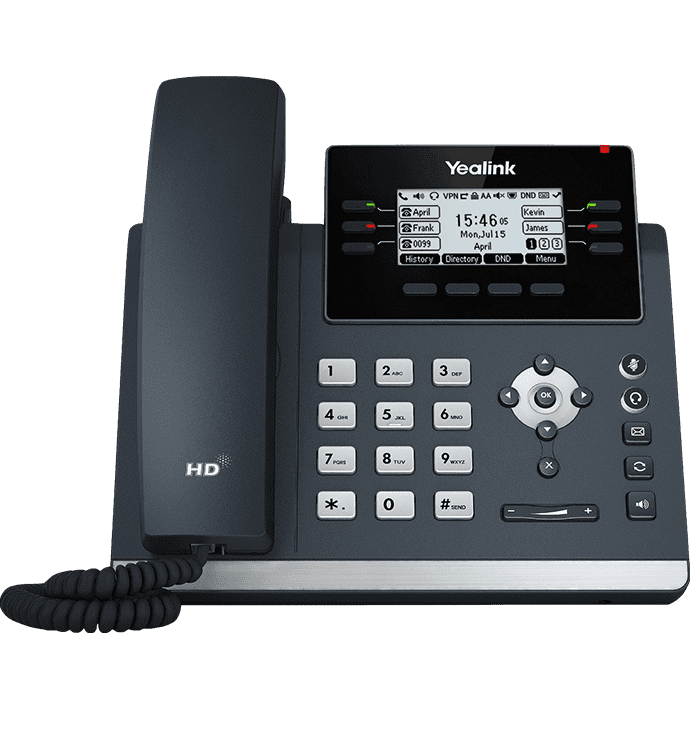
Modern business communication depends on more than simply placing and receiving calls. A suitable desk phone must fit the organization’s SIP platform, network architecture, user roles, headset choices, power design, security policy, and management process. This model is positioned as a professional mid-range endpoint for users who need richer call control than an entry-level phone but do not require a large color display or a touch-driven interface. Its combination of a backlit graphical screen, six physical line keys, programmable functions, multiple SIP accounts, Gigabit Ethernet, PoE, and dual USB ports gives IT teams a flexible base for standard office deployment.
The phone can serve individual employees, reception staff, administrators, customer-facing teams, finance personnel, educators, healthcare workers, and branch-office users. Up to 12 SIP accounts allow one device to manage several identities, departments, or service lines where the configured PBX and provider support that design. The dual Ethernet arrangement can connect the phone to the network and pass connectivity through to a nearby computer, helping reduce the need for a separate wall port at each desk. Power over Ethernet can simplify cabling when a compatible PoE switch or injector is available, while an optional power adapter may be required in environments without PoE.
Two USB ports are a particularly useful differentiator for offices that want to add compatible USB headsets, local USB recording, or optional Yealink accessories for Bluetooth and Wi-Fi. These functions are not automatically included with every unit, so buyers should identify which dongles, headsets, storage devices, adapters, or cables are part of the intended deployment. Audio capabilities include Yealink Optima HD Voice, Opus codec support, Acoustic Shield, and smart noise filtering features intended to improve intelligibility in everyday office conditions. Actual call quality still depends on the codec negotiated with the PBX or service provider, network performance, headset or handset choice, and wider voice infrastructure.
For Africa-based projects, careful preparation matters because a telephone rollout may involve multiple locations, mixed switch infrastructure, hosted or on-premises PBX platforms, different user profiles, and varying accessory requirements. FourTeck helps buyers translate those operational details into a clearer product request. The aim is to confirm the right endpoint, quantity, accessories, powering method, provisioning expectations, and commercial requirements before the order proceeds, reducing the risk of receiving phones that cannot be deployed as planned.
Key Business Benefits
◆ Flexible Line Handling
Support for up to 12 SIP accounts helps organizations assign several extensions, service identities, or departmental lines to one desk. This can be useful for reception, shared administrative positions, branch managers, or staff who handle multiple business functions. The final number of active identities and calling behavior depends on the PBX configuration and service plan.
◆ Cleaner Desk Deployment
Power over Ethernet can carry power and data through one network cable when compatible switching is available. This reduces dependence on a separate wall socket and power adapter at every desk, supports tidier installations, and can make centralized power planning easier when the network switch is protected by a suitable UPS.
◆ USB Expansion Choice
Dual USB ports allow businesses to plan beyond basic handset use. Compatible USB headsets, optional Bluetooth or Wi-Fi dongles, and USB recording storage can be added according to user needs. Keeping two ports available gives more flexibility than a single-accessory design, although compatibility must be checked before purchase.
◆ Clearer Voice Experience
HD voice processing, wideband codec support, Acoustic Shield, and smart noise filtering are designed to improve speech clarity. Better intelligibility can reduce repeated information, misheard names, and fatigue during routine business calls. Network quality, the remote endpoint, and codec negotiation remain important parts of the final experience.
◆ Gigabit Network Pass-Through
Dual-port Gigabit Ethernet allows the phone and a nearby computer to share one network drop in a common desk layout. This can preserve wired network performance for the workstation and reduce additional cabling requirements. VLAN, quality-of-service, switch policy, and endpoint security should still be planned by the network administrator.
◆ Scalable Administration
Provisioning and centralized configuration options can help IT teams standardize settings across multiple phones. A repeatable template can reduce manual setup time and improve consistency for account settings, dial plans, function keys, network parameters, and firmware policies. The exact management method depends on the selected PBX and deployment tools.
Together, these benefits make the endpoint suitable for organizations seeking a balanced desk phone rather than the lowest-feature option or a premium executive device. It can support a standardization strategy across many everyday users while leaving room for compatible accessories where particular roles need wireless headsets, Wi-Fi connectivity, Bluetooth, or recording functions. Buyers gain the most value when the phone is selected as part of a complete voice design that accounts for network readiness, licensing, provisioning, support ownership, and user training.
Product Highlights
The design focuses on efficient office calling. A 2.7-inch, 192 × 64-pixel backlit graphical display presents line status, menus, caller information, directories, and call functions in a compact format. Six line keys with dual-color indicators can be assigned across multiple pages for paperless programmable functions, helping frequent users reach transfers, hold, pickup, speed dials, shared lines, or other configured features quickly. The exact function available on each key depends on the PBX and administrator settings.
Useful for users who need several extensions, shared appearances, or departmental calling profiles.
Supports a wider accessory plan, including compatible headsets, dongles, and USB storage.
Provides network connectivity for the phone and pass-through connectivity for a co-located computer.
Allows power and data on one Ethernet cable when connected to compatible PoE infrastructure.
Supports USB headsets, a wired headset interface, and electronic hook switch options for compatible devices.
The stand offers two viewing angles, and wall mounting is supported where the correct mounting arrangement is used.
The phone also supports optional Wi-Fi through compatible WF40 or WF50 USB dongles and optional Bluetooth through the BT41 accessory. These are useful where a wired drop is unavailable, where a wireless headset is preferred, or where mobile-device pairing is part of the workflow. They should be ordered only after confirming regional availability, firmware support, and deployment policy. USB recording may be available with suitable storage and configuration, but organizations should apply their legal, privacy, consent, and retention rules before enabling call recording.
Technical Specifications
Specifications should be treated as part of a complete solution review rather than a stand-alone checklist. A business may require the phone, a PoE switch, VLAN configuration, a hosted or on-premises PBX account, compatible firmware, a headset, a Bluetooth or Wi-Fi dongle, a power adapter, network patch leads, a wall-mount arrangement, and provisioning support. Packaging can vary by channel and region, so the quotation should identify which items are included and which are optional. Buyers should also confirm whether their service provider supports the required line-key behavior, directory integration, call recording, codecs, encryption, remote provisioning, and firmware policy. A model can meet the hardware specification and still fail to deliver the expected workflow if the PBX or provider does not expose the required feature.
Configuration and Buyer Guidance
The correct purchase decision begins with the voice platform. Confirm whether the organization uses a hosted SIP service, an on-premises IP PBX, a unified communications platform, or a managed provider. Ask the provider to verify device support, provisioning method, required firmware, authentication settings, supported codecs, emergency-calling rules, and any restrictions on programmable keys. A generic statement that a platform supports SIP is not always enough because advanced functions can vary between providers.
1. User and Line Profile
State how many SIP accounts, shared lines, speed dials, call queues, and programmable functions each user needs. Reception and support staff usually need a different key layout from a standard office user.
2. Network Readiness
Confirm available switch ports, PoE capacity, voice VLAN design, DHCP options, DNS, quality-of-service policy, internet resilience, and whether the workstation will connect through the phone.
3. Accessory Plan
Identify USB or wired headsets, EHS adapters, Wi-Fi dongles, Bluetooth accessories, power adapters, mounting hardware, and USB storage. Request part numbers rather than describing accessories only by function.
4. Rollout and Management
For multiple units, decide who will create templates, provision accounts, update firmware, manage credentials, label devices, test calls, train users, and retain configuration records.
Quantity also affects planning. A single replacement phone may only require compatibility confirmation, while a rollout across departments or branches needs a staged deployment plan, serial-number tracking, standardized firmware, configuration templates, user acceptance testing, spare-unit policy, and support escalation route. Warranty expectations should be discussed before ordering, including who diagnoses faults, what evidence is required, whether accessories are covered separately, and how returns are coordinated. FourTeck can use this information to prepare a more accurate quotation and flag missing elements before the devices are supplied.
Ideal Business Use Cases
Reception and Front Desk
Reception staff can use multiple SIP identities, programmable line keys, transfer functions, directories, and a headset. The phone suits moderate call-handling requirements where a compact screen is acceptable and an expansion console is not essential.
Administrative Teams
Administrative users often handle internal calls, supplier coordination, appointment scheduling, and shared departmental lines. Programmable keys can shorten common actions, while headset support helps users who need to type or work in business systems during calls.
Customer Service Desks
For teams with regular inbound and outbound calls, HD audio, USB headset options, Ethernet performance, and programmable functions can support a more consistent workflow. Queue features, recording, monitoring, and reporting depend on the PBX or contact-center platform.
Branch Offices
A standards-based SIP phone can provide a consistent desktop experience across branch locations connected to a central or hosted voice platform. Remote provisioning and documented templates are especially valuable when local IT resources are limited.
Education and Healthcare
Schools, colleges, clinics, and care environments may use the phone for reception, departmental extensions, administrative offices, and service coordination. Buyers should align deployment with privacy rules, emergency communication procedures, and network segmentation policies.
Hotels and Professional Services
The phone can fit back-office, reservations, management, finance, security, and service desks where multiple lines or speed dials are useful. Hospitality-specific room-phone workflows should be reviewed separately because this model is primarily an office endpoint.
This product is not automatically the correct choice for every desk. Executives who need a large color screen, touch controls, built-in wireless features, or video may require another model. High-volume operators who need many visible keys may prefer an endpoint that supports an expansion module. Very basic users may not need 12 SIP accounts or dual USB ports. Matching device capability to the role helps control cost while improving adoption and usability.
Yealink T42U Voice Clarity and Call Handling
Voice quality is created by the full communication path: the microphone or headset, the phone’s processing, the negotiated codec, the local network, the internet or private WAN, the PBX, and the far-end device. This endpoint contributes Optima HD Voice technology, wideband audio support, Opus codec capability, acoustic processing, and smart noise filtering. In a well-designed environment, these features help speech sound more natural and understandable than narrowband calling, particularly when both ends and the service platform support wideband audio.
Acoustic Shield and noise-filtering functions are useful in open offices, shared service counters, or work areas with moderate ambient sound. They are intended to reduce distractions reaching the far end, but they should not be treated as a substitute for workspace planning or a suitable headset in a very noisy environment. For users who spend long periods on calls, a compatible professional headset may improve comfort, microphone positioning, and consistency. Buyers should confirm whether they need a USB headset, a wired headset, or an EHS-enabled wireless option.
Call handling can be adapted with programmable keys, shared line appearances, speed dials, pickup, transfer, hold, voicemail access, directories, and other PBX-supported functions. IT teams should create role-based templates rather than a single layout for every employee. A receptionist may need transfer and shared-line keys; a finance user may need only a few speed dials; a branch manager may need multiple SIP identities. Thoughtful key programming reduces confusion and makes the hardware more useful than a default out-of-box setup.
Yealink T42U Connectivity and USB Expansion
The connectivity design gives businesses several ways to integrate the phone into a real office. Dual-port Gigabit Ethernet supports the common arrangement where one cable connects the phone to the switch and a second short cable links the phone to the user’s computer. This can reduce the number of wall outlets required, but the network design must still protect the voice and data environment. Administrators should consider voice VLANs, switch port profiles, quality of service, device authentication, DHCP behavior, and the impact of connecting a workstation through the phone.
Power over Ethernet is valuable for centralized deployment. A compatible PoE switch can power the phone through its network cable, which simplifies desk cabling and can support continuity when the switch and wider voice system are connected to a suitable UPS. Before ordering, verify the switch’s PoE standard, available power budget, port count, and resilience strategy. Where PoE is unavailable, the quote should state whether a compatible power adapter is included or must be purchased separately.
Two USB ports support a broader accessory plan. A compatible USB headset can serve high-call users; optional Wi-Fi may help in locations where Ethernet cannot be installed; optional Bluetooth can support selected wireless workflows; USB storage can support local recording where policy permits. Each function has limitations. Wireless connectivity must meet security policy, accessory models need firmware compatibility, recording requires governance, and using several accessories can affect port availability. A bill of materials should list every accessory by model and quantity so the supplied solution matches the intended user experience.
Yealink T42U Deployment, Provisioning, and Security
A successful multi-phone rollout depends on repeatable configuration. Automated provisioning can allow devices to receive account settings, network parameters, dial plans, time settings, certificates, key assignments, and firmware policies from a controlled source. The precise process varies by PBX, service provider, or Yealink management tooling. Before deployment, administrators should build a tested template, document variables for each user, secure the provisioning location, and decide how credentials are generated and stored.
Firmware management is equally important. A phone should not be deployed with an unknown or inconsistent version across the fleet. The selected release must be compatible with the voice platform and approved accessories. Security features such as encrypted signaling, secure web administration, certificate validation, restricted management access, strong administrator credentials, and current firmware should be configured according to organizational policy. Yealink identifies TLS 1.3 support with applicable V87 firmware, so buyers needing that capability should confirm the exact firmware path and PBX compatibility.
Operational controls should cover the device’s full life cycle. Record serial numbers and assigned users, limit administrator access, change default credentials, restrict unnecessary services, protect provisioning files, monitor voice VLAN activity, retain configuration backups, and define how a phone is wiped before reassignment or disposal. For remote branches, create a clear support path so staff know whether to contact internal IT, the hosted provider, an integrator, or the supplier. These steps turn a collection of handsets into a manageable business communication service.
What Buyers Should Check Before Purchase
Before requesting a quote, buyers should confirm the required configuration, usage environment, compatibility needs, warranty expectations, and delivery location. Choosing only by model name can leave important gaps such as a missing power adapter, an unsupported headset, insufficient PoE capacity, incompatible provider firmware, or a key feature that the PBX does not expose. A useful quotation begins with operational information rather than quantity alone.
Configuration Fit
Provide the PBX or hosted service name, required SIP accounts, line-key behavior, codecs, directories, call queues, recording needs, and user roles. Note whether the phones are replacements or part of a new deployment.
Compatibility Check
Confirm provider certification or support, firmware version, network authentication, VLAN policy, DHCP requirements, PoE standard, headset model, EHS adapter, and any Bluetooth or Wi-Fi dongle.
Availability and Warranty
Ask which package is being offered, whether accessories are included, what warranty terms apply, how faults are assessed, and whether availability differs for large quantities or optional items.
Quote Preparation
Share quantity, destination country, required delivery location, target deployment date, accessories, configuration services, tax or commercial documentation needs, and whether supply will be staged across several sites.
Buyers should also consider long-term operating cost. The purchase price is only one component. Network upgrades, PoE switching, PBX subscriptions, SIP trunks, headsets, replacement accessories, provisioning effort, training, support contracts, spare phones, firmware testing, and logistics can all affect total cost. Standardizing on one or two suitable models may simplify support, but only when the chosen models match the majority of user roles.
For project or bulk supply, request a documented bill of materials and a sample validation stage before the full rollout. Test account registration, inbound and outbound calling, transfers, hold, voicemail, directories, emergency dialing, call quality, PoE behavior, headset control, computer pass-through, firmware updates, and remote provisioning. FourTeck can help review these requirements and suggest related accessories or alternative phone models when the requested device does not match the intended workflow.
Africa Availability and Service Support
FourTeck supports product inquiries across Africa with assistance for model selection, configuration review, quote preparation, accessory matching, delivery coordination, and warranty guidance. Availability may vary based on the requested quantity, supplier status, packaging, optional accessories, firmware requirements, and destination. For that reason, a quotation should be treated as the correct source for current commercial details rather than assuming every variation is immediately available.
Business buyers can improve the speed and accuracy of the process by sharing the voice platform, number of users, delivery country, preferred powering method, headset needs, wireless requirements, and expected deployment schedule. Where several branches are involved, include the quantity per site and whether the phones should arrive as standard units or with configuration services. FourTeck can also help identify missing accessories, compatible alternatives, and differences between nearby Yealink models.
Warranty guidance depends on the source and commercial terms of the offered units. Buyers should confirm the coverage period, return process, diagnostic requirements, accessory coverage, and responsibility for configuration-related issues. A hardware warranty does not replace PBX support or network troubleshooting, so the support arrangement should distinguish device faults from account, cabling, switching, internet, and service-provider problems. Use the contact link below to request a current quote and a review of the proposed deployment.
Africa Country and Regional Coverage
Africa-based voice projects range from a handful of phones in one office to multi-site deployments that connect branches, service desks, schools, healthcare facilities, hotels, financial organizations, and public-sector teams. FourTeck’s role is to help the buyer define the technical and commercial requirement before supply. This includes reviewing the proposed PBX, SIP service, network readiness, PoE design, accessory list, user profiles, quantity, packaging, delivery destination, and warranty expectations.
Availability, lead time, suitable configuration, accessories, support options, and delivery arrangements can differ by product model, supplier position, order quantity, destination, and project scope. A branch deployment may require staged quantities and remote provisioning; a replacement order may need matching firmware and settings; a new office may require switches, cabling, headsets, PBX licensing, and installation support in addition to the phones. Explaining these details at the quotation stage helps avoid a narrow hardware-only order that does not deliver a working communication service.
The following sections provide more focused guidance for Tanzania, Libya, and Seychelles while keeping the overall page centered on Africa. The examples are intended to help organizations prepare a useful inquiry, not to claim local inventory, fixed lead times, or a branch presence. Buyers can start at the FourTeck Africa website or use the Africa product assistance form to share their requirements.
Yealink SIP-T42U in Tanzania
Organizations evaluating the Yealink SIP-T42U in Tanzania should begin with practical deployment conditions rather than the handset specification alone. A growing office in Dar es Salaam, a school, healthcare provider, financial institution, public-sector department, reseller, or system integrator may need a different combination of phones, headsets, switches, and provisioning services. The first planning step is to identify the PBX or hosted voice platform, the number of users, and whether each desk has a reliable Ethernet connection with PoE. Where a computer will share the network outlet through the phone, the switch configuration should preserve suitable data performance while separating or prioritizing voice traffic according to the organization’s policy. Power planning is also relevant: PoE can simplify desks, but the network switch and upstream voice systems should be considered in the business-continuity design. For multi-site requirements, buyers should document quantities by location, expected account settings, line-key layouts, local administrator responsibilities, and the process for remote support. Optional Wi-Fi, Bluetooth, headsets, EHS adapters, power supplies, and USB storage must be listed individually because they may not be included in a standard package. A useful request for quotation should state the delivery destination, quantity, target deployment stage, required accessories, commercial documentation needs, and whether configuration assistance is expected. FourTeck can review these points, help match the endpoint to the intended user roles, coordinate current availability information, and provide warranty guidance based on the offered source and terms. This preparation is particularly useful for organizations expanding infrastructure, replacing mixed analogue and IP phones, or standardizing communications across departments without choosing a device solely by price or model name.
Yealink SIP-T42U in Libya
Procurement teams considering the Yealink SIP-T42U in Libya can strengthen project outcomes by defining reliability, compatibility, and support ownership before the phones are ordered. The device may suit corporate offices, service organizations, education environments, administrative departments, financial teams, and project-based installations that require a professional SIP endpoint with multiple accounts, Gigabit Ethernet, PoE, and accessory flexibility. The commercial request should identify the exact voice platform and whether the deployment uses a centralized PBX, a hosted provider, or a managed service. It should also state the required firmware, codec expectations, security settings, directory integration, programmable key functions, and whether user accounts will be provisioned locally or remotely. Infrastructure checks should cover PoE capacity, switch-port availability, VLAN configuration, internet or WAN resilience, and the powering method for sites that do not have suitable PoE equipment. Accessories deserve separate attention because wireless connectivity and headset workflows rely on compatible optional components. Project planners should specify USB headsets, EHS adapters, Bluetooth or Wi-Fi dongles, power adapters, mounting needs, spare units, and patch cables instead of assuming they are part of the base phone. Delivery coordination should be discussed through a formal quotation that reflects quantity, destination, supplier status, packaging, and project timing, without relying on unverified inventory or transport assumptions. Warranty expectations should distinguish a physical device fault from PBX registration, network quality, configuration, or service-provider issues. FourTeck can help structure the bill of materials, review alternative models when user requirements differ, and provide current commercial guidance for the requested scope. A staged validation with a sample phone is often valuable for larger deployments because it allows the organization to test calls, provisioning, security, headsets, and key functions before committing the full quantity.
Yealink SIP-T42U in Seychelles
For buyers assessing the Yealink SIP-T42U in Seychelles, value often comes from fitting the phone to compact teams, distributed sites, and service-driven operations rather than selecting the most complex endpoint available. Hospitality groups, professional-services firms, government departments, schools, healthcare providers, financial organizations, retailers, and tourism-related businesses may use the phone at reception, reservations, administration, finance, security, or management desks. A multi-site organization should decide whether all phones will register to one hosted platform, connect through site-to-site networking, or operate under separate accounts. That decision affects provisioning, support responsibility, security controls, and continuity planning. The phone’s Gigabit pass-through can be helpful where desk cabling is limited, while PoE can reduce local power-adapter requirements. Nevertheless, switch capacity, UPS protection, network segmentation, and internet resilience should be considered as part of the complete communication service. In compact offices, optional Wi-Fi can offer placement flexibility, but wired Ethernet is often preferred where consistent performance and centralized control are priorities. Headset users should have their working style reviewed: a front-desk operator may need EHS control and all-day comfort, while an occasional caller may only require the handset. Quote preparation should include destination, site quantities, accessory models, wall-mount needs, required configuration support, warranty expectations, and any plan for spare devices. Delivery arrangements and availability should be confirmed for the specific order rather than inferred from a general listing. FourTeck can help compare the requested endpoint with other Yealink options, identify the accessories required for a complete installation, and coordinate commercial guidance for a phased or single-site order. Long-term value is improved when the organization standardizes firmware, documents user assignments, secures provisioning, and keeps a clear process for remote diagnosis and replacement.
Other Options Buyers May Consider
Different users may need a larger display, more visible keys, built-in wireless capability, executive functions, or a simpler entry-level device. Related Yealink models and accessories can help create a role-based phone standard rather than forcing one endpoint onto every desk. The options below should be reviewed against the same PBX, firmware, network, headset, and support requirements as the main product.
Yealink SIP-T43U
A related T4U-series option with a larger graphical display, useful for users who want more screen space while retaining a familiar business-phone approach.
Yealink SIP-T46U
A higher-positioned desktop phone for users who need a color display, additional account capacity, and a more information-rich interface.
Yealink SIP-T48U
A touchscreen-oriented option for executive users, reception areas, and roles that benefit from richer navigation and more visual call control.
Yealink BT41 Bluetooth Dongle
An optional accessory for supported Bluetooth functions. Confirm firmware, regional availability, and device compatibility before adding it to the order.
Yealink WF50 Wi-Fi Dongle
A compatible optional adapter for Wi-Fi connectivity where a wired network drop is not available or practical.
FourTeck VoIP Project Support
Use a solution review when the requirement includes phones, PoE switches, headsets, PBX licensing, cabling, provisioning, and branch rollout planning.
The nearest model is not automatically the most appropriate alternative. A larger display may improve usability but increase cost; built-in wireless may simplify some locations but be unnecessary where structured cabling exists; additional line keys may help reception but add little value for a basic office user. FourTeck can help segment users into practical profiles and match each profile to a suitable phone and accessory set.
Why Buyers Choose FourTeck
FourTeck approaches business technology purchasing as a requirement-matching exercise. The objective is not merely to identify a recognizable model, but to understand the users, platform, infrastructure, accessories, service expectations, delivery needs, and future support plan. This is important for IP telephony because phones that look similar can differ in account capacity, display, key layout, expansion options, wireless capability, firmware path, and platform support.
Assistance for individual replacements, departmental orders, reseller requests, and larger project quantities.
Review of PBX, SIP accounts, PoE, firmware, headsets, wireless accessories, and deployment expectations.
Commercial preparation based on quantity, destination, accessory list, service scope, and supplier status.
Order coordination is discussed for the specific destination and project rather than presented as a generic delivery promise.
Clarification of the offered warranty terms, fault process, and distinction between hardware and configuration issues.
Alternative phones and accessories can be reviewed when user roles or infrastructure require a different option.
This buyer-focused process can reduce incorrect orders and make internal approval easier. Procurement receives a clearer bill of materials, IT gains better visibility into deployment dependencies, and users are more likely to receive a device suited to their role. FourTeck does not need to rely on unverified claims about stock, authorization, or delivery speed; confidence comes from careful requirement review, transparent quotation details, and practical pre-sales guidance.
Frequently Asked Questions
What is this Yealink phone used for?
It is a professional SIP desk phone for business voice communication. Typical uses include office extensions, reception, administration, customer service, finance, branch communication, and shared departmental lines. It registers with a compatible SIP PBX or hosted voice provider. Available call features depend on the platform, account configuration, firmware, and service subscription.
How many SIP accounts does it support?
The phone supports up to 12 SIP accounts. This can help users manage several extensions or service identities from one desk. The practical setup depends on the PBX, provider rules, line-key programming, and user workflow. Buyers should state how many accounts and simultaneous call appearances are required so the configuration can be checked before purchase.
Does the phone include Wi-Fi and Bluetooth?
Wi-Fi and Bluetooth are available through compatible optional USB accessories rather than being assumed as built-in functions. Yealink lists WF40 or WF50 for Wi-Fi and BT41 for Bluetooth support. Accessory availability, firmware compatibility, and regional package contents should be confirmed. Include the required dongles in the quotation request to avoid receiving only the base phone.
Can it be powered by the network cable?
Yes. It supports IEEE 802.3af Power over Ethernet when connected to a compatible PoE switch or injector. Buyers should confirm switch capacity and available PoE budget. Where PoE is not available, a compatible power adapter may be required, and the package contents should be checked because an adapter may not be included with every commercial offering.
Will it work with our hosted PBX or SIP provider?
The phone is designed for standards-based SIP communication, but exact feature support must be verified with the provider. Ask about device provisioning, firmware, authentication, codecs, directories, line keys, call recording, encryption, and support policy. A platform may allow basic registration while handling advanced functions differently, so written compatibility confirmation is recommended for larger deployments.
Can FourTeck help with configuration planning?
FourTeck can help review the requested model, quantity, PBX environment, PoE arrangement, headset needs, optional wireless accessories, deployment locations, and provisioning expectations. The scope of hands-on configuration or installation should be defined in the quotation. Providing detailed requirements allows the sales team to identify missing components and suggest suitable alternatives where necessary.
Is the phone available for buyers across Africa?
FourTeck supports Africa-focused product inquiries and can coordinate current availability and delivery information for a specific request. Availability varies with supplier status, quantity, accessories, packaging, destination, and project timing. A formal quotation is the correct place to confirm current commercial details rather than relying on a general product-page statement.
What should be included in a quote request?
Include quantity, delivery country and location, PBX or hosted provider, required SIP accounts, PoE availability, headset type, Bluetooth or Wi-Fi needs, power-adapter requirement, mounting preference, deployment schedule, and any configuration or warranty expectations. For multi-site projects, list quantities per location and whether supply should be delivered in stages.
Can businesses request bulk or project supply?
Yes. Business, reseller, integrator, and project inquiries can include multiple units and related accessories. Larger deployments benefit from a sample validation, standardized firmware, provisioning templates, serial-number tracking, user-role profiles, spare-unit planning, and a documented bill of materials. Availability and commercial terms should be confirmed for the full scope and destination.
What warranty support is available?
Warranty coverage depends on the source and terms of the offered product. The quotation should clarify the period, return process, diagnostic requirements, and whether accessories are covered separately. Hardware warranty does not normally resolve PBX, network, account, cabling, or configuration problems, so buyers should maintain an appropriate technical support arrangement for the complete voice service.
Need Help Choosing the Right Business IP Phone?
FourTeck can help review product availability, PBX compatibility, SIP account needs, PoE infrastructure, headset options, wireless accessories, warranty guidance, and delivery requirements for your Africa-based office or project.


Reviews
There are no reviews yet.