

Quick Product Information
Yealink
UVC30-CONTENT
USB whiteboard content camera kit
Microsoft Teams Rooms on Windows
Up to 4K at 30 frames per second
Approximately 6 to 9 feet wide
Length-adjustable wall bracket and hardware
Contact FourTeck for current options
Manufacturer terms and supply route should be confirmed
Configuration review, quote preparation and delivery coordination
Product Overview
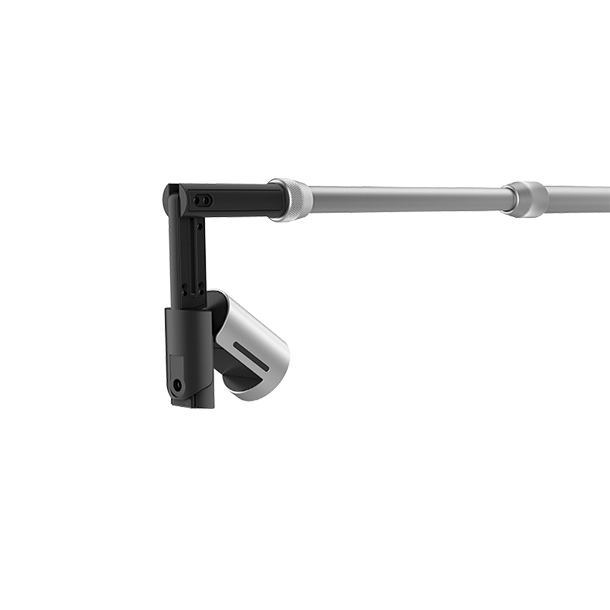
Hybrid meetings often work well until a presenter turns toward a physical whiteboard. People in the room can follow the writing, arrows and diagrams, while remote attendees may see only a distant room-camera image or an incomplete screen share. This camera kit addresses that practical gap by giving a Microsoft Teams Rooms on Windows environment a dedicated view of an existing whiteboard. The camera is positioned above the board using the supplied length-adjustable bracket, allowing the meeting system to receive a focused image of handwritten material as the session develops.
The solution is particularly relevant to organisations that use visual discussion as part of daily work. Engineering teams can map processes, teachers can develop examples step by step, healthcare groups can discuss workflows, project managers can organise tasks, and leadership teams can sketch options without forcing every participant onto a digital drawing application. The 4K camera provides the image detail needed for content capture, while the 120-degree diagonal view helps cover compatible boards. Yealink states that the kit is intended for whiteboards around six to nine feet wide, so buyers should measure the usable writing surface rather than relying only on the room name or wall dimensions.
This is not simply a general webcam placed near a board. The package includes a UVC30 Room camera, a bracket designed to extend across different board widths, the necessary mounting accessories and a quick-start guide. Its most important value comes from integration planning: the Teams Rooms platform, camera connection, board position, wall structure, lighting, user movement and cable route all need to work together. A suitable deployment should keep the camera stable, avoid glare where possible, preserve access to the writing surface and provide a neat USB path back to the room system.
For Africa buyers, FourTeck provides a practical procurement route rather than treating the camera as an isolated accessory. The team can help review the intended room, confirm the correct model, identify possible mounting or cable considerations, prepare a quotation and coordinate delivery requirements. This is useful for single boardrooms as well as education, government, hospitality or enterprise projects involving several rooms. Availability, lead time and warranty handling can differ by supplier status, quantity and destination, so these commercial details should be confirmed alongside the technical fit.
Key Business Benefits
The strongest reason to choose a dedicated content camera is not the camera specification alone; it is the improvement in how people participate when ideas are developed on a physical board. The following benefits connect the hardware to real meeting outcomes and procurement priorities.
◆ Better Remote Participation
Remote attendees can follow developing notes, diagrams and action plans through the meeting platform instead of depending on a distant room-camera view. This can make workshops more inclusive and reduce repeated explanations after the meeting.
✓ Reuse Existing Whiteboards
Organisations can continue using familiar dry-erase boards rather than changing every room to an interactive display. Reuse can simplify user adoption and protect earlier investment, provided the board dimensions and wall conditions suit the kit.
● Clearer Visual Detail
Up to 4K capture gives the room system a detailed source image for written content. Legibility still depends on marker colour, handwriting size, room lighting and platform processing, but a high-resolution source supports a stronger starting point.
⚙ Flexible Board Coverage
The adjustable bracket is intended to accommodate different whiteboard widths within the supported range. This helps standardise a deployment across rooms that are similar but not physically identical.
↗ Practical Hybrid Workflows
Presenters can stand, write and explain naturally while the room system shares the board. This preserves the pace of classroom teaching, design reviews and planning sessions without adding a separate content-preparation step.
✓ Easier Room Standardisation
Procurement teams can define a repeatable whiteboard-capture pattern for compatible Microsoft Teams Rooms. Consistent room documentation, mounting heights and cable plans can reduce variation during a multi-room rollout.
These benefits depend on thoughtful deployment. A content camera cannot correct a severely reflective board, unreadable marker colours, an unstable wall surface or an unsupported room platform. FourTeck therefore encourages buyers to treat the kit as part of the room design and to share enough information for a meaningful configuration check before purchase.
Product Highlights
The UVC30 platform combines a compact camera body with the imaging functions needed for meeting-room use. In the content-camera package, the adjustable wall-mount assembly is the defining component because it positions the lens above the board and supports compatible board widths. The result is a focused capture arrangement that can be easier to use consistently than asking every presenter to reposition a room camera before a workshop.
Supports detailed content capture at up to 4K resolution, with lower-resolution modes available for different room-system and network workflows.
A wide fixed view helps cover the board when the bracket and camera are positioned according to the room design.
The 1/2.5-inch sensor provides the imaging foundation for high-resolution whiteboard and room-camera applications.
The kit uses a wired USB link, so buyers should confirm the route, distance and room-system port allocation before installation.
Image controls including wide dynamic range, exposure and white-balance functions help the camera handle normal meeting-room variation, although lighting design remains important.
The package includes the camera, length-adjustable wall bracket, required mounting hardware and setup guidance for the intended content-capture role.
Buyers should distinguish this content-camera package from the ordinary UVC30 Desktop edition and from a standalone UVC30 Room camera. The included bracket, supported whiteboard range and Microsoft Teams Rooms use case are central to the purchase. Model confirmation is important when comparing quotations because similar camera names can refer to packages with different cables, mounts or intended workflows.
Technical Specifications
Configuration selection starts with the room platform. The content-camera workflow is intended for Microsoft Teams Rooms on Windows, so buyers should not assume that every Teams appliance, personal computer or third-party meeting application will provide the same whiteboard behaviour. Confirm the exact Teams Rooms system, operating environment and available camera connections. In rooms with multiple cameras, also confirm how the content camera is presented to the platform and whether an installer must configure camera roles.
The second decision is physical fit. Measure the whiteboard’s writing area, note any frame or tray, photograph the wall above it and identify obstacles such as screens, lights, air-conditioning units or conduits. The camera needs a stable mount and a practical cable path. Marker contrast, board glare and presenter position influence results even when the camera specification is correct. For a project covering several rooms, record these measurements in a simple room schedule so each location can be checked before equipment is dispatched.
Configuration and Buyer Guidance
A reliable content-camera deployment begins with a room assessment, not only a model number. Use the following questions to prepare a useful quotation and reduce the risk of missing accessories, unsuitable mounting or platform mismatch.
1. Which room system is installed?
Provide the Microsoft Teams Rooms make, model and Windows configuration. Include details of any existing front-of-room camera, touch controller and USB extension system.
2. What are the board dimensions?
Measure the actual writable width and height. Note the frame thickness, tray depth and distance from the top edge to the ceiling or nearest obstruction.
3. Is the wall suitable?
The installer needs to know the wall material and whether secure fixing points are available. A mounting plan may differ for masonry, concrete, drywall or panelled surfaces.
4. How will USB reach the room system?
Document cable distance, conduit availability and port allocation. Long runs may require an approved extension approach that should be designed before installation.
5. What is the lighting condition?
Photograph the board with room lights on and blinds in their normal position. Strong reflections or direct sunlight may need practical room changes.
6. Is this a single room or project rollout?
For multiple rooms, provide quantity, room types, required delivery sequence and installation responsibility. Standardisation is easier when room data is collected early.
Support expectations should also be discussed. Clarify who will mount the bracket, configure the Teams Rooms system, test whiteboard capture, train users and handle future warranty communication. FourTeck can help organise the product and commercial information, while the final installation scope should be written clearly in the quotation. This prevents confusion between hardware supply, room preparation, cabling, platform configuration and on-site services.
Ideal Business Use Cases
A whiteboard content camera delivers the most value in rooms where people create information together rather than only present finished slides. The following use cases show where the kit can fit naturally, provided the organisation uses a compatible Microsoft Teams Rooms on Windows environment.
Project Planning Rooms
Teams can map dependencies, assign tasks and sketch timelines while remote colleagues follow the same board. The workflow suits construction, technology, operations and change-management projects.
Education and Training
Teachers and trainers can develop equations, diagrams, language examples or process maps in real time. Remote learners receive a dedicated view rather than a distant image from the main room camera.
Design and Engineering Reviews
Engineers, architects and product teams can annotate concepts and discuss alternatives using the quick, informal nature of a dry-erase board while including specialists from another location.
Healthcare Briefings
Administrative and clinical operations teams can review schedules, process changes and non-patient-specific workflows. Sensitive information should still be managed according to organisational policy.
Board and Leadership Workshops
Leaders can compare scenarios, shape strategy and record decisions visually without interrupting discussion to create a formal slide. Remote executives can see the evolving content as it is explained.
Multi-Site Operational Meetings
Distributed branches can use a shared whiteboard view for process improvement, incident reviews, sales planning and service coordination while preserving a consistent meeting method across locations.
The camera is less relevant when a room has no compatible physical board, when all collaboration already takes place on an interactive display, or when the meeting platform does not support the intended content-camera workflow. In those cases, a different Yealink camera, video bar, wireless presentation tool or interactive meeting board may be a more suitable investment. FourTeck can help compare the room requirement with these alternatives before the buyer commits to a specific package.
Yealink UVC30 4K Whiteboard Capture
Whiteboard content contains fine visual detail: thin marker strokes, small labels, arrows, boxes and changes that happen quickly as the presenter speaks. A high-resolution source helps the room system preserve more of this detail before platform processing, scaling and network transmission take place. The UVC30 camera supports 4K at 30 frames per second, together with 1080p and 720p modes, giving the deployment team options for different room-system conditions.
Resolution alone does not guarantee readable writing. The board should be clean, markers should provide strong contrast, and the presenter should write large enough for remote viewers. Lighting needs to illuminate the board without creating a bright reflection that hides part of the surface. The camera’s wide dynamic range and exposure controls can help with ordinary variation, but they cannot fully correct a board facing intense sunlight or a spotlight reflected directly into the lens.
For buyers, the practical lesson is to test the complete chain: board, camera, Teams Rooms system, meeting platform, display and remote endpoint. A pilot room can be valuable before a larger rollout, especially where rooms use different lighting, board finishes or wall layouts. Record the chosen marker colours, mounting measurements and user instructions so later rooms can reproduce the same result. FourTeck can help include this pilot-first approach in the quotation and deployment discussion.
Yealink UVC30 Adjustable Whiteboard Mount
The length-adjustable wall bracket separates this package from a normal USB camera purchase. Its purpose is to place the lens above the board at a suitable distance so the 120-degree diagonal view can capture the intended writing area. Yealink identifies support for whiteboards approximately six to nine feet wide, but the final fit still depends on frame shape, mounting height, wall space and obstacles around the board.
A professional installation should begin with accurate measurements. The installer needs the writable width, the total outer-frame width, the distance to the ceiling, the wall material and the position of nearby screens or electrical fittings. The bracket must be fixed securely and aligned so the camera remains stable when the room is used. Loose mounting can cause image movement, while poor alignment can leave part of the board outside the capture area.
Cable management deserves equal attention. The USB route should look neat, avoid strain on the connector and remain accessible for maintenance. Where the room system is far from the board, an installer may need to assess an appropriate extension method rather than joining unapproved cables. Buyers should request a clearly defined scope stating whether the quotation covers hardware only, bracket installation, cable containment, USB extension, Teams Rooms configuration, testing and user handover. This protects both the procurement team and the installation provider from unclear expectations.
Yealink UVC30 Teams Rooms Workflow
The content-camera kit is designed around Microsoft Teams Rooms systems on Windows. That distinction matters because Microsoft Teams can be used in many other ways: a personal laptop, a Teams phone, an Android meeting bar or a browser session. The presence of the Teams application does not automatically mean that the device supports the same whiteboard-camera workflow. Buyers should identify the exact room-system architecture and confirm how the camera will be connected and selected.
In a typical room, the main camera captures participants while the content camera is assigned to the physical board. The room configuration should allow users to share the board without confusing the two camera roles. This makes user training simple: staff need to know when to start the whiteboard content function, how to position themselves and how to verify that remote participants can see the writing. A short instruction card in the room often provides more value than a long manual stored elsewhere.
IT teams should also plan firmware, Teams Rooms application maintenance and change control. A room that works during commissioning can be affected later by platform updates, USB changes or replacement hardware. Documenting the original camera connection, room-system settings and test procedure makes support easier. For larger deployments, FourTeck recommends that buyers nominate an internal room owner or support contact who can reproduce the test and provide clear information if assistance is needed.
What Buyers Should Check Before Purchase
Before requesting a quote, buyers should confirm the complete requirement rather than selecting only by camera name or the headline 4K specification. The first check is the exact package. Ask for the UVC30 content-camera kit with the length-adjustable whiteboard bracket and mounting hardware, not only a standalone UVC30 camera. Confirm the manufacturer part number on the quotation and ask what is included in the regional box. Similar names can refer to desktop, room or content-camera configurations with different intended uses.
Package Confirmation
Request the full part number, contents list, cable information and bracket details. Confirm whether installation consumables beyond the supplied screws are required for the actual wall type.
Platform Compatibility
Provide the Teams Rooms hardware model and Windows environment. Ask the room integrator to confirm content-camera support, available USB ports and any software configuration needed.
Room and Board Fit
Share the writable board dimensions, wall material, ceiling clearance, room photos and lighting conditions. These details help prevent a technically correct product from being installed in an unsuitable position.
Cable and Accessory Plan
Confirm cable distance, containment, extension requirements and service access. Ask whether the project needs ladders, wall anchors, trunking, USB extension hardware or after-hours installation.
Warranty Expectations
Review the applicable manufacturer warranty, proof-of-purchase requirements, return route and responsibility for removal or reinstallation. Hardware warranty and on-site labour are not automatically the same service.
Project Supply Information
State the quantity, destination, required sequence, room readiness and whether partial delivery is acceptable. For bulk orders, request model consistency and package verification across the complete batch.
Long-term usage cost is mainly connected to room support rather than a subscription for the camera itself. Consider installer labour, cable work, room-system maintenance, user support and the time needed to recommission a room if hardware is moved. A well-documented installation can reduce future support cost because technicians know the original bracket position, cable route and Teams Rooms settings.
A useful quote request should include the product name and part number, quantity, country and delivery location, room-system details, board width, room photos, installation requirement and desired warranty handling. FourTeck can use this information to review the request, identify missing items and suggest an alternative when the content-camera package does not match the platform or physical room.
Africa Availability and Service Support
FourTeck supports product enquiries across Africa with assistance for model confirmation, room-fit discussion, quotation preparation, commercial review, delivery coordination and warranty guidance. The UVC30 content-camera package may be sourced through different channels depending on the destination, requested quantity and supplier position. For that reason, availability should be checked at the time of enquiry rather than assumed from a model listing.
A complete request helps the sales team respond more accurately. Buyers should provide the quantity, destination, Microsoft Teams Rooms system, whiteboard dimensions and whether the order covers hardware only or a wider meeting-room project. Where installation is needed, include photographs of the board wall, approximate cable distance and the preferred work schedule. These details allow the quotation to separate product supply, accessories, delivery and professional services where applicable.
Warranty guidance can include the applicable manufacturer term, documentation required for a claim and the route for returning or assessing equipment. Exact coverage depends on the supplied unit and sales channel. FourTeck does not treat warranty as a substitute for correct installation, so buyers should also confirm mounting responsibility, room-system configuration and acceptance testing. For multi-room projects, a phased delivery or pilot room can be discussed as part of the commercial plan.
Africa Country and Regional Coverage
Meeting-room projects across Africa vary widely in scale. One buyer may need a single boardroom camera, while another may be standardising classrooms, training rooms or collaboration spaces across several sites. FourTeck helps translate those different requirements into a structured procurement discussion covering the product package, platform compatibility, room dimensions, accessories, delivery destination and support expectations.
Suitable configuration, supply timing and commercial terms can change according to the selected model, order quantity, supplier status, project scope and destination. A content-camera request may also depend on items that are not part of the camera box, including cable containment, USB extension, wall preparation, room-system configuration or installation labour. These should be identified before an order is approved so procurement teams can compare quotations on the same basis.
The following sections provide dedicated buying context for Tanzania, Libya and Seychelles. Each market has different room types, procurement structures and project priorities, but the core process remains consistent: confirm the technical fit, prepare accurate room information, request current availability, define delivery and installation responsibilities, and document warranty expectations. Buyers can start at the FourTeck Africa technology portal or send project details through the Africa contact page.
Yealink UVC30 Content Camera in Tanzania
Tanzanian organisations planning hybrid classrooms, corporate training rooms, public-sector meeting spaces, healthcare briefings or project offices can use a dedicated whiteboard camera to make visual discussion easier for participants joining remotely. The Yealink UVC30 Content Camera in Tanzania should be considered as part of the complete Microsoft Teams Rooms environment rather than as a standalone webcam purchase. Procurement teams should first record the room-system model, Windows platform, writable board dimensions and wall conditions. This is especially useful for growing institutions that may be fitting several rooms over time, because a shared room schedule can standardise mounting height, cable paths, marker guidance and acceptance testing. Infrastructure conditions differ between sites, so the quotation should identify who provides secure wall fixing, cable containment, USB extension and configuration. Where power stability or network continuity is a wider concern for the meeting room, those items should be addressed through the room’s UPS, switching and connectivity design instead of expecting the camera itself to solve them. Schools and training providers may benefit from testing marker contrast and handwriting size with a remote participant before a larger rollout. Enterprises and integrators should also decide whether installation will be handled by an internal team or included as a service. FourTeck can review the required quantity, room photos, delivery destination, desired project sequence and warranty expectations, then prepare a commercial response based on current sourcing options. This practical approach helps Tanzanian buyers avoid ordering the wrong UVC30 package, overlooking the adjustable bracket or discovering too late that the board width, wall clearance or Teams Rooms architecture does not match the intended workflow.
Yealink UVC30 Content Camera in Libya
For a Libya-based meeting-room project, operational continuity begins with clear scope and compatible equipment. The Yealink UVC30 Content Camera in Libya is most appropriate where an organisation already has, or is designing, a Microsoft Teams Rooms system on Windows and wants to share a traditional whiteboard during live meetings. Before commercial approval, the project team should distinguish the full content-camera kit from other UVC30 editions, verify the manufacturer part number and confirm that the adjustable wall bracket is included. Room preparation should then be reviewed in a structured sequence: measure the writable board width, identify the wall construction, check the space above the frame, map the USB route and assess lighting that may reflect from the board. This information is valuable for corporate offices, engineering teams, universities, professional services, healthcare administration and government departments that use diagrams or planning boards during distributed discussions. The quotation should separate equipment, mounting materials, cable work, platform configuration and testing so each responsibility is visible. Buyers should avoid relying on an assumed delivery date or local inventory position; current supplier status, quantity and destination need to be confirmed when the request is made. It is also sensible to agree how warranty documentation will be retained and who will remove, return or reinstall hardware if a claim is required. For multi-room projects, a pilot installation can establish the right camera alignment and user method before further units are deployed. FourTeck can help prepare the product and commercial requirements, review compatible alternatives where the platform differs, coordinate delivery information and provide warranty guidance based on the selected supply route without making unsupported assumptions about local stock or project timing.
Yealink UVC30 Content Camera in Seychelles
Organisations in Seychelles often work with compact meeting rooms, distributed offices and teams connected across separate sites, making simple room operation and dependable remote collaboration important. The Yealink UVC30 Content Camera in Seychelles can support hospitality groups, government departments, education providers, financial services, healthcare administration, professional firms and growing businesses that use physical whiteboards for planning or training. The camera’s value is strongest when the room already uses a compatible Microsoft Teams Rooms on Windows platform and the board falls within the intended six-to-nine-foot width range. Space planning should take priority: buyers need to confirm that the adjustable bracket can extend above the board without interfering with a display, ceiling feature or decorative wall treatment. A neat USB path is also important in guest-facing or customer-facing environments where visible cabling may be undesirable. For organisations managing several islands or sites, remote manageability of the wider Teams Rooms system, documented room settings and a simple user instruction card can reduce support effort after installation. Energy use from the camera is modest compared with the complete room, but the project should still consider display, compute, network and power-protection requirements as one system. Accessory and installation responsibility must be written into the quote, especially where wall materials or cable distances differ by room. FourTeck can help buyers review room photographs, board measurements, system details, quantity, delivery destination and warranty expectations before preparing a quotation. This allows procurement teams to compare the long-term value of reusing existing whiteboards against alternatives such as interactive meeting boards, while avoiding unverified assumptions about local inventory, delivery speed or support outcomes.
Other Options Buyers May Consider
The right alternative depends on whether the buyer needs whiteboard capture, participant video, room audio, a complete conferencing endpoint or a broader communications platform. The following FourTeck links help procurement teams explore related equipment and category options without assuming that every room needs the same architecture.
Yealink Product Portfolio
Review Yealink phones, conferencing devices, headsets and collaboration families when the project includes more than a whiteboard camera.
Grandstream GVC3220
A room-based video conferencing system for buyers evaluating a complete conferencing endpoint rather than an accessory for an existing Teams Rooms deployment.
Grandstream GXV3480
A video-capable business IP phone for desktop communication scenarios where personal video calling is more important than room whiteboard capture.
Yealink MP58-WH E2
A dedicated Microsoft Teams desk phone for executive and front-office users who need professional calling rather than a meeting-room content camera.
FourTeck Africa Solutions
Browse business technology categories when the meeting-room requirement also includes networking, power protection, displays or communications infrastructure.
A suitable alternative should be selected by workflow. A standalone USB camera can improve participant video but may not provide the intended whiteboard function. An all-in-one video bar can simplify a small meeting room but may still need a separate content strategy. An interactive board can replace the physical writing surface but changes user behaviour and project cost. FourTeck can help compare these options using room size, platform, user preference, installation complexity and future support requirements.
Why Buyers Choose FourTeck
Business technology procurement is easier when the supplier understands the difference between ordering a box and delivering a usable room. FourTeck supports buyers by collecting the information that determines fit: platform, room layout, quantity, destination, accessories, service scope and warranty expectations. This approach helps reduce avoidable model errors and makes quotations easier for technical and purchasing teams to review.
Product discussions are connected to the wider room environment, including network, power, displays, cabling and communications infrastructure.
FourTeck helps buyers confirm the model package, platform and room-fit information needed before commercial approval.
The response can separate hardware, accessories, delivery and service elements so buyers understand what is and is not included.
Destination, quantity and project timing are reviewed against current supply options before commitments are made.
Buyers can discuss applicable manufacturer terms, documentation and claim routes based on the selected source.
When the content camera is not the right fit, FourTeck can help identify cameras, room systems or collaboration alternatives suited to the requirement.
Support is available for small businesses, education institutions, public-sector buyers, system integrators and enterprise procurement teams. The exact engagement can range from a single-product quotation to a broader room and infrastructure discussion. Clear project information remains essential: FourTeck can provide better guidance when the buyer shares the actual room conditions and expected outcome rather than only requesting a price for a model name.
Frequently Asked Questions
What is the UVC30 content camera used for?
It is used to capture writing and diagrams from a compatible physical whiteboard and share that content through a Microsoft Teams Rooms system on Windows. The kit is designed for organisations that want remote meeting participants to follow a presenter working on a traditional board. It includes a UVC30 camera, an adjustable wall bracket and mounting accessories.
Does it work with every Microsoft Teams device?
No assumption should be made from the Teams name alone. The intended workflow is for Microsoft Teams Rooms systems on Windows. Personal laptops, browser meetings, Teams phones and Android room appliances may operate differently. Buyers should provide the exact room-system model and software environment so compatibility and camera-role configuration can be reviewed before purchase.
What whiteboard size does the kit support?
Yealink specifies support for whiteboards approximately six to nine feet wide. Buyers should measure the actual writable area and outer frame, then check wall clearance and nearby obstacles. Board finish, lighting and mounting position also influence the result, so dimensions alone are not a complete room assessment.
Can FourTeck help confirm the correct package?
Yes. FourTeck can review the requested part number, intended Teams Rooms platform, quantity, whiteboard size and installation scope. This helps distinguish the content-camera kit from UVC30 desktop or standalone room-camera editions. The quotation can also identify included items and any additional cabling, mounting or service requirements.
Is professional installation recommended?
Professional installation is advisable when the wall type, bracket alignment, cable route or Teams Rooms configuration requires specialist work. A secure mount and correct camera position are important for stable board coverage. Buyers should ask whether the quotation includes hardware only or also mounting, cable containment, platform setup, testing and user handover.
Is the camera available for Africa delivery?
FourTeck supports Africa-focused enquiries and can review current sourcing and delivery options. Availability depends on supplier status, quantity, destination and project scope, so it should be confirmed when the quotation is prepared. Share the country, delivery location and required quantity to receive a more relevant commercial response.
What warranty guidance is available?
Yealink lists a two-year limited hardware warranty for the kit, but the applicable regional terms and claim route should be confirmed with the supplied unit. FourTeck can explain the available documentation and commercial route. Installation labour, cable work and on-site removal are separate matters unless they are specifically included in a service agreement.
What information should I send for a quote?
Provide the product and part number, quantity, destination, Teams Rooms system details, whiteboard width, room photographs and expected installation scope. Also note cable distance, wall type, delivery sequence and warranty expectations. For multiple rooms, a simple schedule listing each room can improve model verification and project planning.
Can businesses request several units for a rollout?
Yes. Businesses, education institutions, government organisations and integrators can request project quantities. A pilot room is often useful before a larger deployment. Buyers should confirm room consistency, required delivery stages, mounting responsibility and whether all units must come from the same package revision. Current supply and commercial terms will depend on the final quantity and destination.
What should I choose if this kit does not fit my room?
The alternative depends on the goal. A standard USB camera may suit participant video, an all-in-one video bar may simplify a small room, and an interactive board may replace the physical whiteboard. FourTeck can compare these choices using platform, room size, user workflow, installation complexity and budget rather than recommending a content camera where it does not fit.
Need Help Planning Whiteboard Capture?
Send FourTeck your Microsoft Teams Rooms details, whiteboard dimensions, room photographs, quantity and delivery destination. The team can help review the package, identify configuration questions and prepare an Africa-focused quotation.
Reviews
There are no reviews yet.