

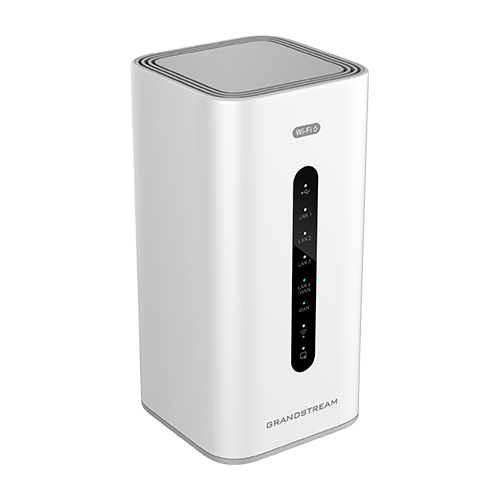
Quick Product Information
A Practical Wi-Fi 6 Foundation for Small and Growing Networks
The Grandstream GWN7062 Wi-Fi 6 Router is built for buyers who need more than a basic consumer internet box but do not want the cost and complexity of a large enterprise edge design. It combines routing, wireless access, firewall functions, VPN capability and expansion support in one compact platform. That combination can simplify a new office, professional studio, clinic, retail site, training centre, managed apartment, branch workspace or executive home office where internet access must support several different activities at the same time.
Modern teams rarely use the network for one purpose. Staff may be joining video meetings while cloud files synchronize, IP phones carry calls, point-of-sale systems exchange data, printers remain connected and mobile devices move between work areas. A router must therefore manage traffic from many endpoints while keeping the user experience predictable. Wi-Fi 6 improves efficiency in busy wireless environments through technologies such as OFDMA and MU-MIMO. The GWN7062 uses dual-band 2×2:2 wireless architecture and supports aggregate wireless throughput up to 1.77 Gbps, giving properly equipped clients a stronger platform for daily collaboration and connected operations.
The wired side is equally important. One Gigabit Ethernet WAN port connects to the internet service, a second Gigabit port can be configured for WAN or LAN use, and three additional Gigabit LAN ports connect local equipment. This layout gives buyers flexibility for a primary broadband link, selected wired devices, a switch uplink or a secondary WAN design where supported by the planned configuration. It is still important to map the ports before installation because a site with many cameras, phones, desktops or access points will normally require a separate managed switch.
Security and remote connectivity are central to the product’s value. The router offers firewall functions such as Anti-DoS controls, traffic rules, NAT and ALG, alongside guest-network capability, device blocking and secure boot protections. Built-in VPN options can support secure connections for remote users or site-to-site communication, subject to correct policy design and compatible remote endpoints. These capabilities are useful for businesses that need to connect a remote worker, link a small branch to another location or protect internal resources from direct public exposure.
FourTeck helps turn those features into a deployment plan. A successful purchase starts with the internet speed, user count, device mix, building layout, coverage obstacles, VPN requirement, switch design and expected growth. By reviewing those points before quotation, buyers can decide whether one router is sufficient, whether a mesh or wired access-point extension is required, and which supporting equipment should be included from the start.
Key Business Benefits
A good business router should improve daily work, reduce avoidable interruptions and make future changes easier. The following benefits explain how the GWN7062 can contribute to those outcomes when it is correctly sized and configured for the site.
◆ Efficient Multi-Device Wireless
Wi-Fi 6 scheduling helps the router communicate more efficiently with many compatible devices. For a busy office, this can mean fewer slowdowns caused by multiple laptops, phones, tablets and smart devices competing for airtime. Actual results depend on distance, interference, client capability and the internet service, but the platform is designed for denser use than a basic legacy router.
◆ Strong Wired Foundation
Five Gigabit Ethernet interfaces provide a practical mix of internet and local connectivity. Buyers can connect a broadband service, a business switch, desktop systems, a network storage device or other critical equipment. The configurable WAN/LAN port also gives additional planning flexibility for environments that may require a different edge layout.
◆ Secure Remote Connectivity
Built-in VPN support helps authorized users or branch networks reach business resources through an encrypted connection. This is valuable for remote work, small branch communication and controlled access to internal applications. VPN performance and user experience depend on the tunnel type, encryption, internet bandwidth and traffic pattern, so planning remains essential.
◆ Easier Coverage Expansion
Grandstream mesh support allows the wireless network to expand with compatible GWN access points. This can help businesses cover additional rooms, floors or work zones without replacing the original router. Wired backhaul remains preferable where cabling is available, while mesh can provide flexibility where new cable routes are difficult.
◆ Centralized Administration
The product can be managed through its embedded interface and supported Grandstream management platforms. Centralized visibility becomes useful when a business has more than one GWN device or wants an administrator to review configuration, connected clients and network settings from a consistent management environment.
◆ Practical Network Segmentation
Guest networking, VLAN-related functions and traffic policies can help separate visitors, staff and selected devices. Segmentation reduces unnecessary visibility between groups and supports a cleaner network design. The correct structure depends on the switch, access points, application requirements and security policy used across the site.
◆ Better Growth Control
A router that supports a large number of wireless clients and compatible access-point expansion gives a growing organization more options. Rather than replacing the entire edge device when coverage needs change, the business may add switching, cabling or GWN access points according to the new requirement.
Product Highlights That Matter to Buyers
The router uses a 64-bit 1.2 GHz quad-core processor with 512 MB of memory, giving it the processing foundation for wireless access, routing, firewall rules, network address translation and VPN functions. Grandstream lists support for up to 120,000 NAT sessions, up to 2 Gbps NAT routing performance and up to 850 Mbps IPsec VPN performance. These figures describe platform capability under test conditions; real deployment performance varies with packet size, enabled services, encryption, firmware, internet speed and network design.
Wireless service is provided across 2.4 GHz and 5 GHz bands using Wi-Fi 6 standards. The combined maximum wireless rate is up to 1.77 Gbps, while dual-band 2×2:2 MU-MIMO and downlink/uplink OFDMA help distribute airtime efficiently. The two bands serve different needs: 2.4 GHz generally reaches farther and supports many legacy or low-bandwidth devices, while 5 GHz can provide higher data rates at shorter practical distances. A professional setup normally keeps both bands available and uses channel planning to reduce interference from nearby networks.
The GWN7062 supports up to 256 concurrent Wi-Fi client devices, but that figure should not be treated as a promise that every client can run a high-bandwidth application simultaneously. User experience depends on the total internet capacity, radio conditions and traffic profile. A site with hundreds of active video users needs a different design from a site with hundreds of mostly idle sensors or mobile devices. FourTeck can help translate the stated client capacity into a realistic design based on application demand.
Up to 1.77 Gbps aggregate throughput and up to 256 concurrent clients.
Quad-core processing, Gigabit interfaces and high NAT-session capacity.
Guest access, blocklists, secure boot and configurable firewall functions.
VPN, mesh networking and cloud or on-premise management options.
Technical Specifications
| Specification | Details |
|---|---|
| Brand / Model | Grandstream GWN7062 |
| Product Type | Secure dual-band Wi-Fi 6 Gigabit router |
| Processor | 64-bit 1.2 GHz quad-core processor |
| Memory and Sessions | 512 MB RAM; up to 120,000 NAT sessions |
| Wi-Fi Standards | IEEE 802.11 a/b/g/n/ac/ax |
| Wireless Architecture | Dual-band 2×2:2 MU-MIMO with downlink and uplink OFDMA |
| Maximum Wireless Throughput | Up to 1.77 Gbps aggregate wireless throughput |
| Concurrent Wi-Fi Clients | Up to 256 clients; practical experience depends on traffic and radio conditions |
| Network Interfaces | 1 x Gigabit Ethernet WAN, 1 x Gigabit Ethernet configurable WAN/LAN, 3 x Gigabit Ethernet LAN |
| Routing Performance | Up to 2 Gbps NAT routing; actual results depend on services and traffic profile |
| IPsec VPN Performance | Up to 850 Mbps under vendor test conditions |
| VPN Client | L2TP, PPTP, IPsec and OpenVPN |
| VPN Server | IPsec and OpenVPN |
| Network Protocols | IPv4, IPv6, 802.1Q, 802.1p, 802.1x and 802.11e/WMM |
| Quality of Service | 802.11e/WMM, VLAN and TOS support |
| Firewall Functions | DDNS, port forwarding, DMZ, UPnP, Anti-DoS, traffic rules, NAT and ALG |
| Wireless Security | Guest networking, network blocklist and secure platform protections; final options depend on firmware |
| Mesh Expansion | Supports mesh networking with compatible Grandstream access points |
| Management | Embedded controller interface, GDMS Networking cloud management and GWN Manager on-premise management |
| Power / Regional Pack | Power accessory and plug type may vary by regional supply package; confirm during quotation |
| Warranty and Availability | Dependent on supplier, order route, country and confirmed quotation |
How to Read These Specifications
Maximum throughput figures are not the same as the speed every user will receive. Wireless rates are shared across connected devices and are affected by distance, walls, neighbouring networks, channel selection, client capability and protocol overhead. Internet performance cannot exceed the subscribed broadband service, and security or VPN processing may reduce throughput according to the enabled functions.
For an accurate design, compare the router specification with the real workload. A ten-user consultancy with cloud applications and video calls has different needs from a busy guest environment, a retail site with many smart devices or a branch carrying continuous VPN traffic. FourTeck can help review the requirement before the equipment list is finalized.
Configuration and Buyer Guidance
Router selection should begin with the business environment rather than a speed number on a product sheet. The first question is how the internet is used. Web browsing and email create a lighter load than continuous cloud backup, multiple high-resolution meetings, remote desktop sessions, media streaming or many simultaneous VPN connections. List the main applications and identify which ones are business-critical. This helps determine whether the GWN7062 has the correct performance profile or whether a larger router and dedicated wireless access points would provide a better long-term fit.
1. Count Users and Devices
Count laptops, phones, tablets, printers, cameras, voice devices, TVs, automation equipment and guest devices. Then estimate how many will be active at the same time. Client count alone is not enough; active traffic is the more important sizing factor.
2. Measure the Site
Record the number of rooms, floors, thick walls, metal shelving and outdoor areas. One router cannot guarantee complete coverage in every building. Larger or obstructed sites may need wired access points or a carefully planned mesh design.
3. Confirm Internet Links
Document the primary internet service, modem or optical terminal, public addressing and any backup link. The configurable WAN/LAN port may support a more flexible design, but the intended failover or multi-WAN behavior should be confirmed during configuration planning.
4. Define Security Zones
Decide whether staff, guests, finance systems, voice devices and smart equipment should be separated. The router can support network policies, but effective segmentation may also require a managed switch and compatible access points.
5. Plan VPN Usage
Identify the number of remote users, branch tunnels, remote networks and applications that will pass through the VPN. Confirm whether IPsec or OpenVPN is preferred and whether the other endpoint supports the same encryption and authentication settings.
6. Include Supporting Equipment
A complete installation may require a Gigabit switch, access points, Cat6 cabling, patch leads, surge protection, a UPS and secure mounting. Including these items early prevents a router purchase from being delayed by missing infrastructure.
Management preferences also matter. A single site may be comfortable with the embedded web interface, while an organization using several Grandstream devices may prefer GDMS Networking or GWN Manager for broader visibility. Clarify who will administer the network, how configuration backups will be protected, how firmware updates will be handled and who will respond to an outage. FourTeck can use this information to prepare a more accurate equipment and service quotation.
Ideal Business Use Cases
The GWN7062 works best where routing, wireless coverage and security requirements are meaningful but still within a small-site design. The following examples show practical deployment scenarios without assuming that one router will fit every building or traffic level.
Small Office Connectivity
A professional office can use the router for staff Wi-Fi, selected wired devices, cloud applications, video calls and guest access. A managed switch may be added for printers, IP phones, access control and other fixed equipment. The router becomes the edge platform while the switch and optional access points extend the local network.
Branch-to-Head-Office VPN
A smaller branch can use IPsec or OpenVPN to reach services hosted at another location, provided the remote firewall supports compatible settings. This can help staff use shared applications, file services or administrative systems without exposing those resources directly to the public internet.
Remote and Hybrid Work
A home-based professional or remote employee can use the router for work computers, voice devices, secure corporate access and household connectivity. Separating work and personal devices, applying strong wireless security and using a UPS can improve reliability where the network is essential to daily employment.
Retail and Service Locations
A small retail outlet, showroom or service desk may use the router for point-of-sale connectivity, office devices, staff Wi-Fi and guest internet. Payment systems and operational devices should be separated from public access, and wired connections should be preferred for critical terminals whenever practical.
Training and Learning Spaces
A small classroom, training room or learning centre can connect laptops and tablets while supporting instructor systems and online content. Capacity planning should consider whether many users will stream video simultaneously, because that demand affects both wireless airtime and the required internet service.
Clinics and Professional Practices
A compact practice may use the router for reception systems, staff devices, secure cloud applications and isolated guest access. Sensitive business information still requires proper application security, endpoint protection, account controls and backup; a router is one layer of the overall protection plan.
Smart Office and Automation
Wireless lighting, environmental sensors, displays and automation devices can share the network when their bandwidth and security needs are understood. Placing smart devices in a separate network zone can reduce unnecessary access to staff systems and make troubleshooting easier.
Hospitality and Managed Residences
A small guest property or managed residence may use the router as the internet edge while compatible access points extend coverage. Guest isolation, bandwidth expectations, room layout and support responsibility should be planned carefully. Larger hospitality deployments usually need a controller-based design with more dedicated infrastructure.
Grandstream GWN7062 Wi-Fi 6 Capacity and Traffic Handling
Capacity is more than the advertised wireless rate. The router must divide radio time among connected clients, process internet traffic, maintain sessions, apply firewall rules and possibly encrypt VPN data. The quad-core processor and 512 MB memory provide a capable foundation for a small-site platform, while support for up to 120,000 NAT sessions helps when many applications open numerous simultaneous connections.
Wi-Fi 6 improves efficiency by scheduling transmissions rather than allowing every device to compete in the same way older networks did. OFDMA can divide a wireless channel into smaller resource units so several compatible clients are served more efficiently. MU-MIMO allows the system to communicate with multiple clients in a coordinated manner. These technologies are most useful when client devices also support them and the radio environment is properly planned.
The stated 1.77 Gbps aggregate figure combines the capabilities of both wireless bands and should not be interpreted as a guaranteed application speed on one device. Protocol overhead, channel width, signal level, interference and client hardware all reduce usable throughput. A wired Gigabit connection is usually the better choice for fixed systems that require consistent performance, such as a network storage device, desktop workstation, video recorder or high-volume backup endpoint.
For buyers, the important question is whether the expected workload fits the platform. A few dozen active office users can create more demand than hundreds of mostly idle devices. FourTeck can help estimate peak usage, identify the applications that need priority and determine whether additional access points, managed switching or a larger routing platform should be included.
Grandstream GWN7062 VPN, Firewall and Network Protection
A business edge router must control how traffic enters, leaves and moves between networks. The GWN7062 includes firewall functions such as Anti-DoS controls, traffic rules, NAT, ALG, port forwarding, DMZ, DDNS and UPnP. These tools support a wide range of network scenarios, but they must be configured carefully. Opening ports without a clear requirement can increase exposure, while an overly restrictive rule can stop a legitimate application from working.
VPN capability is useful for remote users and inter-site communication. Client support includes L2TP, PPTP, IPsec and OpenVPN, while server support includes IPsec and OpenVPN. The preferred protocol should be chosen according to the security requirement, remote platform and administrative policy. Legacy protocols may remain available for compatibility, but organizations should favour stronger options supported by both endpoints and keep firmware current.
Guest networking and device blocking can reduce unnecessary access to internal systems. A well-designed guest network should use a separate address range and policy, with no direct route to protected business devices. Staff, voice, cameras and smart equipment may also benefit from separate VLANs, but that requires compatible switching and access-point configuration. The router is therefore part of a security design rather than a replacement for every other security control.
Endpoint protection, strong account credentials, multi-factor authentication, application updates and reliable backups remain essential. Businesses with advanced threat inspection, regulatory obligations or high-risk internet exposure may need a dedicated next-generation firewall in front of or instead of a general-purpose router. FourTeck can help identify when the GWN7062 is sufficient and when a stronger security appliance should be considered.
Grandstream GWN7062 Mesh Expansion and Management
Wireless coverage changes from one building to another. Concrete walls, metal shelving, lifts, machinery and neighbouring networks can weaken or distort a signal. Mesh networking allows compatible Grandstream access points to extend coverage without requiring every connection between nodes to be wired. This can be helpful in rented spaces, finished interiors or smaller sites where new cabling is difficult.
Mesh should still be planned with realistic expectations. Every wireless hop uses radio capacity, so a poorly placed node can deliver a strong signal indicator but limited throughput. Access points need a good link back to the router or another mesh node. Where possible, Ethernet backhaul provides more consistent capacity and leaves wireless airtime available for clients. A site survey or at least a careful placement test is recommended before final installation.
Management options help administrators maintain the environment. The embedded controller gives direct access through the product interface, which can suit a single site. GDMS Networking provides cloud-based management for Grandstream networking products, while GWN Manager offers an on-premise approach. The best choice depends on the number of devices, internet access policy, administrative responsibility and whether the business wants remote visibility.
Good administration includes more than changing a Wi-Fi password. Configuration backups, firmware updates, user access control, device naming, monitoring, incident records and secure administrator credentials should be part of the operating process. FourTeck can help buyers plan the initial device list and identify whether configuration or ongoing support should be included in the quotation.
What Buyers Should Check Before Purchase
Before requesting a quote, confirm the required usage environment, internet service, device quantity, coverage area, VPN design, security zones and supporting infrastructure. Choosing only by model name can lead to missing switches, insufficient coverage or an incomplete power plan. FourTeck helps review the full requirement so the proposed solution reflects how the network will actually be used.
Correct Model Fit
Confirm whether a compact Wi-Fi router is appropriate or whether the site needs a dedicated firewall, multi-WAN router, separate controller and several access points. User count, internet speed and business risk should guide the choice.
Coverage and Placement
Share a floor plan or describe rooms, floors and obstacles. Decide where the internet handoff and power outlet are located. Coverage may require an additional GWN access point, mesh node or wired backhaul.
Cabling and Switching
Five router ports may be enough for a very small site, but most offices need a switch for desktops, phones, cameras and access points. Confirm port count, PoE requirements and whether VLAN support is needed.
VPN Compatibility
Provide the remote firewall or VPN service details, encryption preferences, user count and networks to be connected. Both ends must support compatible settings, and public addressing may affect the design.
Power Protection
Confirm the local plug type and consider a UPS or surge-protection plan. Keeping the router, modem and switch powered together can preserve connectivity during short interruptions, subject to the selected UPS capacity.
Warranty Expectations
Ask which warranty terms apply to the quoted supply route and what documentation is required for a claim. Warranty conditions can vary by seller, region and product origin, so they should be written into the commercial discussion.
Deployment Support
Decide whether the order is hardware only or should include setup assistance. Useful services may include firmware review, WAN configuration, Wi-Fi settings, guest access, VPN setup, VLAN planning and handover documentation.
Quote Preparation
Provide quantity, delivery location, required date, internet type, device estimate, coverage description, VPN requirement, switch details and support expectations. A clear brief helps FourTeck prepare a more relevant quotation.
Africa Availability and Service Support
FourTeck supports business inquiries across Africa with product selection, quotation assistance, delivery coordination and warranty guidance. Availability can change according to distributor supply, product lifecycle, regional pack, order quantity and delivery destination. For that reason, the page does not present an unconfirmed stock promise. The commercial team checks the current supply route when the buyer provides the required quantity and location.
Configuration support can cover the practical questions that influence a successful deployment. Buyers may need help deciding whether the router will operate alone, connect to a managed switch, extend through compatible GWN access points or form part of a VPN between locations. FourTeck can also help identify commonly required items such as Cat6 patch leads, a power backup unit, a network cabinet, PoE switching or installation support.
The most useful quotation request includes the internet service speed, estimated number of users and devices, building layout, application profile, VPN requirement and delivery location. Project buyers should also provide rollout phases, site count and preferred implementation window. This gives the FourTeck team enough information to discuss the correct router quantity and possible alternatives instead of quoting an isolated item that may not solve the whole requirement.
Africa Country and Regional Coverage
Businesses across Africa, including Kenya, Uganda, Nigeria, Ghana, Tanzania, Rwanda, Ethiopia, South Africa, Zambia, Botswana, Senegal and nearby commercial markets, can contact FourTeck for availability checking, configuration review and quotation support. Requests may come from a single office, a regional procurement team, a system integrator, a reseller or an organization planning equipment for several sites.
Delivery options and lead times depend on the confirmed supply route, quantity, import conditions and destination. FourTeck can help align the equipment list with the buyer’s operational needs, whether the requirement is a new branch, a replacement router, a small-office wireless upgrade or a project that combines routers, switches, access points, cabling and power protection. Regional buyers should share their location and required timeline when requesting a quotation.
GCC, Middle East and Africa Availability
FourTeck Africa can support product inquiries for organizations operating across Africa while coordinating selected regional technology requirements through FourTeck platforms serving GCC and Middle East markets. Businesses with offices or procurement teams linked to the UAE, Saudi Arabia, Qatar, Oman or Bahrain can discuss cross-regional requirements alongside projects in Kenya, Uganda, Nigeria, Ghana, Tanzania, Rwanda, Ethiopia or South Africa.
Availability, warranty handling, delivery routes and commercial terms may differ by country. A product sourced for one market may include a different power accessory, warranty process or distribution route from the same model supplied elsewhere. Multi-country buyers should therefore provide a site list, quantities and required dates so each destination can be reviewed correctly.
Regional information is available through FourTeck Africa, FourTeck Kenya, FourTeck Uganda and FourTeck UAE. The correct platform and supply route can be confirmed during the inquiry.
Other Grandstream and Networking Options Buyers May Consider
The right alternative depends on whether the requirement is lower wireless capacity, newer wireless performance, multi-WAN routing, greater coverage or more wired ports. The cards below provide useful directions for further discussion. Final specifications and availability should be checked for the selected model.
Grandstream GWN7052F
A lower-tier dual-band router option for smaller environments where Wi-Fi 5 capacity may meet the requirement.
Grandstream GWN7062E
A newer Wi-Fi 6 option for buyers considering higher wireless throughput and a different port layout.
Grandstream GWN7002
A wired multi-WAN router path for deployments that may use separate wireless access points and require broader edge control.
Grandstream GWN7660
A Wi-Fi 6 access point that may extend wireless coverage when a single router cannot serve the full site.
Grandstream GWN7811P
A managed PoE switch direction for installations that need to power compatible access points, phones or other PoE devices.
Network Design Services
Ask FourTeck to review routers, switches, access points, cabling, VPN and power protection as one connected requirement.
Why Business Buyers Choose FourTeck
Technology procurement works better when the supplier understands how the product fits into the operating environment. FourTeck focuses on the complete buying conversation: what the router must support, how the site is connected, what additional equipment is required and what the buyer expects after delivery. This approach reduces the risk of ordering the correct model but the wrong overall solution.
FourTeck checks the requested model, quantity and delivery location before preparing the commercial response. Where the original model is constrained, a suitable alternative can be discussed rather than silently substituted.
Buyers can discuss WAN setup, wireless coverage, guest access, mesh expansion, VPN needs and supporting switches. The objective is to match the order to the intended environment.
Commercial support can reflect quantity, delivery destination, accessories and requested services. This helps procurement teams compare a complete requirement rather than an incomplete device-only figure.
FourTeck helps review practical delivery options based on the current supply route and destination. Timing remains subject to confirmation because products and import conditions can change.
The team can explain the warranty information associated with the quotation and help buyers understand the documentation and process that may apply to the selected supply channel.
Routers do not work alone. FourTeck can help connect the discussion with switching, Wi-Fi coverage, cabling, UPS protection, IP telephony, security and wider infrastructure requirements.
FourTeck serves SMB buyers, project teams, resellers, institutions and enterprises that need practical pre-sales communication. The service does not depend on exaggerated claims. It depends on gathering the right information, presenting a suitable option and keeping the buyer informed about configuration and supply conditions.
Frequently Asked Questions
What is the Grandstream GWN7062 used for?
It is used to connect a small office, branch, remote-work site or advanced home network to the internet while providing dual-band Wi-Fi 6, Gigabit wired connectivity, firewall controls, VPN and mesh expansion. It can support cloud applications, web meetings, voice devices, staff and guest access, smart equipment and general business connectivity when correctly configured.
How many Wi-Fi clients can it support?
Grandstream specifies support for up to 256 concurrent Wi-Fi clients. This is a connection-capacity figure, not a guarantee that all clients can run high-bandwidth applications at the same time. The practical experience depends on internet capacity, application demand, interference, signal strength, channel planning and the capabilities of connected devices.
Does the router support VPN connections?
Yes. It supports L2TP, PPTP, IPsec and OpenVPN in client roles, with IPsec and OpenVPN server options. The correct protocol and settings depend on the remote endpoint, security policy and internet environment. FourTeck can help review the intended site-to-site or remote-user design before the order is finalized.
Can it cover a large building by itself?
Coverage cannot be guaranteed from the router specification alone. Walls, floors, metal structures, interference and placement affect the signal. Larger or obstructed premises may need compatible Grandstream access points connected by Ethernet or mesh. A floor plan and a description of the building help determine the likely expansion requirement.
Can FourTeck help with configuration?
FourTeck can discuss configuration support for internet settings, Wi-Fi networks, guest access, VLAN planning, VPN, mesh expansion and related switching. The exact service scope should be agreed during quotation. Buyers should provide the internet details, network layout, remote VPN information and desired security structure before deployment begins.
Is the GWN7062 available across Africa?
FourTeck accepts product inquiries from African business buyers and can check current availability based on quantity and delivery location. Supply status and lead time may vary, so availability is confirmed through a current quotation rather than assumed. Share the required units, destination and preferred timeline for a more accurate response.
What equipment may be needed with the router?
Depending on the site, the order may also need a Gigabit or PoE switch, compatible wireless access points, Cat6 cabling, patch leads, a UPS, surge protection or a network cabinet. The correct accessories depend on the number of wired devices, coverage plan, power environment and whether IP phones or access points require PoE.
How is the router managed?
It can be administered through its embedded web interface and supported Grandstream management platforms. GDMS Networking provides cloud-based management, while GWN Manager offers an on-premise option. The best approach depends on how many devices are deployed, who manages them and whether remote administration is permitted by company policy.
Can businesses request bulk or project supply?
Yes. Organizations, resellers and project teams can request multiple units or a broader network package. Provide site count, quantities, destination list, implementation schedule and required accessories. FourTeck can then discuss product supply, possible alternatives, delivery coordination and any configuration or deployment support that should be included.
How do I request a quotation?
Use the FourTeck contact page and include the model, quantity, delivery country, internet speed, user estimate, building description, VPN requirement and target date. Adding this information allows the sales team to respond with a more relevant commercial discussion and identify any switches, access points or services needed for the complete solution.
Need Help Planning the Right Router and Wi-Fi Setup?
FourTeck can help review product availability, network size, internet links, VPN requirements, compatible access points, switching, power protection and delivery details for your business location. Share the requirement and request a quotation prepared around the real deployment.


Reviews
There are no reviews yet.